
The ultimate tweaker for Internet Explorer that can by handled be beginners and experienced users alike in order to fix common issues. #Tweak internet explorer #Junk file remover #Optimize internet explorer #Tweaker #Tweak #IE


IE Tweaker is a lightweight and portable software application that permits users to make some quick tweaks to Internet Explorer. It bundles an intuitive set of options that can be easily figured out.
Since installation is not a prerequisite, you can drop the executable file in any location on the hard disk and just click it to run.
There is also the possibility of saving IE Tweaker to a USB flash disk or similar storage unit, in order to run it on any PC with minimum effort and no prior installers.
An important aspect to take into account is that the Windows registry does not get updated with new entries, and no extra files are created on the disk, leaving it clean after removal.
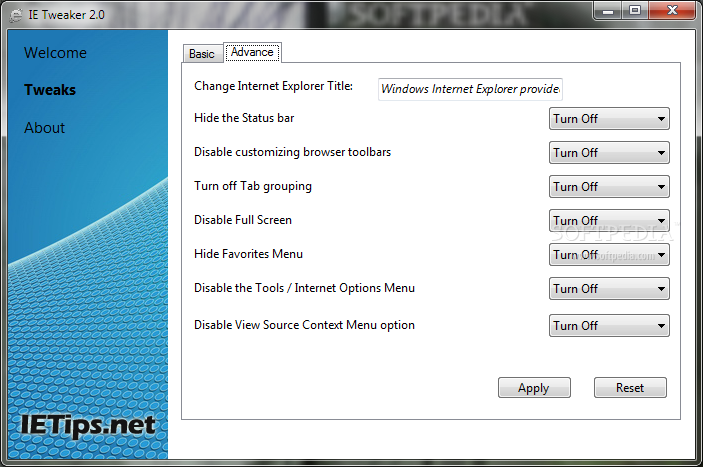
As for the interface, the main app window has a well-organized layout that contains two tabs for basic and advanced settings in IE.
You can disable the picture display, reseting changing proxy and advanced page settings, disable the IE context menu and the feature for resetting web settings, as well as remove the address bar completely, among others.
As for advanced options, it is possible to edit the IE titlebar text, hide the status bar, disable customizing browser toolbars, turn off tab grouping, disable full screen, hide the favorites menu, and so on. Changes are applicable with the click of a button. Plus, they can be restored to their default parameters.
IE Tweaker is very responsive to commands and runs on low CPU and RAM, so the PC's overall performance is not affected. We have not come across any issues throughout our evaluation, since the tool did not hang, crash or display error dialogs. IE Tweaker comes packed with some intuitive options for tweaking Internet Explorer, and they can be used by anyone.
What's new in IE Tweaker 2.0:
- Toggle Enable/Disable options.
- Mostly used tweaks.
IE Tweaker 2.0
add to watchlist add to download basket send us an update REPORT- runs on:
- Windows All
- file size:
- 1.8 MB
- filename:
- IETweaker.rar
- main category:
- Tweak
- developer:
- visit homepage
7-Zip

Zoom Client

Microsoft Teams

Bitdefender Antivirus Free

4k Video Downloader

calibre

Windows Sandbox Launcher

IrfanView

ShareX

Context Menu Manager

- IrfanView
- ShareX
- Context Menu Manager
- 7-Zip
- Zoom Client
- Microsoft Teams
- Bitdefender Antivirus Free
- 4k Video Downloader
- calibre
- Windows Sandbox Launcher