
User-friendly application that helps you increase the overall browsing speed of Mozilla Firefox with the aid of three optimization modes. #Firefox Booster #Optimize Firefox #Accelerate Firefox #Firefox #Optimizer #Accelerate

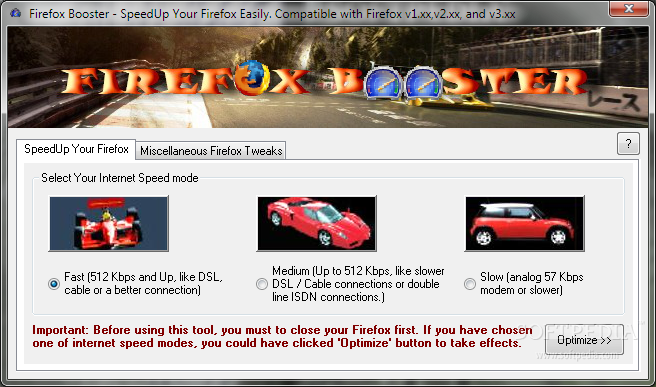
Firefox Booster is a very easy-to-use software application designed to increase the overall browsing speed of Mozilla Firefox, a browser that’s already famous for the impressive page loading times it provides.
Since it’s supposed to handle such a simple task, Firefox Booster relies on a very user-friendly approach, which is quite great for inexperienced users.
The interface is minimal and relies on two different tabs, both sporting pretty intuitive features.
There are three different optimization modes, as it follows: fast, for networks with a speed of 512 kbps and up, such as DSL, cable or a faster connection, medium, for networks with a speed below 512 kbps and slow for modems or even slower connections.
It’s very important to make sure that Firefox is not running when hitting the “Optimize” button, otherwise Firefox Booster may have absolutely no effect.
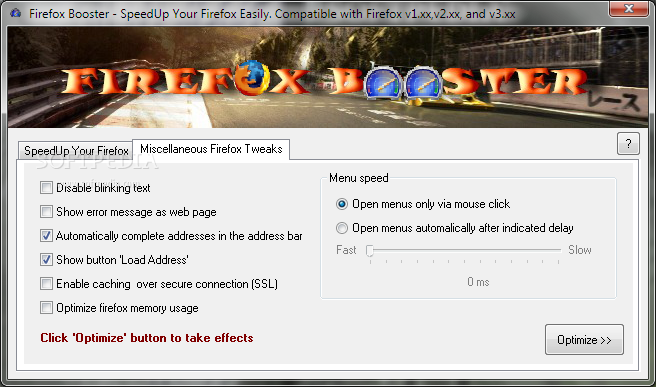
The second tab is the one that provides access to some different options, so you can disable blinking text, show error message as webpage, reveal button “Load Address,” optimize Firefox memory usage and open menus only via mouse click.
It’s absolutely no surprise that Firefox Booster runs on very low computer resources and seems to work smooth on all Windows versions. Still, Windows 7 users need administrator privileges to make it work.
In case you’re wondering whether it is effective or not, it is, but don’t expect to see a huge performance increase. Firefox Booster is a decent tool that not only provides you three basic optimization modes, but also some other options that may come in handy to many Firefox users out there looking for some customization apps for their browser.
Firefox Booster 1.1.2
add to watchlist add to download basket send us an update REPORT- runs on:
-
Windows NT
Windows 7
Windows Vista
Windows XP
Windows 2K - file size:
- 1.1 MB
- filename:
- FirefoxBooster_Setup.zip
- main category:
- Internet
- developer:
- visit homepage
Context Menu Manager

4k Video Downloader

ShareX

7-Zip

Windows Sandbox Launcher

Zoom Client

Microsoft Teams

IrfanView

calibre

Bitdefender Antivirus Free

- IrfanView
- calibre
- Bitdefender Antivirus Free
- Context Menu Manager
- 4k Video Downloader
- ShareX
- 7-Zip
- Windows Sandbox Launcher
- Zoom Client
- Microsoft Teams