
Tweak your CPU with this basic looking infographic that will give you all the information you need to asses the processing power of your CPU. #CPU tweak #CPU tweacker #Optimize CPU #Tweack #Tweacker #Optimize
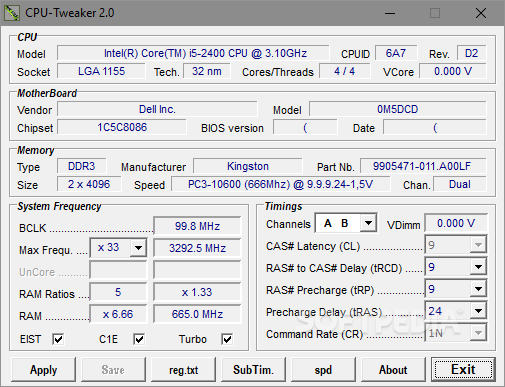
You CPU (Central Processing Unit) can be considered the very brain of any PC, so making sure that it works at optimum efficiency is a must. CPU-Tweaker is a very easy to use software solution designed to help you tweak the CPU and thus get a performance boost in just a few minutes.
Although it may all sound like something too good to be true, CPU-Tweaker is not one of the apps addressed to beginners and since there's no help file included in the package, those inexperienced have no other choice than to search the web for information. CPU-Tweaker is exclusively addressed to processors with an integrated memory controller and provides an easy to use interface with all features comprised in a single window.
While the top of the window is being used to provide information about the CPU, motherboard, memory and system frequency, more options are placed at the bottom of the window, including various timings to adjust the CPU. For instance, you can configure write recovery time, refresh cycle time, write to read (same rank), round-trip latency, refresh interface and idle cycle limit straight from the main window.
CPU-Tweaker gives you the power to set up precharge delay and command rate but, as we said, you need to search the web for more info if you're not sure that what you're doing is 100 percent safe. Just as expected, CPU-Tweaker runs on low computer resources and works okay on all Windows versions, but Windows 7 users need administrator privileges to be able to make modifications.
All aspects considered, as long as you know what all the information means and you know how to make good use of it, then you will definetly find a use for a software tool like CPU-Tweaker.
Download Hubs
CPU-Tweaker is part of these download collections: Tweak CPU
CPU-Tweaker 2.0
add to watchlist add to download basket send us an update REPORT- PRICE: Free
- runs on:
-
Windows Vista
Windows XP
Windows 2K - file size:
- 435 KB
- filename:
- CPU-Tweaker.zip
- main category:
- Tweak
- developer:
Microsoft Teams

Bitdefender Antivirus Free

7-Zip

IrfanView

Windows Sandbox Launcher

calibre

Zoom Client

ShareX

4k Video Downloader

Context Menu Manager

- ShareX
- 4k Video Downloader
- Context Menu Manager
- Microsoft Teams
- Bitdefender Antivirus Free
- 7-Zip
- IrfanView
- Windows Sandbox Launcher
- calibre
- Zoom Client