Softpedia
 

WINDOWS CATEGORIES:


GLOBAL PAGES >>
SOFTPEDIA REVIEWS >>
MEET THE EDITORS >>

WEEK'S BEST

  • DAEMON Tools Pro (...
  • FlashFXP [ DISCOUN...
  • PowerISO 4.9
  • WebcamMax [DISCOUN...
  • Zemana AntiLogger ...
  • System Mechanic Pr...
  • Glary Utilities Pr...
  • All My Movies [DIS...
  • Ad-Aware Internet ...
  • Atlantis Word Proc...
  • Home > Windows > Tweak > Memory Tweak
     Report malware

    Fresh RAM [DISCOUNT: 50 % OFF] 5.0.0

    download button

    Part of the Tweak Memory download hub
    Downloads: 93,527  View global page  Tell us about an update
    User Rating:
    Rated by:
    Very Good (4.4/5)
    352 user(s)
    Developer:

    License / Price:

    Size / OS:

    Last Updated:

    Category:

    Trial / USD 7.50 buy button
    3.7 MB / Windows XP / Vista / Vista64 / 7 / 7 x64
    [view history]
    C: \ Tweak \ Memory Tweak

     Read user reviews (3)  Send to friend   Follow (0 users)

    Fresh RAM [DISCOUNT: 50 % OFF] description

    Award Winning RAM Optimization Solution

    Softpedia in association with Reohix offers you a special discount: Now, only from Softpedia, you can buy Fresh RAM with a 50% discount. Take advantage of this opportunity and press the Buy Now button; you'll surely notice, the discount has been activated. No coupons, no codes, no questions, no hassle! Get it now, while it's hot!

    One of the main conditions of comfortable work with computer is a fast response: applications should run in a second, files should be opened in a millisecond, most of functions should be performed immediately; and the fast response of the operative system in applications highly depends on the amount of free memory system can use.

    Fresh RAM is a software which can effectively improve the situation, optimizing the ways your system and applications are using memory, and, therefore, fastening entire work without any additional hardware expenses.

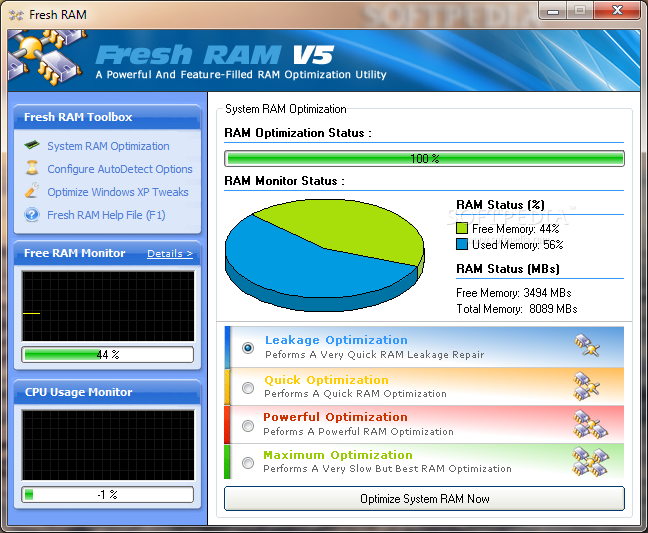
    Fresh RAM has fast and complicated memory analysis algorithms under the hood; but the appearance of the software is simple, understandable and attractive: you always see the overall situation about your system memory, you can select analysis algorithm complexity (speed vs. effectiveness selection) and run optimizations; in a few minutes you’ll feel how fresh the air in your system is — all running things are running like a breeze! In addition, this application also includes several Microsoft Windows XP tweaks, which will help you optimize the performance of your computer.

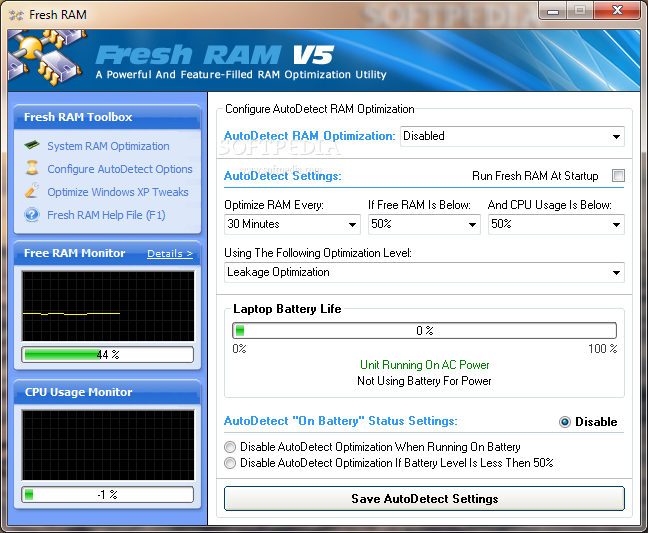
    But that is not all! Fresh RAM takes memory optimization to the next level, and with version 5.0, we have also integrated customizable automatic memory optimization options as well as Process RAM Usage Identifier. The Process RAM Usage Identifier will help you understand which applications consume the most memory and how to control them, while the automatic memory optimization options will make sure that free memory is always available for when you need it the most.

    Here are some key features of "Fresh RAM [DISCOUNT: 50 % OFF]":

    · Improve your computer's performance drastically by optimizing the free memory available to Windows and applications.
    · Enable applications and games to run faster and smooth by allowing them to utilize as much ram as possible.
    · Advanced automatic optimization options make sure that free memory is always available for when you need it most.
    · Enhance your Microsoft Windows XP performance even further with additional system tweaks.
    · Identify which processes consume the most memory so that you can learn on how to maximize your system resources

    Requirements:

    · 500 MHz CPU Speed
    · 64 Megabytes of installed RAM
    · 25 Megabytes free hardisk space

    Limitations:

    · 30 days trial
    · Nag screen

    What's New in This Release: [ read full changelog ]

    · Added Compatibility to Windows 7
    · Added New Splash Screen
    · Added Help File Documentation
    · Added Tray Bar Menu
    · Added RAM Usage Analyzer
    · Improved AutoDetect Optimization
    · Fixed AutoDetect Optimization Halting Bug
    · Added AutoDetect “On Battery Status” Settings
    · Increase AutoDetect CPU Usage and RAM Percentage Intervals
    · Fixed Pie Chart Overflow Error
    · Added System Monitors (CPU, RAM & Battery Usage)
    · Fixed saving fail error for Windows XP Tweaks
    · Added automatic Windows XP detection for enabling tweaks
    · Fixed Histogram Overflow Bugs
    · Improved overall report rendering engine
    · Improved coding to utilize much less memory when running in background
    · Massive improvements to RAM Optimization algorithms
    · Able to automatically detect which RAM should not be cleared
    · Fixed slowdown issues due to moving RAM Content to disk page file (still required for Maximum Optimization)
    · Added several keyboard shortcuts for quick feature access
    · Added a 30-day trial period instead of 30-...

       Softpedia guarantees that Fresh RAM [DISCOUNT: 50 % OFF] 5.0.0 is 100% CLEAN, which means it does not contain any form of malware, including spyware, viruses, trojans and backdoors. [read more >]


    TAGS:

    memory optimizer | RAM optimizer | memory scanner | optimize | optimizer | RAM


    HTML code for linking to this page:


    Go to top

    WindowsGamesDriversMacLinuxScriptsMobileHandheldNews

    SUBMIT PROGRAM   |   ADVERTISE   |   GET HELP   |   SEND US FEEDBACK   |   RSS FEEDS   |   UPDATE YOUR SOFTWARE   |   ROMANIAN FORUM