Search Perform an advanced search query SOFTPEDIA
 
SOFTPEDIA
Updated one minute ago
HomeSubmit a program for being reviewedAdvertise on our websiteGet help on surfing our websitesSend us your feedbackGet information about our XML/RSS backend and how to use itBrowse the news archiveVisit our discussion forumVizitati forumul in limba romana


Program Finder NormalFreeware onlyShareware only

Rambooster 2.0 Report spyware 

Click to download Rambooster Bilton
View more Rambooster screenshots (3)
 Downloads: 7,512
Rating: Good (3.3/5) | Rated by: 36 user(s)
Add to download basket     Send us update information
 Developer: Paul Bilton | More programs by this producer
 License: Freeware  
 Size / OS: 339 KB, Windows All
 Last Updated: May 29th, 2007, 10:12 GMT
 Category: C: \ Tweak \ Memory Tweak
 Read user reviews (2) Add a review Refer to friend Subscribe
    Download Rambooster Bilton

Rambooster Bilton description
Rambooster - Windows fills up your computer's memory (RAM)

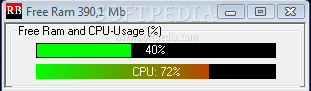
RAMBooster monitors the amount of RAM your system is using and allows you to free it up. This will let your PC run smoother and faster, and you won't have to reboot as often. It will monitor the memory at all times, and if the amount of free RAM gets too low, it will automatically boost it for you, finding unused RAM and returning it to the free pool.

Rambooster is a software that helps you optimize your RAM.

RAMBooster will also monitor your CPU usage. Includes replaced CPU-infotext with a gauge. RB now always minimizes to the tray instead of taskbar or tray. The GUI looks almost like the old GUI, to make things easier for those who have used RAMBooster for years. Supports RAM up to 9999 MB instead of previous 99. Help-file problems fixed.

Fixed conflicts with CPU-usage
meter. Also some dial-up system caused to CPU-reading to freeze to 0%. This part has also been rewritten. Allows only one instance of the program. Lots of code optimization, invisible to users. It is bettter, faster, and more reliable now.

Here are some key features of "Rambooster Bilton":

· Shows the amount of free Ram all the time
· Free/Postcardware
· Option to autolaunch at Windows start-up
· Option to start minimized
· Sits in the system-tray and/or taskbar
· Sound effects available (You can replace the originals with your own soundfiles)
· User defined alarm-level
· Selectable amount of ram to free at alarm-level
· User defineable retry-count
· Possibility to reboot Windows
· Possibility to restart Windows without rebooting
· A popup-menu on icon, all the important setting can be done using it
· Shows free ram on icon-mouse-over
· NEW : Optional Cpu-monitor also with XP/NT
· Option to run only if Cpu-usage is below user-defineable limit
· NEW: Full support for XP Themes
· Requires installation (Installation available)
· Requires a special uninstallation-routine if InstallShield is not used NO
· Installation package available
· Installation package contains Uninstall support
· Free user support available
· Completely rewritten, still same good old GUI


Things RamBooster does NOT do :
· Modify your system in any way
· Defragment the RAM
· Double your RAM etc.
· Increase system resources (GDI and USER)


Softpedia guarantees that Rambooster 2.0 is 100% CLEAN, which means it does not contain any form of malware, including but not limited to: spyware, viruses, trojans and backdoors.

This software product was tested thoroughly and was found absolutely clean, therefore it can be installed with no concern by any computer user.

However, it should be noted that this product will be retested periodically and the award may be withdrawn, so you should check back on this page from time to time. (click here for more information)


Related downloads IT News Popular downloads New additions   Latest reviews  
ThrottleWatch 2.02
Monitors and displays both CPU load and throttling of Intel chips
CPU Graph 2.0
CPU Graph is a free widget that will show you a nice graph of CPU usage and processor temperature
CPU Monitor 2.1
This Yahoo widget is a simple, scalable and colorizable CPU graph
AeonStat 1.5
AeonStat monitors the CPU, memory, HDD and bandwidth in a very simple and intuitive interface
DN Sys Info 1.0.1784.35636
DN Sys Info - Monitor your CPU and Memory
CPU Moniter Plus 2.0
CPU Moniter Plus is a free widget that monitors your cpu
BiCPU 2.1
BiCPU is a cool CPU monitor for 1 or 2 CPU motherboards
ClearView 1.0.1.64
ClearView is a program that will monitor simultaneously your computer's CPU, disk, memory, and network
Throbber 1.1
This tiny widget allows you to monitor your CPU activity

go to top Use the following code to link to this page:


Welcome!
Hello, Guest

Login if you have a Softpedia.com account.

Otherwise, register for one.

Main categories:
  • Antivirus
  • Compression tools
  • CD/DVD Tools
  • Office tools
  • Programming
  • Authoring tools
  • File managers
  • Desktop Enhancements
  • Internet
  • Network Tools
  • IPOD TOOLS
  • Mobile Phone Tools
  • Multimedia
  • Tweak
  • System
  • Security
  • Others
  • Science / CAD
  • UNIX
  • Windows Widgets
  • PORTABLE SOFTWARE

  • Week's best:
  • Adobe Media Player 1...
  • Registry Mechanic 8....
  • BitSpirit 3.3.2.263
  • AnyDVD 6.4.5.6
  • Firefox 3.0.1 / 2.0....
  • AutoCAD 2009
  • Norton AntiVirus 200...
  • Norton Internet Secu...
  • The Bat! Professiona...
  • WinRAR 3.80 Beta 3 /...
  • GMail Drive shell ex...
  • DAEMON Tools Lite 4....
  • UBCD4WIN 3.2.0
  • Adobe Reader 9.0.0 /...
  • Total Commander Ulti...
  • System Mechanic 8.0....
  • Adobe Acrobat Profes...
  • iPhone PC Suite 1.0....
  • Portable Firefox 3.0...
  • MPlayer for Windows ...
  • Vista Codec Package ...
  • Windows Live Messeng...
  • WinBubble 1.73
  • Kaspersky Anti-Virus...
  • Malware Removal Tool...
  • Royale Noir Theme fo...
  • IBM Lotus Symphony 1...
  • Adobe Dreamweaver 10...
  • Adobe Fireworks 10.0...
  • BitDefender Total Se...
  • © 2001 - 2008 Softpedia. All rights reserved.
    Softpedia™ and Softpedia™ logo are registered trademarks of SoftNews NET SRL.
    Copyright Information | Privacy Policy | Terms of Use | Contact Softpedia | Update your software | Archive