WINDOWS CATEGORIES:


NEWS ARCHIVE >>
SOFTPEDIA REVIEWS >>

WEEKLY HIGHLIGHTS

DVD Cloner45
Spyware Doctor40
1Click DVD Copy40
Apollo DVD Copy40
ABC Amber BlackBer...45
Protected Music Co...40

7-DAY TOP DOWNLOAD

#
Program
Avira AntiVir
Personal - Free
Antivirus 9.0.0.407

197,527
Windows Live
Messenger 2009
14.0.8089.726

191,571
Avira Antivir Virus
Definition File
Update November 6,
2009

183,902
Nexus Radio 4.1.1
132,855
Windows Live
Messenger
8.5.1302.1018

114,274
FreeZ Online TV 1.30
94,065
Microsoft Office
2007

83,055
Y! Multi Messenger
8.x and 9.x

80,995
DVD Shrink 3.2.0.15
60,078
AVG Free Edition 9.0
Build 698a1730

56,394

WEEK'S BEST

  • Internet Explorer ...
  • Online Armor ++ 4....
  • cFosSpeed 5.01 Bui...
  • SONY Vegas Pro 9.0...
  • Firefox 3.6 Beta 1...
  • Nokia Photos 1.6.434
  • Windows Server 200...
  • Skype Portable 4.1...
  • Google Chrome Port...
  • PCMark Vantage Bas...
  • Kaspersky Anti-Vir...
  • Microsoft Virtual ...
  • Messenger Plus! Li...
  • WinX DVD Author [F...
  • SoftPerfect Networ...
  • System Mechanic Pr...
  • Ad Muncher 4.8 Bui...
  • Windows 7 Upgrade ...
  • Pidgin 2.6.3
  • OpenOffice.org 3.2...
  • VirtualDub 1.9.7 B...
  • Maxthon [Softpedia...
  • Spyware Doctor 7.0...
  • SUPERAntiSpyware 4...
  • Adobe Acrobat Prof...
  • Camfrog Video Chat...
  • Adobe Reader 9.2.0...
  • Foxit PDF Reader 3...
  • Microsoft Maliciou...
  • AVG Identity Prote...
  • Home / Windows / Tweak / System Tweak
     Report spyware

    FSAutoStart 1.1 build 11

    Softpedia Pick Award
    Download button

    Downloads: 78,569  Add to download basket  Tell us about an update
    User Rating:
    Rated by:
    Good (3.9/5)
    66 user(s)
    Developer:

    License / Price:

    Size / OS:

    Last Updated:

    Category:
    Ken Salter | More programs
    Freeware / FREE
    244 KB / Windows XP
    November 27th, 2004, 20:41 GMT
    C: \ Tweak \ System Tweak

     Read user reviews (0)  Add a review  Refer to a friend  Subscribe


    FSAutoStart 1.1 build 11 description


    Allows the user the ability to automatically shutdown services and programs to provide as much resources

    FSAutoStart, a popular utility for users of Microsoft Flight Simulator to maximize system performance, has now been released in a new version. It is a utility not just for Flight Simulator users, but for users of any application that needs as much resources your computer can offer.

    FSAutoStart allows the user the ability to automatically shutdown services and programs to provide as much resources to running today's most demanding applications and games.

    It also provides the ability to launch selected programs before the application is launched. Lastly, it can automatically restart those programs and services previously shutdown, thus bringing the computer back to its original state.

    It also adds some performance enhancing options like Defragment Memory.

    How To Use:

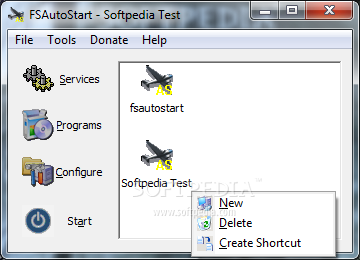
    · Execute FSAutoStart. The main window will appear and the default profile will be selected.
    · Click on the Services Button. This will display a list of all services on your computer. Not available on Windows 9x/ME systems.
    · Select the services you wish to stop. Click in the action column to display a drop down list of actions. Available actions are "No Action", "Stop", and "Stop & Restart". "No Action" will do nothing. "Stop" will stop the service. "Stop and Restart" will stop the service, then restart it after the main application has finished. Click Save to save your settings.
    · Click on the Programs Button. This will display a list of all programs currently running on your computer.
    · Select the programs you wish to stop. Click in the action column to display a drop down list of actions. Available actions are "No Action", "Stop", and "Stop & Restart". "No Action" will do nothing. "Stop" will stop the program. "Stop and Restart" will stop the program, then restart it after the main application has finished. Click Save to save your settings.
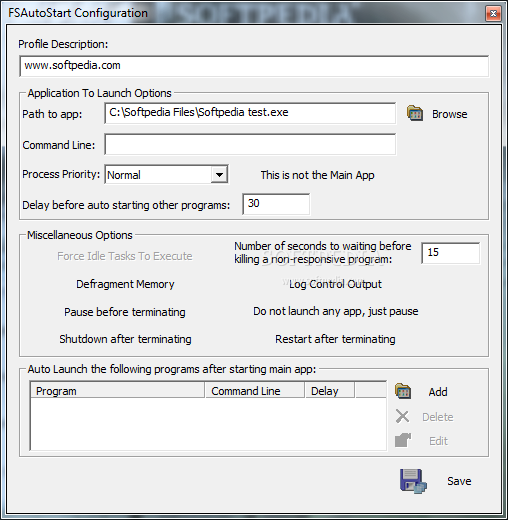
    · Click on the Configure button. This will display the configuration window for FSAutoStart
    · Make sure that the path to the application you wish to run is correct. If it is not, click on the Browse button to find the application executable.
    · You can optionally enter a command line for the application, and set the priority that the application will run.
    · You select to defragment memory before the application is started by selecting the Defragment Memory check box.
    · On XP systems, you can choose for Force Idle Tasks to Execute by checking the Force Idle Tasks check box (this is disabled on non-XP systems)
    · If you would like to automatically start any software before the application starts, click on the Add button. You can then browse to the executable of the program you wish to execute. You may then add any command line arguments the program may require. Click Save to save your settings.
    · Click Start to begin shutting down services and programs and launch the application. After clicking start, FSAutoStart will be terminated and fsasctl (FSAutoStart Control) will start.
    · At this point, the process becomes completely automated
    · You can create as many configurations as you want by using the File->New menu option. Select to create a blank configuration or a copy of the currently loaded configuration. Then browse to the location where you want your file to reside. All of your profiles will be available in the list on the main window.

     Softpedia guarantees that FSAutoStart 1.1 build 11 is 100% FREE, which means it does not contain any form of malware, including spyware, viruses, trojans and backdoors. [read more >]


    TAGS:

    | |


    HTML code for linking to this page:


    Go to top

    Windows tabGames tabDrivers tabMac tabLinux tabScripts tabMobile tabHandheld tabGadgets tabNews tab

    SUBMIT PROGRAM   |   ADVERTISE   |   GET HELP   |   SEND US FEEDBACK   |   RSS FEEDS   |   ENTER NEWS SITE   |   ENGLISH BOARD   |   ROMANIAN FORUM