
Simple utility that can contribute to improving overall system performance by running defragmentation jobs on system files at boot time. #Registry defrag #Registry hives #Registry tweak #Registry #Tweak #Defrag
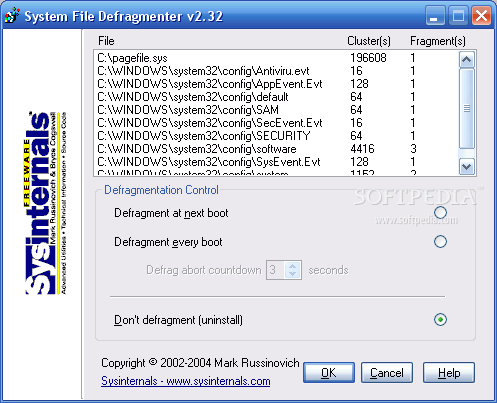
Pagedefrag has been designed as a solution for improving the overall performance of the system on older versions of Windows, by running defragmentation jobs on system files and the registry.
The utility can be launched as soon as extracted from the download archive, saving the user the trouble of going through an installation process.
Once started, a simple interface shows a list with the system files detected; the entries are accompanied by information such as the number of allocation units they occupy and the amount of fragments available.
In the lower part of the application window there are options for initiating the defragmentation procedure. Since this sort of data is required by the system in order to function properly, processing them can be done when Windows is offline.
As such, Pagedefrag offers the possibility to set the defrag job to occur at the next boot of the machine; another option is to configure the program to run the optimization routine before each boot of the computer.
Despite its simplicity, the product includes the option to abort the operation should the user want to boot the computer without any delay. Thus, the user is provided the possibility to set a period of time (in seconds) that delays the optimization process.
Data defragmentation entails organizing the files on the hard disk so that there is no free space between them. This leads to faster read and write operations and an increased overall performance of the system.
Pagedefrag is a simple utility with a simple purpose. It runs out of the box and makes available a short list of settings. Even if it is not a complicated tool it includes proper documentation. Before
Pagedefrag 2.32
 Softpedia Editor's Pick
add to watchlist
add to download basket
send us an update
REPORT
Softpedia Editor's Pick
add to watchlist
add to download basket
send us an update
REPORT
- runs on:
-
Windows 2003
Windows XP 32/64 bit
Windows 2K - file size:
- 68 KB
- filename:
- PageDefrag.zip
- main category:
- Tweak
- developer:
- visit homepage
ShareX

Zoom Client

7-Zip

calibre

Windows Sandbox Launcher

IrfanView

Microsoft Teams

Bitdefender Antivirus Free

Context Menu Manager

4k Video Downloader

- Bitdefender Antivirus Free
- Context Menu Manager
- 4k Video Downloader
- ShareX
- Zoom Client
- 7-Zip
- calibre
- Windows Sandbox Launcher
- IrfanView
- Microsoft Teams