
With all the buttons on your keyboard, as well as modern mice that have more than three, you might want to enhance Windows with some tools that make navigation faster, and put important functions at a mouse click away. In this regard, Pitaschio bundles up some of the most common Windows features and makes them fully configurable.
The first advantage you stumble upon even before running the application is that you don’t have to go through a setup process in order to make it function, because it’s portable. As a consequence, it can easily be carried around on an USB Flash drive and used on other computers as well. Moreover, system registries remain intact.
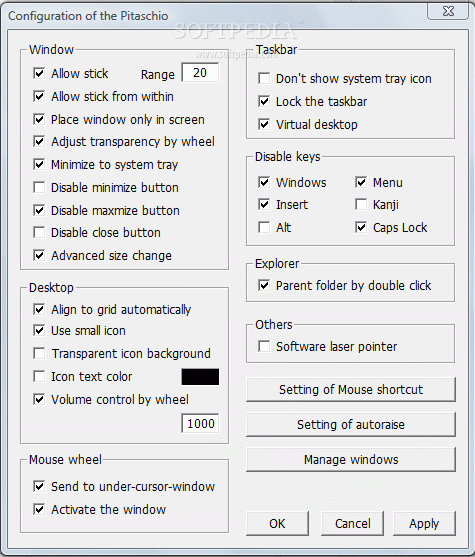
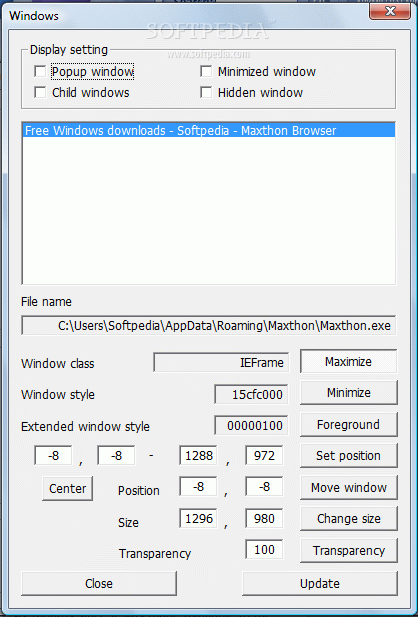
When it runs, the application directly goes to the system tray, and it’s the place it spends most of its time. However, it’s a good idea to double-click the icon to take a look at the set of features so you get an idea of what it can do for you. The general configuration window shows a list that covers some areas like window, desktop, taskbar, mouse wheel, explorer, and more.
To get into more details, the application gives you the possibility to configure some general buttons, even mouse buttons, to trigger the screensaver, for instance. Another example is the mouse wheel that can be used on the desktop to adjust the system volume.
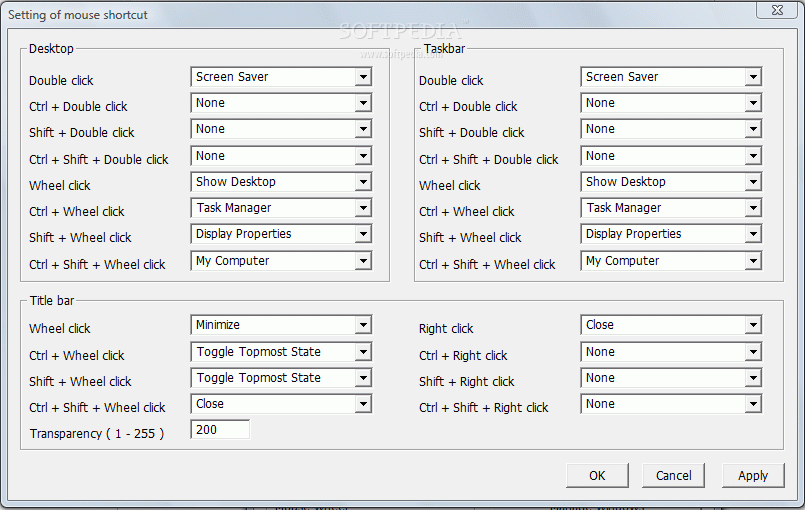
On the other hand, the application lets you configure some more details, such as disabling window minimize, expand, or even the close button so you don’t accidentally press them. Hitting the Setting of Mouse shortcut button brings up yet another window with more controls.
However, these are dedicated only to the mouse, and activate themselves only when used on the desktop, taskbar, and title bar. Several button combinations, like the three mouse buttons along with special keys, are put at your disposal to assign to actions such as launching the screensaver, displaying properties, running the task manager, minimize, setting transparency, or even shutting down your computer.
Bottom line is that Pitaschio does indeed manage to bring that level of enhancement to Windows that can help both beginners and experienced computer enthusiasts. Only a little time needs to be spent configuring it, even though possibilities become close to endless. It’s portable, works on all Windows iterations, and can considerably enhance the way you work or relax.
Filed under
- Version:
Pitaschio 2.26
- runs on:
-
Windows Vista
Windows XP
Windows 2K - file size:
- 60 KB
- filename:
- pita226.zip
- main category:
- Tweak
- developer:
Zoom Client

IrfanView

4k Video Downloader

Microsoft Teams

calibre

Context Menu Manager

ShareX

Bitdefender Antivirus Free

7-Zip

Windows Sandbox Launcher

- Bitdefender Antivirus Free
- 7-Zip
- Windows Sandbox Launcher
- Zoom Client
- IrfanView
- 4k Video Downloader
- Microsoft Teams
- calibre
- Context Menu Manager
- ShareX