
Improve Windows hidden settings so that your computer runs at its best performance. #OS optimizer #Tweak system #System tweak #Tweak #Optimize #Boost

Most Windows XP users surely know that this particular OS needs some tweaking under the hood for optimal performance. Instead of watching countless tutorials on the Internet to learn how to manually adjust some settings, you can try a dedicated software that knows exactly what can be optimized and will do it on the spot.
SpeedXP is an application designed especially to assist you in this matter. It is one of the simpler tools for tinkering with the operating system but it can yield surprising results, even if it offers only a handful of options.
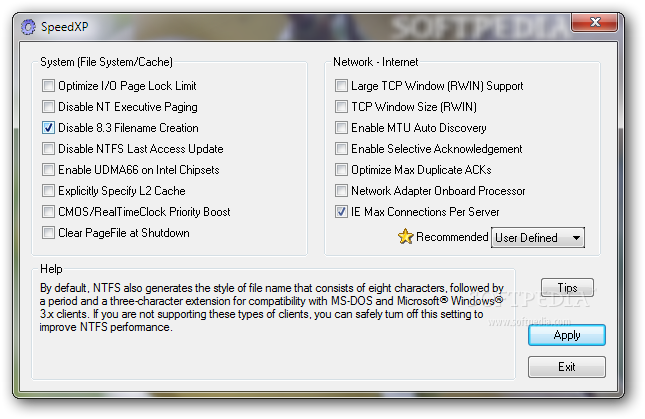
The program addresses all user categories because the interface is as simple as it gets, just a single window that hosts all the options, be they the ones concerning the system or the ones addressed to network or Internet.
The app thus enables you to disable NT executive paging and the NTFS last access update, enable UDMA66 on Intel chipsets, clear pagefile at shutdown, enable MTU auto-discovery, optimize max duplicate ACKs and many more.
SpeedXP provides recommendations depending on the Internet connection, be it cable, DSL or dial-up and it can manage a file system and cache settings as well. Every feature comes with a detailed explanation that appears when you hover the cursor over it.
After you decide which modifications will be applied to your system, SpeedXP will prompt you to restart the PC in order to make the optimizations come into effect. During our tests, we did notice that the OS was a bit more nimble after applying the appropriate tweaks, so this tools actually did its job quite well.
Overall, plain and simple as it may be as an application, SpeedXP can really have a positive impact on the performances of your system, so in case you're still using Windows XP, this tool can actually be what you're looking for.
SpeedXP 1.0.329
add to watchlist add to download basket send us an update REPORT- runs on:
-
Windows 7
Windows Vista
Windows XP - file size:
- 901 KB
- filename:
- SpeedXP.zip

- main category:
- Tweak
- developer:
Bitdefender Antivirus Free

7-Zip

calibre

ShareX

Context Menu Manager

Windows Sandbox Launcher

4k Video Downloader

Microsoft Teams

IrfanView

Zoom Client

- Microsoft Teams
- IrfanView
- Zoom Client
- Bitdefender Antivirus Free
- 7-Zip
- calibre
- ShareX
- Context Menu Manager
- Windows Sandbox Launcher
- 4k Video Downloader