
Toggle the state of the Windows DreamScene feature with just the press of a button to be able to use videos as wallpapers for a neat workspace #DreamScene Activator #Activate DreamScene #Enable DreamScene #DreamScene #Enable #Activate

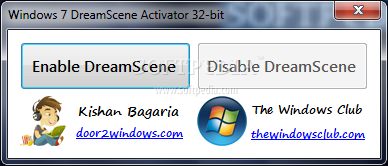
If you do not know what DreamScene is, you are either a Windows XP user or you are just a beginner who is only now trying to get the most out of their Windows 7 operating system. However, since DreamScene is only available on Windows Ultimate editions, if you have a different flavor of the OS you can rely on Windows 7 DreamScene Activator.
DreamScene is the feature that enables you to use a video or an animation as the desktop background, and this does not stress the CPU as it uses the GPU instead. While it is recommended to use files provided by Microsoft, you can also use custom videos as the background.
Windows 7 DreamScene Activator is nothing fancy and nothing complicated, as it only comes down to a simple dialog that lets you enable or disable this great Windows 7 feature. It only takes one second until it is enabled, so you should not encounter too many problems while using it.
Needless to say that the application needs to be launched on Windows 7 to prevent any potential compatibility issues. Since you are using Windows 7, it is advised to right click the executable file and hit the “Run as Administrator” option to allow the application successfully apply the modifications to your operating system.
Initially, it restarts Windows Explorer, then it adds the necessary registry keys and values, and the feature is active. It needs to be mentioned that the software currently supports only MPG and WMV videos.
All things considered, Windows 7 DreamScene Activator is a great utility for those who have a powerful machine and do not mind slowing it down a little bit with this particular feature, especially since it can add some fun and sophistication to your PC.
What's new in Windows 7 DreamScene Activator 1.1:
- Combines the 32bit & 64bit bits
Windows 7 DreamScene Activator 1.1
add to watchlist add to download basket send us an update REPORT- PRICE: Free
- runs on:
- Windows 7 32/64 bit
- file size:
- 421 KB
- filename:
- W7DSA.zip
- main category:
- Tweak
- developer:
- visit homepage
Zoom Client

Microsoft Teams

Context Menu Manager

calibre

ShareX

Windows Sandbox Launcher

Bitdefender Antivirus Free

IrfanView

7-Zip

4k Video Downloader

- IrfanView
- 7-Zip
- 4k Video Downloader
- Zoom Client
- Microsoft Teams
- Context Menu Manager
- calibre
- ShareX
- Windows Sandbox Launcher
- Bitdefender Antivirus Free