WINDOWS CATEGORIES:


NEWS ARCHIVE >>
SOFTPEDIA REVIEWS >>

WEEKLY HIGHLIGHTS

DVD Cloner45
Spyware Doctor40
1Click DVD Copy40
Apollo DVD Copy40
ABC Amber BlackBer...45
Protected Music Co...40

7-DAY TOP DOWNLOAD

#
Program
Avira AntiVir
Personal - Free
Antivirus 9.0.0.415

170,556
Windows Live
Messenger 2009
14.0.8089.726

140,493
Avira Antivir Virus
Definition File
Update December 1,
2009

128,729
Nexus Radio 4.2.2
125,219
FreeZ Online TV 1.30
88,201
Y! Multi Messenger
8.x and 9.x

77,176
Microsoft Office
2010 14.0.4536.1000
Beta / 2007

74,779
DVD Shrink 3.2.0.15
50,362
Windows Live
Messenger
8.5.1302.1018

50,211
AVG Free Edition 9.0
Build 707a1765

47,231

WEEK'S BEST

  • Kaspersky Password...
  • Daniusoft Video to...
  • VirtualBox 3.1.0 r...
  • SiSoftware Sandra ...
  • Kaspersky Virus Re...
  • Faststone Image Vi...
  • Vuze (formerly Azu...
  • Softpedia Wallpape...
  • Softpedia Wallpape...
  • Softpedia Wallpape...
  • RSSOwl 2.0.1
  • Internet Explorer ...
  • Online Armor ++ 4....
  • cFosSpeed 5.01 Bui...
  • SONY Vegas Pro 9.0...
  • Firefox 3.6 Beta 4...
  • Nokia Photos 1.6.434
  • Windows Server 200...
  • Skype Portable 4.1...
  • Google Chrome Port...
  • PCMark Vantage Bas...
  • Kaspersky Anti-Vir...
  • Microsoft Virtual ...
  • Messenger Plus! Li...
  • WinX DVD Author [F...
  • SoftPerfect Networ...
  • System Mechanic Pr...
  • Ad Muncher 4.81 Bu...
  • Windows 7 Upgrade ...
  • Pidgin 2.6.4
  • Home > Windows > Tweak > System Tweak
     Report spyware

    Winstep Start Menu Organizer 1.2

    Download button

    Downloads: 1,176  Add to download basket  Tell us about an update
    User Rating:
    Rated by:
    NOT RATED
    0 user(s)
    Developer:

    License / Price:

    Size / OS:

    Last Updated:

    Category:
    Winstep Software Technologies | More programs
    Freeware / FREE
    2.8 MB / Windows All
    November 13th, 2009, 20:30 GMT
    C: \ Tweak \ System Tweak

     Read user reviews (0)  Add a review  Refer to a friend  Subscribe


    Winstep Start Menu Organizer description


    Organize your Start Menu with just a few clicks!

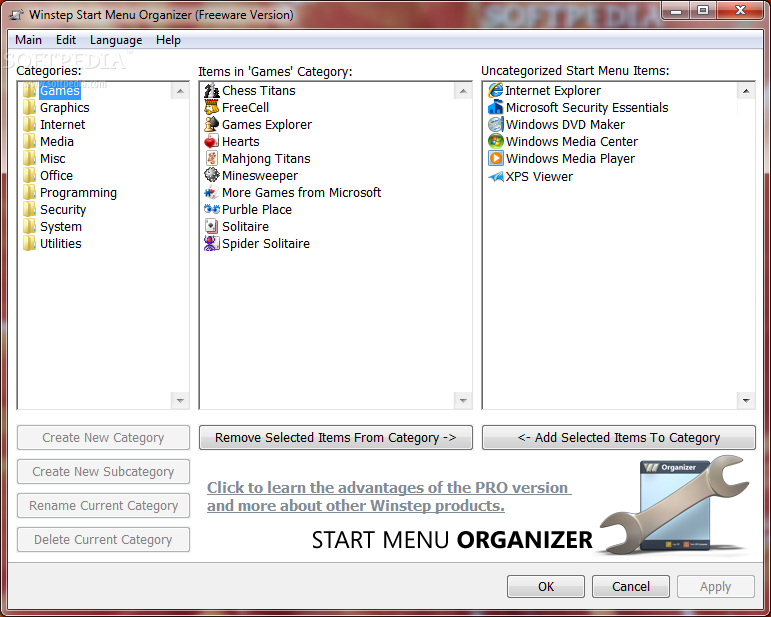
    Winstep Start Menu Organizer is a freeware program designed to rapidly help you clean and organize your Microsoft Windows Start Menu.

    Over time, as more and more applications get installed, the Start Menu can get so cluttered that you end up spending a lot of time simply trying to find the program you want to run. When this happens, it's time to organize the Start Menu.

    The shortcuts and folders displayed in your All Programs menu are actually stored in two separate folders in your hard drive: one set specific to the current logged in user and another common to all users.

    This means you could use nothing but Explorer to reorganize the contents of your All Programs menu, but then you would have to know the location of both folders on your system - which is different in basically every version of Windows - and you would have to be careful in order to keep both components of the All Programs menu synchronized.

    For instance, the Accessories folder exists in both the current and all users folders, however Windows only displays a single entry for it in the Start Menu - and it also automatically merges the contents of both versions.

    This is where the Winstep Start Menu Organizer comes in: it allows you to quickly and effortlessly group your Start Menu shortcuts into a specific set of categories (e.g. Utilities, Internet, Office, etc...).

    Here are some key features of "Winstep Start Menu Organizer":

    · Organizes your Windows Start Menu.
    · Extremely easy to use with intuitive interface.
    · Full Drag & Drop support.
    · Multi item selection and handling.
    · Unlimited Undo and Redo levels.
    · No actual changes made until you are satisfied with the new organization.
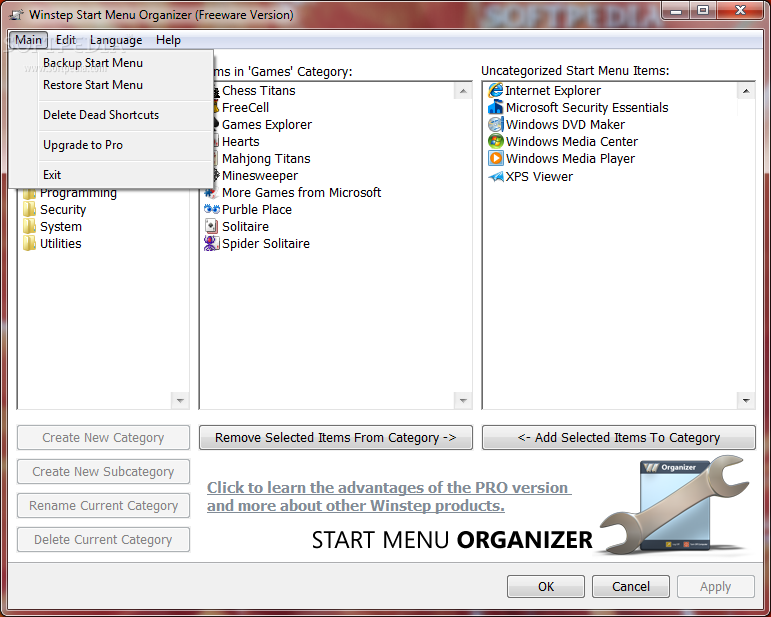
    · Start Menu Backup and Restore support.
    · Automatic backup of the Start Menu contents on first run.
    · Support for single click removal of irrelevant shortcuts.
    · Ability to search for and remove dead shortcuts.
    · Multi language support.
    · Ten standard categories available in the free version.
    · Includes Update Manager to look for, download, and automatically install new versions.

    Requirements:

    · 100 Mhz or faster processor.
    · 64 MB of RAM or more.
    · 10 MB of free hard disk space or more.
    · Screen resolution of 800x600 or higher.

    Limitations:

    · The free version of the Winstep Start Menu Organizer should be enough for most general purposes as it features ten standard categories. If this is not enough, the Pro version of the Organizer allows you to: Create your own Categories / Rename Categories / Delete Categories / Add Subcategories
    · In addition, by upgrading to the Pro version you also get: Ability to reorganize all items in the Start Menu, not just the items at the root / Priority support / Free life-time upgrades / The knowledge that you are supporting future development of the Organizer.

     Softpedia guarantees that Winstep Start Menu Organizer 1.2 is 100% CLEAN, which means it does not contain any form of malware, including spyware, viruses, trojans and backdoors. [read more >]


    TAGS:

    Organize Start Menu | StartMenu Organizer | Clean Start Menu | Start Menu | StartMenu | Organizer


    HTML code for linking to this page:


    Go to top

    Windows tabGames tabDrivers tabMac tabLinux tabScripts tabMobile tabHandheld tabGadgets tabNews tab

    SUBMIT PROGRAM   |   ADVERTISE   |   GET HELP   |   SEND US FEEDBACK   |   RSS FEEDS   |   ENTER NEWS SITE   |   ENGLISH BOARD   |   ROMANIAN FORUM