Search Perform an advanced search query SOFTPEDIA
 
SOFTPEDIA
Updated one minute ago
HomeSubmit a program for being reviewedAdvertise on our websiteGet help on surfing our websitesSend us your feedbackGet information about our XML/RSS backend and how to use itBrowse the news archiveVisit our discussion forumVizitati forumul in limba romana


Program Finder NormalFreeware onlyShareware only

Brute Force Uninstaller (BFU) 1.11 Report spyware 

Click to download Brute Force Uninstaller
View more Brute Force Uninstaller screenshots (1)
 Downloads: 50,917
Rating: Very Good (4.1/5) | Rated by: 53 user(s)
Add to download basket     Send us update information
 Developer: Merijin | More programs by this producer
 License: Freeware  
 Size / OS: 77 KB, Windows All
 Last Updated: February 20th, 2008, 22:26 GMT
 Category: C: \ Tweak \ Uninstallers
 Read user reviews (1) Add a review Refer to friend Subscribe
    Download Brute Force Uninstaller

Brute Force Uninstaller description
A scripting program that can execute a series of preset commands aimed at uninstalled programs that are hard to remove

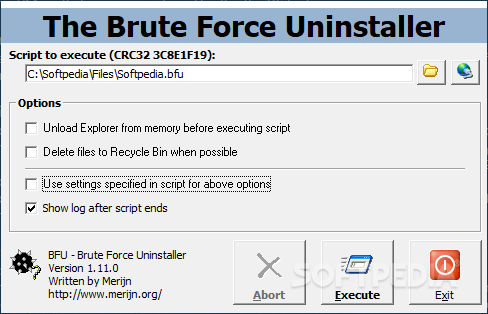
BFU is a scripting application that will execute a series of preset commands like a Windows batch file, aimed at uninstalled programs that are uninstalled improperly, hard to remove or simply unwanted.

There are available options to let the script execution manage files, folders, ini files, Registry keys and values, hosts file content, processes loaded in memory, dll files, NT services and Winsock components. Message boxes can be displayed, the system can be rebooted, the Recycle Bin can be used for delete operations and programs can be started.

Options for the script itself include unloading the shell (i.e. killing the Explorer.exe process), pausing between commands (or all commands) and setting a minimum required version number for BFU itself to be able to run the script. BFU itself does not store anything
on the system and is uninstalled simply by deleting it.

Command syntax
The format of the command is very simple, but has a few notes:
||

The is one of the list below, the amount and format (text, number) of arguments depends on the command.

The pipes (|) between the arguments are needed, as they determine how BFU interprets which argument represents what.
For example, if the SystemRun command is used to launch a program without any parameters but it still needs to be hidden from the user's view (default is 1, show it), the command would be: SystemRun c:windowsnotepad.exe||0

The second argument is empty, but the third is not. The second pipe must not be omitted, or the 0 would be interpreted as parameter for Notepad and the window would be shown.

Whenever brackets are used in the 'Syntax' lines below, this means any of the items seperated by the pipes between them can be used. The brackets should not be used in scripts. For example, when the syntax for a command is DllRegister c:file.dll|[0|1], this means either DllRegister c:file.dll|0 or DllRegister c:file.dll|1 can be used.

Writing scripts
The 'open script' dialog filters on *.bfu. A .bfu script file is plaintext, commands are not case-sensitive. The order of commands can be anything, but it is recommended to put script options at the top and a system restart at the end. Any lines that do not start with a recognized command are ignored, but for readability comments should be easily recognizable, for example by starting them with a certain character (', #, //, /*, whatever you like).


Softpedia guarantees that Brute Force Uninstaller (BFU) 1.11 is 100% CLEAN, which means it does not contain any form of malware, including but not limited to: spyware, viruses, trojans and backdoors.

This software product was tested thoroughly and was found absolutely clean, therefore it can be installed with no concern by any computer user.

However, it should be noted that this product will be retested periodically and the award may be withdrawn, so you should check back on this page from time to time. (click here for more information)


Related downloads IT News Popular downloads New additions   Latest reviews  
Add/Remove Manager 1.2
Add/Remove Manager allows you to easily remove any program name from the Add or Remove Programs section.
Uninstall Plus! 4.1
This application helps you completely uninstall programs, scan, identify and correct registry errors
Best Uninstaller 2.12
Tired of the slow Windows Add/Remove Programs? Try the Best Uninstaller!
Safarp 0.5
Small and fast replacement for the Add or Remove Programs dialog of Windows 2000/XP
Add/Remove Pro 2.09
Add/Remove Pro is a program that displays the entries in the Add/Remove Programs list of Windows Registry
1ClickAddnRemove Installer Uninstaller 1.4.3.10
1Click Add n Remove, an uninstaller for removing unwanted applications from PC
Startup Select 2.2
Startup Select removes harmful programs from running when PC turns on
UninstallIt 1.0.0
UninstallIt is a small tool which will help you remove uninstall entries in Control Panel
ARP++ 1.2
ARP++ will allow you to uninstall programs which cannot be removed from (or may not even appear in) the Windows ARP.
LspCleaner 1.0
Uninstall some programs that were incompletely uninstalled

go to top Use the following code to link to this page:


Welcome!
Hello, Guest

Login if you have a Softpedia.com account.

Otherwise, register for one.

Main categories:
  • Antivirus
  • Compression tools
  • CD/DVD Tools
  • Office tools
  • Programming
  • Authoring tools
  • File managers
  • Desktop Enhancements
  • Internet
  • Network Tools
  • IPOD TOOLS
  • Mobile Phone Tools
  • Multimedia
  • Tweak
  • System
  • Security
  • Others
  • Science / CAD
  • UNIX
  • Windows Widgets
  • PORTABLE SOFTWARE

  • Week's best:
  • Adobe Media Player 1...
  • Registry Mechanic 8....
  • BitSpirit 3.3.2.263
  • AnyDVD 6.4.5.6
  • Firefox 3.0.1 / 2.0....
  • AutoCAD 2009
  • Norton AntiVirus 200...
  • Norton Internet Secu...
  • The Bat! Professiona...
  • WinRAR 3.80 Beta 3 /...
  • GMail Drive shell ex...
  • DAEMON Tools Lite 4....
  • UBCD4WIN 3.2.0
  • Adobe Reader 9.0.0 /...
  • Total Commander Ulti...
  • System Mechanic 8.0....
  • Adobe Acrobat Profes...
  • iPhone PC Suite 1.0....
  • Portable Firefox 3.0...
  • MPlayer for Windows ...
  • Vista Codec Package ...
  • Windows Live Messeng...
  • WinBubble 1.73
  • Kaspersky Anti-Virus...
  • Malware Removal Tool...
  • Royale Noir Theme fo...
  • IBM Lotus Symphony 1...
  • Adobe Dreamweaver 10...
  • Adobe Fireworks 10.0...
  • BitDefender Total Se...
  • © 2001 - 2008 Softpedia. All rights reserved.
    Softpedia™ and Softpedia™ logo are registered trademarks of SoftNews NET SRL.
    Copyright Information | Privacy Policy | Terms of Use | Contact Softpedia | Update your software | Archive