
Uninstalls applications from your computer, deletes leftover files, and forces the removal of programs that cannot be removed in any other way. #Application Uninstaller #Uninstall Program #Remove Application #Uninstaller #Uninstall #Remover

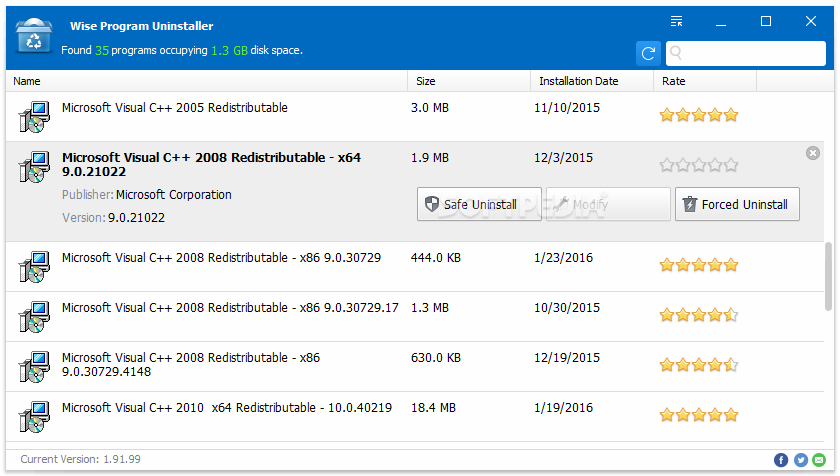
As the name implies, Wise Program Uninstaller is a software solution which deals with the uninstallation of programs from your computer. It packs some extra features, compared to the default Add or Remove Programs function of Windows.
The interface of the tool is clean and intuitive. You can view a list of all installed apps on your system, which is automatically displayed when starting Wise Program Uninstaller.
This list reveals useful information on each item, namely its name, publisher, size, installation date and version. You can find how many apps are shown in total, along with the occupied size on the disk.
In case you have numerous tools, you can use the search function to quickly locate a specific item.
Wise Program Uninstaller supplies users with two uninstall modes - safe and forced. The first option performs the procedure under normal conditions, by trying to remove all related data, without putting the operating system at risk of failure.
The Forced Uninstall mode uses brute force to remove the respective program, together with associated files, which may be left behind on the hard drive, and Windows Registry entries. This is not considered a safe measure, since Windows may start experiencing errors afterward, but it guarantees the removal of all items created by a specific application.
Last but not least, you can repair problematic programs as well as remove the entry of an app from the list, if you are sure you will never uninstall it.
Wise Program Uninstaller has a good response time and swiftly finishes a task while using a low-to-moderate quantity of CPU and system memory. We have not come across any issues throughout our testing, since the utility did not hang or crash. Thanks to its intuitive layout yet powerful features, Wise Program Uninstaller should please users of all skill levels.
Download Hubs
Wise Program Uninstaller is part of these download collections: Program Uninstaller
What's new in Wise Program Uninstaller 3.1.9 Build 263:
- After detecting that the desktop shortcut icon has been deleted, a prompt window pops up asking whether the associated program needs to be uninstalled.
- Improved the rule for checking for updates.
- Added the "Portable Version" option to the menu.
- Changed the search engine from Google to Bing.
Wise Program Uninstaller 3.1.9 Build 263
add to watchlist add to download basket send us an update REPORT- PRICE: Free
- portable version
- Wise Program Uninstaller Portable
- runs on:
-
Windows 11
Windows 10 32/64 bit
Windows 8 32/64 bit
Windows 7 32/64 bit
Windows Vista 32/64 bit - file size:
- 10.1 MB
- filename:
- WPUSetup_3.1.9.263.exe
- main category:
- Tweak
- developer:
- visit homepage
Microsoft Teams

ShareX

calibre

Zoom Client

4k Video Downloader

Bitdefender Antivirus Free

IrfanView

Context Menu Manager

Windows Sandbox Launcher

7-Zip

- Context Menu Manager
- Windows Sandbox Launcher
- 7-Zip
- Microsoft Teams
- ShareX
- calibre
- Zoom Client
- 4k Video Downloader
- Bitdefender Antivirus Free
- IrfanView
