
Have all display settings you need to adjust at the fingertips for extra comfort with the help of this lightweight and easy to use application. #Display manager #Function key management #Configure hotkey #Function key #Display #Hotkey

Dedicated work environments or your personal laptop might require the use of special display settings. It all becomes child's play when proper applications are used. Easy Display Manager is a very easy to use software solution designed to help you manage display options using the function keys on your keyboard.
Mostly addressed to laptops and other portable computers, Easy Display Manager is quite easy to use and provides a straightforward configuration screen to make everything a breeze for all types of users.
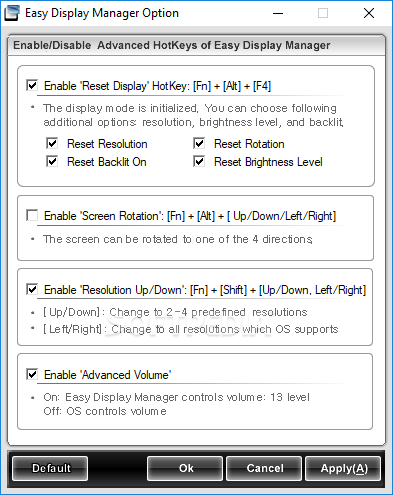
While the amount of options isn't quite breathtaking, Easy Display Manager lets you enable so-called “Reset Display” hotkeys which allow you to reset resolution, rotation and brightness level.
On the other hand, you can also set a hotkey for enabling screen rotation which can be done to one of the four directions, depending on the arrow you press.
If you wish to adjust resolution on the go using predefined key combinations, a dedicated tool in this regard is also available, again with support for the arrow keys, You can use the up and down arrow keys to change to one of the predefined resolutions, or the left and right ones to switch to all resolutions supported by the operating system.
Separate hotkeys for adjusting volume are also available and the feature list basically ends here, which means Easy Display Manager remains just a decent program for the time being.
On the other hand, it works just fine on nearly all Windows versions, without asking for administrator privileges on Windows 7 and without slowing down the system at all.
Overall, Easy Display Manager does what it says with a limited amount of customization options, offering an intuitive interface appropriate for all types of users. It greatly comes in handy when display settings constantly need to be changed, providing a little extra comfort.
Easy Display Manager 3.0.3.5
add to watchlist add to download basket send us an update REPORT- runs on:
-
Windows 7
Windows Vista
Windows XP - file size:
- 17.7 MB
- filename:
- Easy_Display_Manager_3.0.3.5.zip
- main category:
- Tweak
- developer:
Microsoft Teams

ShareX

calibre

Windows Sandbox Launcher

7-Zip

Zoom Client

Bitdefender Antivirus Free

4k Video Downloader

IrfanView

Context Menu Manager

- 4k Video Downloader
- IrfanView
- Context Menu Manager
- Microsoft Teams
- ShareX
- calibre
- Windows Sandbox Launcher
- 7-Zip
- Zoom Client
- Bitdefender Antivirus Free