
A comprehensive set of controls that allow you to carefully tweak your video card in order to get maximum potential with the help of this application. #Video tweak #Registry editor #Edit registry #Tweak #Optimization #Optimize
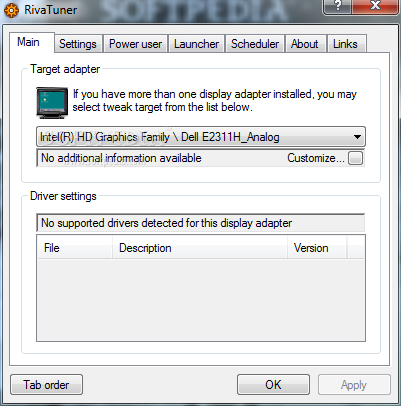
RivaTuner is one of the top-rated video card overclocking software. While its name suggests that it's intended to focus on NVIDIA cards only, RivaTuner also supports ATI / AMD video adapters. Its main goal is to break the barriers set by manufacturers and set clock and memory speeds as well as fan speeds. Thus, you can easily make adjustments to overclock and even underclock your video card.
The installation process of the application only asks for your attention at the end of it, by providing two options: 'Protect process virtual memory' and 'Protect memory mapped I/O ports'. The last of them, as the developer informs us, is a must if you are into multiplayer games that require PunkBuster.
RivaTuner provides in-depth tweaking capabilities for its users. Beginners are only advised to use this program after studying the documentation, as any misjudged tweaking may end up literally frying the video adapter. If you still want to do it, it's recommended that your video card has a high cooling potential. Thus, first of all, make sure you have the proper hardware to tweak before you go ahead and set higher core and memory speeds.
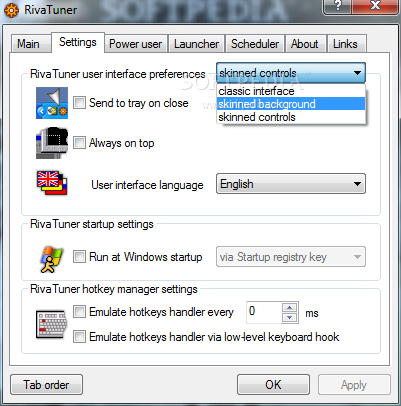
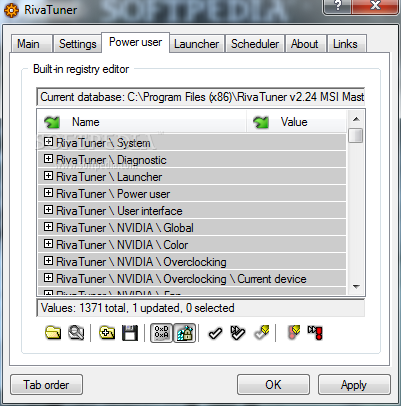
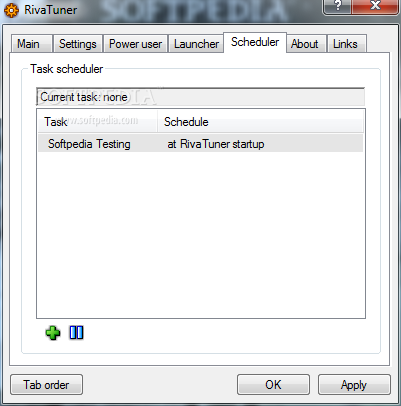
The application's interface is quite simple. It features a tabbed layout comprising 'Main', 'Settings', 'Power user', 'Launcher' or 'Scheduler' options. You get adapter information and driver settings in the 'Main' section and RivaTuner user interface preferences, startup and hotkey manager settings within the 'Settings' section. The 'Power user' tab is available for advanced users that posses a high level of VGA knowledge.
Although it supports hardware from ATI / AMD, RivaTuner works at its best with NVIDIA video cards. The counterpart software in this case is ATI Tray Tools. RivaTuner's 'System tweaks' window enables you to choose the core, shader and memory clocks with the optional 'Link clocks' feature. You can also manage your selection within the 'Overclocking profile settings' by saving, loading and deleting them.
This application brings a sturdy environment for overclockers and the right set of tools for them to make use of. RivaTuner's supported cards spectrum spreads from Riva TNT to GeForce 200 Series. Being one of the most commonly used software for GPU overclocking, RivaTuner provides a wide array of options regarding multi-monitor support, overclocking tool or fan control.
What's new in RivaTuner 2.24:
- Minor bugfixes:
- Fixed bug in hardware monitoring module causing hardware monitoring based scheduled tasks to be ignored due to improper initialization on RivaTuner startup.
- Fixed erroneous 100MHz memory clock reading on G9x GPU series based display adapters caused by bug in memory clock frequency generator source clock detection code.
- File system redirection is no longer disabled when executing a patch script under 64-bit OS to prevent the issues with missing file system browser dialog when pressing the "Continue" button.
RivaTuner 2.24c
 Softpedia Editor's Pick
add to watchlist
add to download basket
send us an update
REPORT
Softpedia Editor's Pick
add to watchlist
add to download basket
send us an update
REPORT
- runs on:
- Windows All
- file size:
- 2.7 MB
- filename:
- RivaTuner224c.exe
- main category:
- Tweak
- developer:
IrfanView

Zoom Client

4k Video Downloader

7-Zip

Context Menu Manager

calibre

ShareX

Windows Sandbox Launcher

Microsoft Teams

Bitdefender Antivirus Free

- Windows Sandbox Launcher
- Microsoft Teams
- Bitdefender Antivirus Free
- IrfanView
- Zoom Client
- 4k Video Downloader
- 7-Zip
- Context Menu Manager
- calibre
- ShareX