


Having shortcuts to the main drive locations on the desktop makes accessing them that much easier. Desktop Media is a small utility that can automatically add drive icons to the main screen.
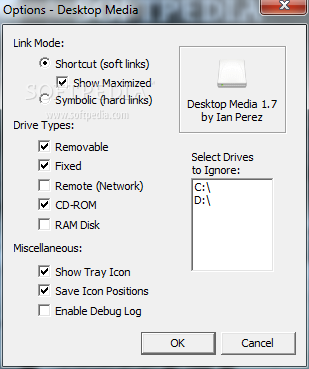
The app comes with a tiny interface that is very easy to figure out.
Basically, Desktop Media saves you the time you would otherwise use to access My Computer and locate all the new drives. The app detects hard drives, CDs and DVDs, USB memory sticks and network drives and can display a shortcut to each of these.
By default, the program is set to add links of the removable devices and the CD/DVD-ROM. In order to add the rest of the shortcuts, the checkboxes next to each option must be ticked from the app’s interface.
Regarding the partitions of the hard drive, you can select the ones you want to ignore; if it was already present on the desktop, the link disappears immediately after the option is confirmed.
The software has the ability to create soft links (shortcuts) or hard links (symbolic links). Also, the program can display a tray icon and save the icon positions.
While the software isn’t overly complicated, it saves you some time and it could be particularly appreciated by those who keep most of their files on the desktop.
The bottom line is that Desktop Media is a nice utility that can prove to be very useful. Inexperienced users should find the program easy to install and customize, thanks to the intuitive interface and the overall simplicity of the app.
Filed under
What's new in Desktop Media 1.7:
- Fixed a memory leak with the Save Icon Positions feature
- Version:
Desktop Media 1.7
- runs on:
- Windows All
- file size:
- 353 KB
- filename:
- desktop-media-setup-1.7.zip
- main category:
- Desktop Enhancements
- developer:
- visit homepage
Windows Sandbox Launcher

Context Menu Manager

ShareX

7-Zip

Zoom Client

Microsoft Teams

calibre

Bitdefender Antivirus Free

4k Video Downloader

IrfanView

- Bitdefender Antivirus Free
- 4k Video Downloader
- IrfanView
- Windows Sandbox Launcher
- Context Menu Manager
- ShareX
- 7-Zip
- Zoom Client
- Microsoft Teams
- calibre