
Assign an action to the 4 corners of your screen, that can either launch a program or file. #Desktop enhancement #Add corner #Launch program #Corner #Launch #Enhance


Hot Corners is a software that enables you to assign shortcuts for various actions, depending on mouse movement.
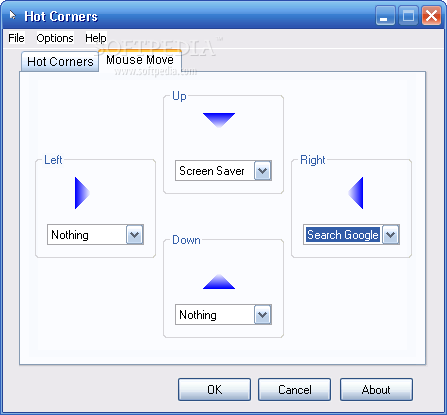
The user interface of the application consists of a standard window in which there are two available tabs - "Hot Corners" and "Mouse Move".
Thus, you can assign a function when your mouse cursor touches the top left, top right, bottom left or bottom right corner of the screen. You can also set a shortcut if you move the mouse to the upper, lower, left of right margin of the screen.
You can bring forth the Control Panel window, lock the computer, view My Documents, run a preferred program or open a file or folder, activate the screen saver or search online for text in a small window.
You can switch to standby mode, show the desktop, minimize or close the current window, and switch back to the last window.
In order to activate the "Mouse Move" controls, you have to press the Windows key + X. The mouse will be automatically placed in the center of the screen, after which you can activate one action - up, down, on the left or on the right of the screen.
In the "Settings" menu, you can adjust the "Hot Corners" delay and "Mouse Move" sensitivity, enable Hot Corners to automatically run at system startup and to show the tray icon.
The program uses a low amount of system resources. It doesn't include a help file but, even so, Hot Corners is extremely easy to use.
The bottom line is that Hot Corners presents a simple solution for hotkeys on your system, but it definitely needs to incorporate more advanced actions.
Hot Corners 2.2.2.0
add to watchlist add to download basket send us an update REPORT- runs on:
- Windows All
- file size:
- 528 KB
- filename:
- HC2-2-2-0.exe

- main category:
- Desktop Enhancements
- developer:
- visit homepage
calibre

4k Video Downloader

Context Menu Manager

IrfanView

Windows Sandbox Launcher

Microsoft Teams

Zoom Client

7-Zip

Bitdefender Antivirus Free

ShareX

- 7-Zip
- Bitdefender Antivirus Free
- ShareX
- calibre
- 4k Video Downloader
- Context Menu Manager
- IrfanView
- Windows Sandbox Launcher
- Microsoft Teams
- Zoom Client