
Modify disk volume IDs on FAT and NTFS hard drives, as well as floppy disk devices using this lightweight, yet very reliable utility. #Change volume ID #Change drive ID #Modify ID #Volume ID #Drive ID #Change

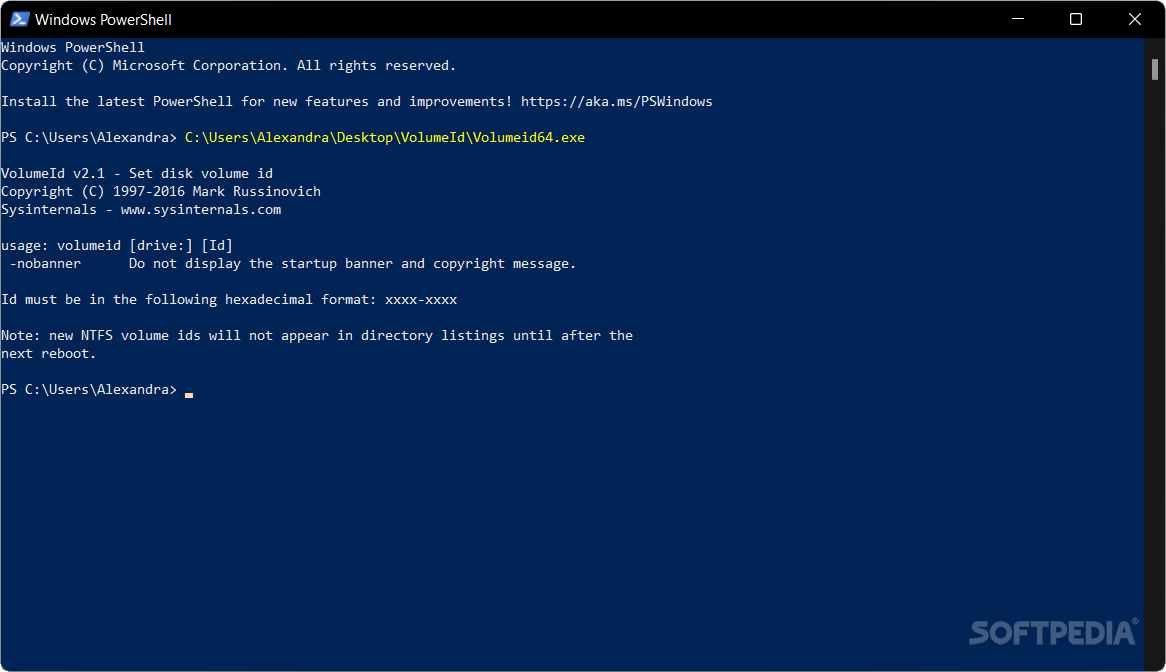
Although Windows’ built-in Label utility enables you to change volume labels, it cannot modify the volume ID. Unlike the label, which acts as a description for the storage, the ID is a unique identifier assigned to a disk volume by the file system.
VolumeID is a lightweight console application that lets you change the storage ID so that you can smoothly perform various advanced and technical tasks, such as disk cloning, backup or restore.
While the application does not require installation or configuration, you do need to know the basics of using commands. The app provides you with some instructions as to how to write the correct commands, but the most important thing to account for is the volumeid <driveletter:> xxxx-xxxx format.
The tool is mainly designed for FAT and NTFS disks, but that can also include floppy disks, which can be helpful if you have an older computer that features one. Take note that the changes to NTFS disks do not occur instantly and that you need to reboot for them to take effect.
The developer warns that you need to shut down all apps before running the tool, as to avoid various conflicts. For instance, NT may become confused and think that the media (disk) has changed after a FAT volume ID has changed. If you get an error message asking you to reinsert the original disk, then there is a chance that the disks doesn’t recognize any apps stored on it.
The application doesn’t appear like a tool for the average users, but rather an app to use when you need to perform various advanced tasks where maintaining a unique identifier for each volume is crucial.
A common situation when the tool can prove useful is instances where software and systems use the volume ID to identify and manage disks. If you want to move programs with licensing or protection mechanisms to the disk or perhaps want to get rid of regular software conflicts, then perhaps VolumeID can come in handy.
VolumeID 2.1
add to watchlist add to download basket send us an update REPORT- PRICE: Free
- runs on:
-
Windows 11
Windows 10 32/64 bit
Windows 8 32/64 bit
Windows 7 32/64 bit
Windows Vista 32/64 bit - file size:
- 42 KB
- filename:
- VolumeId.zip
- main category:
- Programming
- developer:
- visit homepage
4k Video Downloader

Zoom Client

calibre

Bitdefender Antivirus Free

Microsoft Teams

IrfanView

ShareX

Windows Sandbox Launcher

7-Zip

Context Menu Manager

- Windows Sandbox Launcher
- 7-Zip
- Context Menu Manager
- 4k Video Downloader
- Zoom Client
- calibre
- Bitdefender Antivirus Free
- Microsoft Teams
- IrfanView
- ShareX