
Contains only Tor (without the web browser or other software), giving you the possibility of configuring Tor and all of your applications manually. #Internet communication #Communication system #Traffic analysis #Tor #Communication #Encrypt
Anonymous surfing protects your online privacy and allows for a healthy browsing experience, preventing you from being tracked and monitored. In order to keep your online traffic information away from prying eyes, the assistance of a specialized software application is required.
Tor is one of the most popular anonymous surfing companions out there and its notoriety is very much due to its very efficient ways of hiding your identity while surfing the Internet. Tor’s algorithms are based on a network of virtual tunnels that allows users to communicate without compromising their privacy.
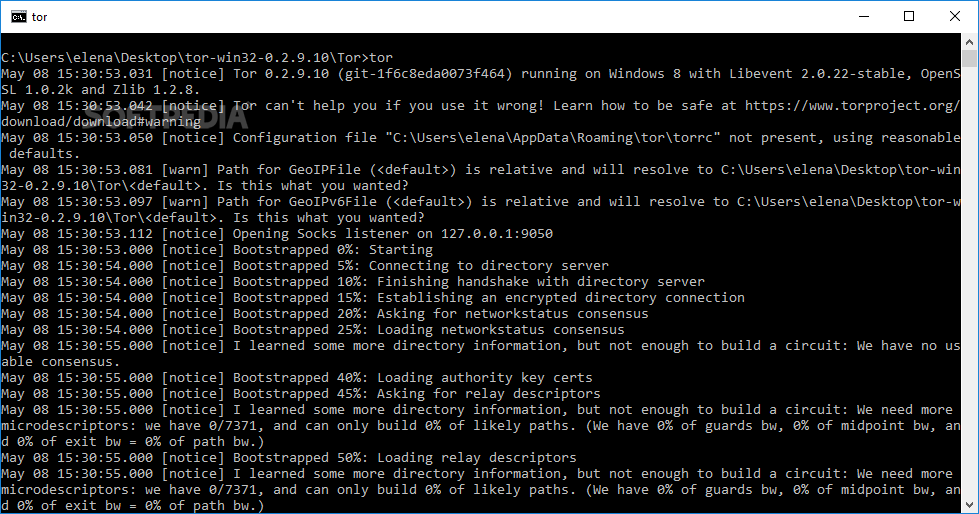
Tor’s installation can be completed in just a few clicks and takes very little time. You can run it by double-clicking the icon it places on your desktop. At this point, the application starts running a set of commands in a command prompt window, informing you of the actions it performs step by step. In order to understand these operations, you need to become familiar with Tor’s architecture. Because it is structured as a distributed network of servers (or onion routers), the application attempts to build a circuit that will bounce a user’s TCP streams around those routers, so the routers themselves will have a hard time identifying the source of the stream.
If building a virtual circuit is successful, Tor lists a message in the command prompt window, notifying you that the client is running correctly. It is possible to configure it manually, but in order to do so, a fair amount of effort and expert skills are required. The documentation included in the installation folder, accompanied by the online resources can be of great assistance.
Tor protects your browsing habits and keeps you safe on the Internet. You can run it any time you wish to remain anonymous or you can adjust it to your taste with the aid of a set of command prompt lines. Regardless of the approach you choose, the result is a clean and secure Internet surfing experience.
Tor (Expert Bundle) 0.4.7.11
add to watchlist add to download basket send us an update REPORT- runs on:
- Windows All
- file size:
- 6.4 MB
- filename:
- tor-win32-0.4.7.11.zip
- main category:
- Security
- developer:
- visit homepage
Windows Sandbox Launcher

ShareX

calibre

Bitdefender Antivirus Free

7-Zip

Context Menu Manager

4k Video Downloader

IrfanView

Microsoft Teams

Zoom Client

- IrfanView
- Microsoft Teams
- Zoom Client
- Windows Sandbox Launcher
- ShareX
- calibre
- Bitdefender Antivirus Free
- 7-Zip
- Context Menu Manager
- 4k Video Downloader