Softpedia
 

WINDOWS CATEGORIES:


GLOBAL PAGES >>
SOFTPEDIA REVIEWS >>
MEET THE EDITORS >>
WEEK'S BEST
  • Sticky Password FR...
  • Parallels Workstat...
  • ESET NOD32 Antivir...
  • BitDefender Total ...
  • WinPatrol 24.6.201...
  • PerfectDisk Free D...
  • Adobe Photoshop CS...
  • PerfectDisk Profes...
  • Windows 8 Consumer...
  • Atlantis Word Proc...
  • 7-DAY TOP DOWNLOAD
    #
    Program
    Sticky Password FREE
    [SOFTPEDIA
    EXCLUSIVE] 6.0.2.323

    116,388 downloads
    Nokia PC Suite
    7.1.180.64

    70,750 downloads
    3DP Chip 12.04
    59,754 downloads
    Adobe Flash Player
    11.3.300.250 Beta 3
    / 11.2.202.235

    44,459 downloads
    Samsung PC Studio
    7.2.24.9

    43,494 downloads
    Nero 9 Free
    9.4.12.3d

    41,567 downloads
    Yahoo! Messenger
    11.5.0.192

    35,027 downloads
    Avira Antivir Virus
    Definition File
    Update May 22, 2012

    33,060 downloads
    Samsung Kies
    2.3.1.12044_18

    32,829 downloads
    Internet Download
    Manager 6.11 Build 7

    32,746 downloads
    Home > Windows > Office tools > Text editors > TxEdit > Screenshots

    TxEdit Screenshots


    Go back to TxEdit

    Screenshot 1 of TxEdit

    The image below has been reduced in size. Click on it to see the full version.

    "The main window of the application allows you to input, edit and format text ."
    TxEdit screenshot 1 - The main window of the application allows you to input, edit and format text .
    Screenshot 2 of TxEdit

    The image below has been reduced in size. Click on it to see the full version.

    "The Edit menu includes the lowercase/uppercase commands and also a sort command used to alphabetically sort text lines."
    TxEdit screenshot 2 - The Edit menu includes the lowercase/uppercase commands and also a sort command used to alphabetically sort text lines.


    Screenshot 3 of TxEdit

    The image below has been reduced in size. Click on it to see the full version.

    "In the View menu the user can find the text conversion commands "OEM to ANSI" and "ANSI to OEM"."
    TxEdit screenshot 3 - In the View menu the user can find the text conversion commands "OEM to ANSI" and "ANSI to OEM".
    Screenshot 4 of TxEdit

    The image below has been reduced in size. Click on it to see the full version.

    "The defined tools can be accesed in the Tools menu. Only the active tools can be used."
    TxEdit screenshot 4 - The defined tools can be accesed in the Tools menu. Only the active tools can be used.
    Screenshot 5 of TxEdit

    The image below has been reduced in size. Click on it to see the full version.

    "Defined text macros are available in the Macros menu. The user can specity the active ones in the Options window."
    TxEdit screenshot 5 - Defined text macros are available in the Macros menu. The user can specity the active ones in the Options window.
    Screenshot 6 of TxEdit

    "The Options window lets you customize the look of the program."
    TxEdit screenshot 6 - The Options window lets you customize the look of the program.
    Screenshot 7 of TxEdit

    "The Printing Tab will allow users to create a personalized header and footer for their document."
    TxEdit screenshot 7 - The Printing Tab will allow users to create a personalized header and footer for their document.
    Screenshot 8 of TxEdit

    "The program can be fully integrated in the Windows Explorer or you can choose to simply show a desktop shortcut."
    TxEdit screenshot 8 - The program can be fully integrated in the Windows Explorer or you can choose to simply show a desktop shortcut.
    Screenshot 9 of TxEdit

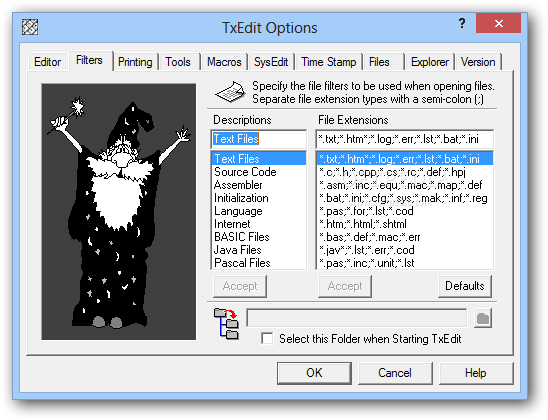
    "In the Filters tab the user can associate specific filters to be used when opening certain file types."
    TxEdit screenshot 9 - In the Filters tab the user can associate specific filters to be used when opening certain file types.
    Screenshot 10 of TxEdit

    "The Tools tab is used to define programs and command lines to be used by advanced users."
    TxEdit screenshot 10 - The Tools tab is used to define programs and command lines to be used by advanced users.
    Screenshot 11 of TxEdit

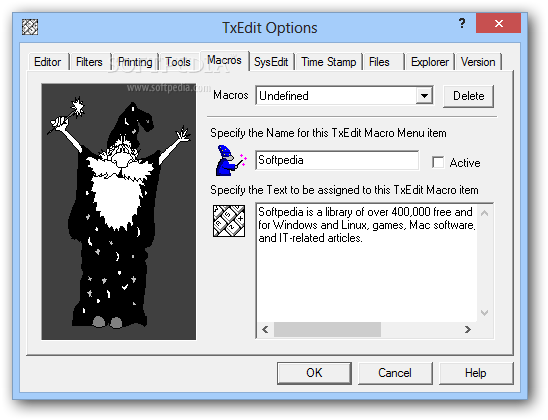
    "Text macros will be defined in the Macros tab. The user must specify a name for the macro and the text that will be inserted."
    TxEdit screenshot 11 - Text macros will be defined in the Macros tab. The user must specify a name for the macro and the text that will be inserted.
    Screenshot 12 of TxEdit

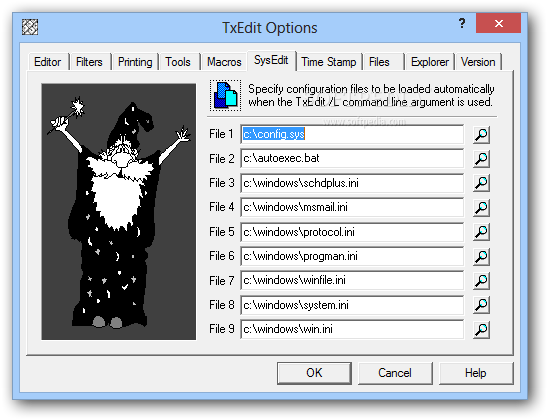
    "The SysEdit tab allows the user to specify the configuration files that will be used when opening the application with command lines."
    TxEdit screenshot 12 - The SysEdit tab allows the user to specify the configuration files that will be used when opening the application with command lines.
    Screenshot 13 of TxEdit

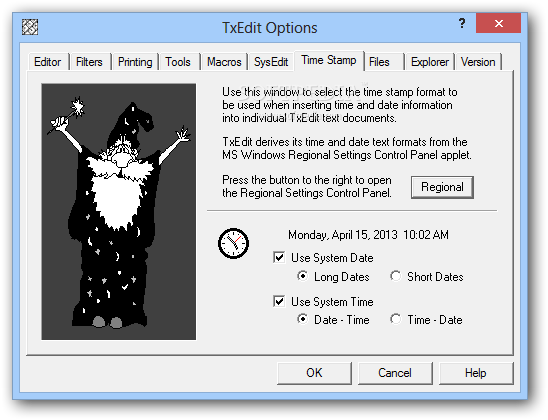
    "The user can create custom time stamps that will later be used to insert date and time into individual text documents."
    TxEdit screenshot 13 - The user can create custom time stamps that will later be used to insert date and time into individual text documents.
    Screenshot 14 of TxEdit

    "The Files tab deals with file associations and here the user can define the program as default editor for certain file types."
    TxEdit screenshot 14 - The Files tab deals with file associations and here the user can define the program as default editor for certain file types.

    Images watermarked with the Softpedia logo are screenshots taken by our editors and cannot be reproduced without prior written consent. For more information see our copyright information page.

    WindowsGamesDriversMacLinuxScriptsMobileHandheldNews

    SUBMIT PROGRAM   |   ADVERTISE   |   GET HELP   |   SEND US FEEDBACK   |   RSS FEEDS   |   UPDATE YOUR SOFTWARE   |   ROMANIAN FORUM