

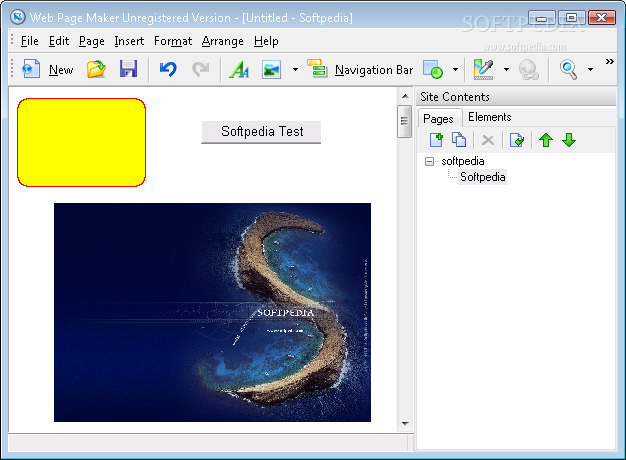
Web Page Maker is an application that you can use to create websites by using some simple tools. It is ideal for beginners.
The user interface of the software is plain and simple. You can create a new website from scratch or import a template.
Evidently, the last option makes things much easier since you only have to double-click fields to edit them.
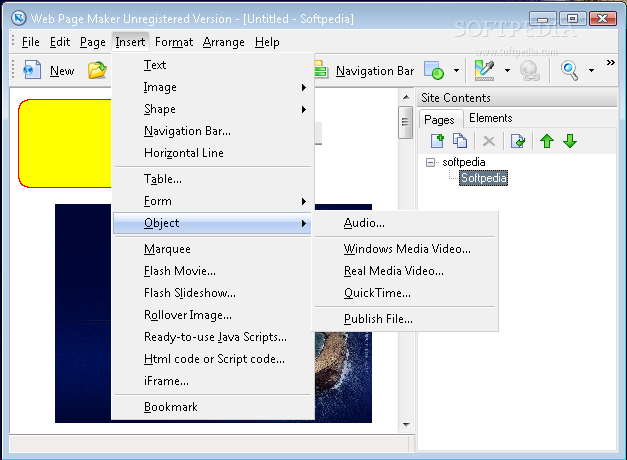
You can add new pages and clone them, insert text, images (from file or library) and image objects (rollover image, photo gallery, word art).
But you can also insert shapes (rectangle, round rectangle, ellipse), a navigation bar, horizontal lines, table, hyperlinks, bookmarks, marquee, Flash objects (movie, video, slideshow) and media (audio, Windows Media, Real Time or QuickTime video).
You can add forms (e.g. dropdown list, image or push button), addons (e.g. PayPal "Donate" button), ready-to-use JavaSript objects (e.g. snow effect, wave text) and iFrames. But you can also write your own HTML or JavaScript code.
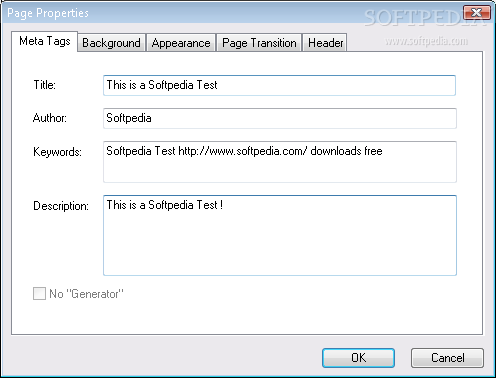
You can configure the format of the website by setting the text link style sheet (customize hover, active and visited links), colors and borders, page properties (meta tags, background, appearance, page transition, header) and extra HTML code. Plus, you can arrange webpages (e.g. bring to front, send to back).
Moreover, you can preview the website, use the "undo" and "redo" functions and keyboard shortcuts, create backups, import an HTML page (even one from another project), save the project as template, include a sitemap when publishing, and more. The whole website will obviously be saved as an HTML file.
The program takes up a low-to-moderate amount of system resources and contains a comprehensive help file with images. Besides the fact that we couldn't access the "Colors and Borders" option in the "Format" menu (clicking the option didn't do anything), we strongly recommend Web Page Maker to all users, especially novices who are looking for quick webdesign solutions.
Filed under
What's new in Web Page Maker 3.22:
- Improved the compatibility with Windows 7 and Windows 8.
- Fixed: "index out of bounds" error in text editor or table editor.
- Fixed: "apply to all" only apply current tab's changes to all pages.
- Fixed: Some gif image error
- Latest version:
Web Page Maker 3.22
- runs on:
- Windows All
- file size:
- 3.6 MB
- filename:
- wpm.exe
- main category:
- Internet
- developer:
- visit homepage
Microsoft Teams

Zoom Client

4k Video Downloader

calibre

Bitdefender Antivirus Free

ShareX

IrfanView

7-Zip

Context Menu Manager

Windows Sandbox Launcher

- 7-Zip
- Context Menu Manager
- Windows Sandbox Launcher
- Microsoft Teams
- Zoom Client
- 4k Video Downloader
- calibre
- Bitdefender Antivirus Free
- ShareX
- IrfanView