14 DAY TRIAL //
 These days, more and more homes have a local network with several computers. No matter if its just your old computer that only gets used for browsing and mail, or a big network of many individual computers for each member of the family, sooner or later you will run into the odd program that won't work well unless your router is properly configured. While routers are perfectly capable of handling multiple computers and spreading the Internet around, inbound connections are a problem, and you will need to properly map the ports in order to get all or any functionality out of the said program. Such examples range from FTP servers that you use to be able to easily move information around, to personal music servers and even certain games. Of course, all routers come with some method of configuring them for exactly these purposes but such static port mapping leaves a lot to be desired, especially when you can use something like Lighthouse.
What it does Lighthouse is a dynamic port mapping utility. It accomplishes the same thing as manually going into your router settings and making the necessary changes, but does it in a significantly different way. Instead of going into the router settings and assigning the ports for the other computers on the network, you assign the ports on the computers themselves, and have the information sent along to the router. The end result is the same, but quite different in terms of flexibility and ease.
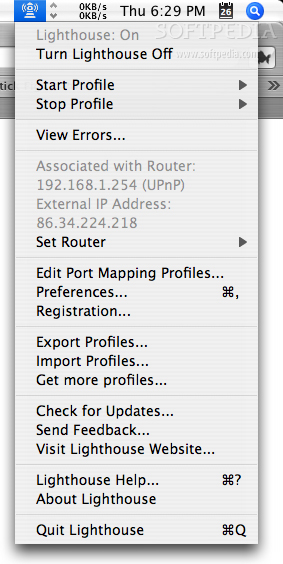
Working with it Lighthouse presents itself as a menubar item from which you can access your port mapping settings. The software is smart enough to be able to automatically work with the vast majority of routers, regardless of their make. By default, it will automatically assume that your gateway is the router, so you most likely won't even have to make any modifications to be able to start using it right away. When it comes to the core of the port mapping process, Lighthouse works the same way as modifying the router settings, but it offers several advantages.
Because Lighthouses are computer centric - unlike the other option, which is router centric - you get to keep them irrespective of your router. If your router breaks, you buy a new one, or simply if you are moving from one place to another with a portable, you can take all your port mapping settings with you. This is especially valuable for people with portables who often change between a home and a work network.
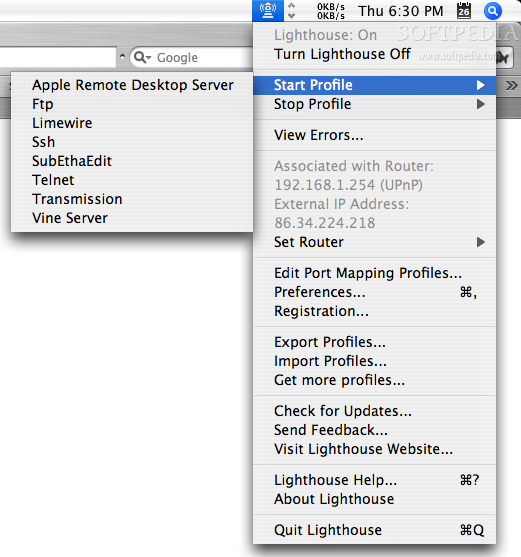
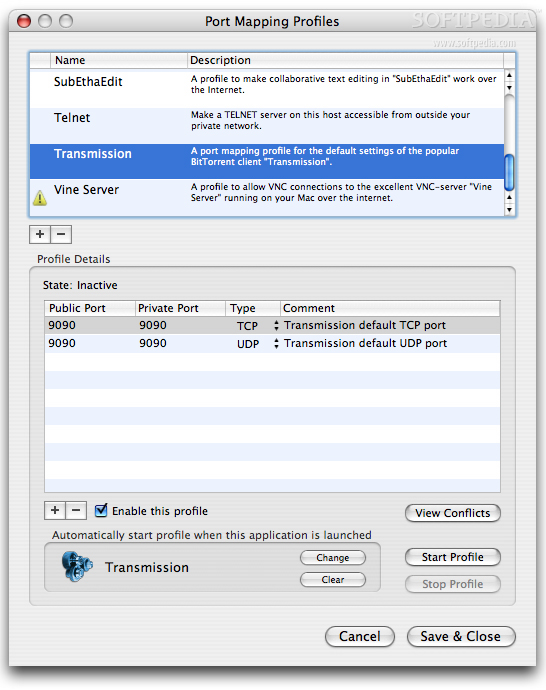
Accessibility is another important factor. All the settings are easily accessible from the menubar, and you can turn any profile on or off with just two clicks. This is a big deal since leaving port mappings active all the time could possibly constitute a security threat. Lighthouse's ability to even do this automatically makes it even more valuable. You can choose which profiles you want visible in the sub menus to avoid the clutter and you can always see everything from the edit screen.
An inherent problem with static port mapping is that everything is set in stone. If you decide that you want to have a port forwarded to a different computer, you have to go in there and remake all the settings. Similarly dynamically assigned IP addresses can be a major headache. With Lighthouse, this is simply not a problem since the settings are located on your computer.
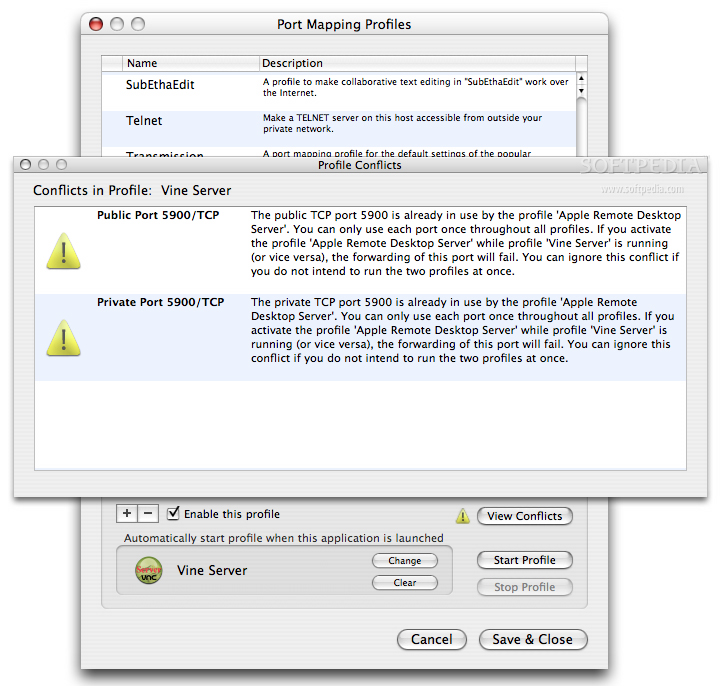
Of all the advantages of using Lighthouse, perhaps the biggest one is the way the program can automatically handle port mapping settings. Each profile can be assigned to a certain application, and when Lighthouse detects that the application has started, it will automatically enable the associated settings. You can thus get the job done easily, and when you are done working with the application and quit it, Lighthouse will automatically disable the settings and things go back to the way they were. Thus it is also possible to have non-disruptive, temporary, port mapping settings that you define once and never think about again. It may not sound like much, but this is huge, and gets rid of oh so many problems with using the same application but on various computers. Amusingly enough, this is also the method for making profiles that are always active, since you just associate them with Lighthouse itself.
Simply better
Lighthouse offers many advantages, and they are all good reasons for using it, but at the end of the day, even the user interface is more than reason enough. Being able to access everything through submenus is a big timesaver, especially considering that the configuration method of most routers requires many little steps. Likewise, the ability to export and import profiles is a big timesaver.
As for the profiles themselves, I can't count the number of times I accidentally deleted the wrong profile. Lighthouse makes this a thing of the past by giving you access to Undo functionality in the profile-editing window.
The Good
Many advantages over the standard way of doing port mapping, giving you more flexibility and less redundancy.
The Bad
Having to assign Lighthouse itself to the profiles you want always active is a rather annoying method of doing things. A tickbox would be far better.
The Truth
If you don't often use applications that rely on port mapping, Lighthouse will hold no interest. However, if you are frustrated by the way you have to juggle port mapping setting from one computer to the other every so often, you will love it.
Here are some screenshots, click to enlarge: