Search Perform an advanced search query SOFTPEDIA
 
SOFTPEDIA
Updated one minute ago
HomeSubmit a program for being reviewedAdvertise on our websiteGet help on surfing our websitesSend us your feedbackGet information about our XML/RSS backend and how to use itBrowse the news archiveVisit our discussion forumVizitati forumul in limba romana


Review Finder NormalFreeware onlyShareware only

Snapz Pro: Add a New Dimension to Screenshot Capture
Category: SOFTPEDIA REVIEWS :: Mac

The little floating zoom info window is just great.
By: Victor Mihailescu, Apple News Editor

Snapz Pro X by Ambrosia Software, Inc. Add Your Rating   See Editor's Ratings
Version reviewed: 2.0.2

Sapz Pro X is a quantum leap in video capture technology, adroitly capturing full motion video of anything on your screen at a blistering pace, complete with digital audio, and an optional microphone voiceover. Think of it as a digital video camera for your screen. If a picture is worth a thousand words, imagine how priceless a movie would be for getting your point across. Snapz Pro X makes short work of making training videos, producing product demos, creating tutorials, archiving streaming video, and anything else you can think of.
Find out why companies like Apple Computer, Inc., Adobe Systems Inc., MacroMedia, Inc., and countless others rely on Snapz Pro X 2.0 when they need to convey an idea effectively. Find out why average users are taking full motion video screen captures rather than the static screenshots of old. Join the video capture revolution, download Snapz Pro X 2.0 today.
In addition to a video capture engine that is 20x faster than anything else on the market, Snapz Pro X 2.0 boasts dozens of other new features that you'll quickly wonder how you lived without. We did not follow the industry trend of bloated software with extraneous features; instead we rethought the product.

Some features:

· For those who need static screen captures for manuals, web sites, etc., Snapz Pro X 2.0 offers many improvements.
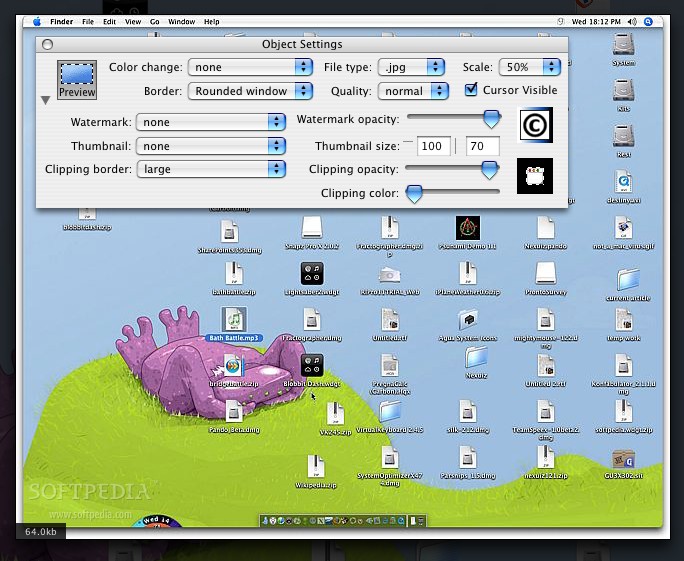
· One of the most useful is "Live Preview" which shows you exactly how your screenshot will look before you save it to disk. This allows you to change border styles, scaling, cropping, and other settings on the fly. Instead of guessing what your screenshots will look like, you can get them right the first time.
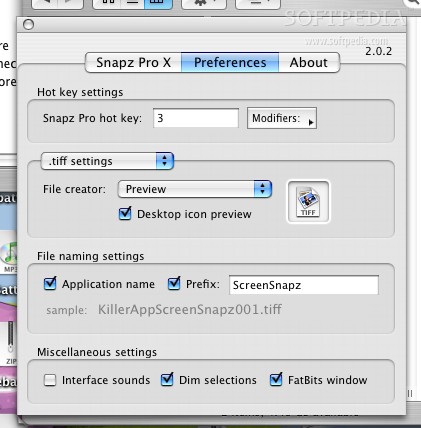
· Snapz Pro X supports saving screenshot as .bmp, .pict, .gif, .jpg, .png, .tiff, .pdf, or Photoshop files, with precise control over image compression.
· Screenshots can be scaled, cropped, color depth-changed, and dithered.
· Snapz Pro X can also add borders, generate automatic thumbnails, overlay watermarks/copyright notices... you name it, we got it!

DOWNLOAD PROGRAM    REQUEST A REVIEW

A long, long time ago, when I was just beginning to use a Mac, the Command Shift 3 combo was one of the first non menu keyboard shortcuts I learned. And it served me well for many, many years. Eventually, I began to feel the limitations of the screenshot files that wound up on the desktop, and turned to various third party solutions.

Today, OS X has the built in option to capture a selection that you defined, also; it is now possible to copy to the clipboard instead of saving in a file on the desktop. And for those of us who know, it is also possible to grab any visible window by hitting space instead of dragging a selection after the Command Control Shift 4. So, with all these built in screen capture options, is a third party solution really needed? To be able to answer this question, one must first ask, is there anything else I need from a screen capture program or anything I want done different?

If the answer to any of the last two questions was yes, then you have reached the limitations of the built in functions and need a third party solution... like Snapz Pro.

What is it?
Snapz Pro is a third party screen capture solution that replaces, or rather shoves aside, the built in screen capture functions of OS X.

What can it do?
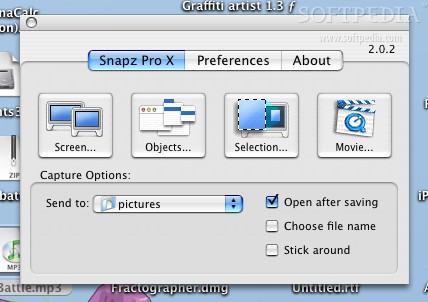
When you invoke Snapz Pro, using the default take screenshot command, you are greeted with the main window. There are four possible actions which are to capture the entire screen, to capture an object from the screen, to capture a selection of the screen and to capture a movie.

Now, of these four, the first three are also supported by the system, although Snapz Pro offers a heap of additional options when working with these actions, but the forth has no built-in equivalent.

Taking a screenshot of the entire screen is pretty
much identical, except for the fact that you have to double click to take it. Oh, I should mention that when you invoke Snapz Pro it 'freezes' the screen. While this is good because you can now take your time to make a selection, it also means that the display is frozen and you will no longer be able to see what is going on until the snapshot operation is complete. It should also be noted that some full screen applications to not take kindly to Snapz Pro pausing them and fiddling with the screen.

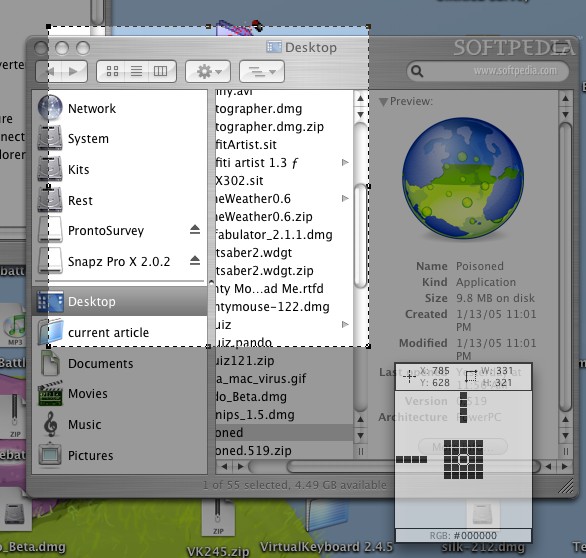
Capturing a selection offers many, many improvements over the default function. For one thing the screen freeze means that you can make selections in your own time, without having to worry about loosing the moment. Furthermore, there is a little floating window that accompanies the mouse, acting as a magnifying glass, a web-color index identifier and a selection information box. It makes getting the perfect selection a snap. Another great feature is the ability to move the selection about, and modify it using one of the eight resize points.

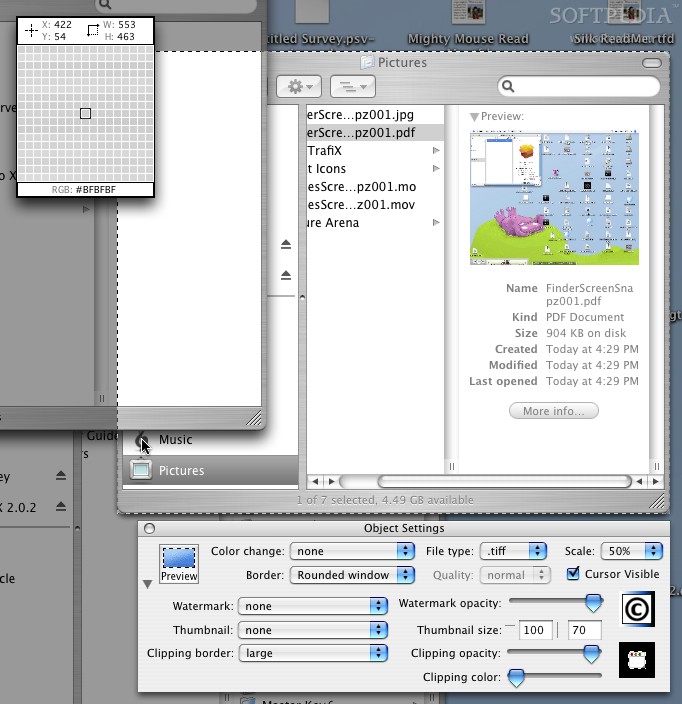
Capturing an object is the Snapz Pro equivalent to the very hidden function built into OS X, with one major difference. Snapz Pro will show you the size of the object, with a selection, letting you gauge just how big that object is even if it is partially hidden. Also, the little floating zoom-info window will tell you precisely the width and height of the object.

Moving Pictures
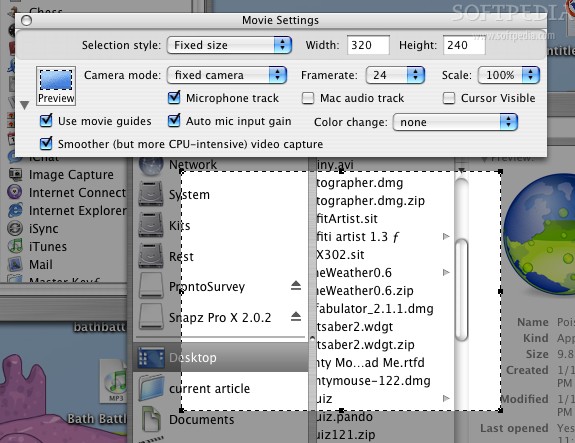
Apart from the static snapshots that Snapz Pro can take, you also have the opportunity of saving a movie from a selection of the screen, complete with microphone capture so you can speak. The only letdown here is that we are not given any previews of the quality of the codecs we can use.

The whole nine yards...
Across all these capture methods, you are given the possibility to preview what the capture will look like, change color depth, add watermarks or copyright information, add borders and generate thumbnails as well as hide or show the mouse cursor.

The Good
Offers many more options than the default solution. Much easier to use and with the powerful preview feature, you can capture exactly what you want the way you want it to look.

The Bad
For full screen applications like games, the old-fashioned take screen shot to file method is still best, Snapz Pro is just too intrusive.

The Truth
Adds a new dimension to screenshots. More features, more control, same ease... who could ask for more?

Here are some screenshots, click to enlarge:
Review image
Review image
Review image
Review image
Review image
Review image


Editor's ratings:
User Interface:   Features:   Ease of Use:   Price/Value:   OVERALL:


14th December 2005, 16:07 GMT | Copyright (c) 2005 Softpedia | Contact:

Read by 4,516 user(s) | Add comment | Link to this news
Subscribe to news | Print article | Send to friend
TODAY'S HEADLINES: Camfrog Video Chat Review  Almanah Diary Review  Portable Quicksys RegDefrag Review  Sunbelt Personal Firewall Review  XML Copy Editor Review  GNOME Mplayer Review  GeoAze Review  Checkout Review  Simply Calenders Review  KJClipper Review  JCODER Review  Optimism Review  
Today's News | Yesterday's News | View News Archive
Search:

Snapz Pro X 2.1.2 - OPINIONS AND REVIEWS


We are sorry, there are no opinions/reviews available for this program.


SHARE YOUR OPINION ABOUT Snapz Pro X 2.1.2

Since you are not logged on, your comments will have to be approved before being displayed.
Click here to login, or register.
Your Name:
Your Email:
Type in the result:
GUI (Graphical User Interface): Poor   Fair   Good   Very Good   Excellent  
Features: Poor   Fair   Good   Very Good   Excellent  
Ease of use: Poor   Fair   Good   Very Good   Excellent  
Price/Value: Poor   Fair   Good   Very Good   Excellent  
Overall rating: Poor   Fair   Good   Very Good   Excellent  
Your review/opinion:


DO YOU WANT TO CONTACT US?  

If you have some comments or you want to send us some information you can send us an email directly to .
You can use the form below for the same purpose.
Your full name: (at least 3 characters)
Your email address: (at least 5 characters)
Message subject: (at least 5 characters)
Message text:
(at least 10 characters)
Type in the result:


Welcome!
Hello, Guest

Login if you have a Softpedia.com account.

Otherwise, register for one.

Main categories:
  • Antivirus
  • Compression tools
  • CD/DVD Tools
  • Office tools
  • Programming
  • Authoring tools
  • File managers
  • Desktop Enhancements
  • Internet
  • Network Tools
  • IPOD TOOLS
  • Mobile Phone Tools
  • Multimedia
  • Tweak
  • System
  • Security
  • Others
  • Science / CAD
  • UNIX
  • Windows Widgets
  • PORTABLE SOFTWARE

  • Week's best:
  • Adobe Media Player 1...
  • Registry Mechanic 8....
  • BitSpirit 3.3.2.263
  • AnyDVD 6.4.5.6
  • Firefox 3.0.1 / 2.0....
  • AutoCAD 2009
  • Norton AntiVirus 200...
  • Norton Internet Secu...
  • The Bat! Professiona...
  • WinRAR 3.80 Beta 3 /...
  • GMail Drive shell ex...
  • DAEMON Tools Lite 4....
  • UBCD4WIN 3.2.0
  • Adobe Reader 9.0.0 /...
  • Total Commander Ulti...
  • System Mechanic 8.0....
  • Adobe Acrobat Profes...
  • iPhone PC Suite 1.0....
  • Portable Firefox 3.0...
  • MPlayer for Windows ...
  • Vista Codec Package ...
  • Windows Live Messeng...
  • WinBubble 1.73
  • Kaspersky Anti-Virus...
  • Malware Removal Tool...
  • Royale Noir Theme fo...
  • IBM Lotus Symphony 1...
  • Adobe Dreamweaver 10...
  • Adobe Fireworks 10.0...
  • BitDefender Total Se...
  • © 2001 - 2008 Softpedia. All rights reserved.
    Softpedia™ and Softpedia™ logo are registered trademarks of SoftNews NET SRL.
    Copyright Information | Privacy Policy | Terms of Use | Contact Softpedia | Update your software | Archive