14 DAY TRIAL //
 DVDs have invaded us and they ended the VHS domination of so many years. And you can't blame it, as the quality delivered by this format is much better than that of the VHS. Maybe there will be a time when the DVD will be buried by some other video format, but until that time comes, we have to live in the present and make the most of it.
My girlfriend asked me one day how much I have "invested" my DVDs. The figure I had in my mind instantly suffered a shrinking of at least two times. Then she asked me how many of my DVDs are still readable. Of course, I told her that all of them are OK, but knowing the truth hurt so much...
So I decided to get myself a DVD cloning software to backup my favorites. 123 DVD Clone seemed an appropriate application so I proceeded. www.DVDVideoTool.com is the developer of the software and their its is $39.95. Luckily, there is a trial period of three days. The period is more than enough for simply testing the program, but, unfortunately, there is also a limitation of uses. You cannot use it more than seven times.
So, if you are a good manager you can test the software to back up a total of seven DVDs. That unless you're discs are still readable by 123 DVD Clone. I lost three uses because I tried to backup a DVD video the software did not recognize and an error message from the system appeared, forcing 123 DVD Clone to close.
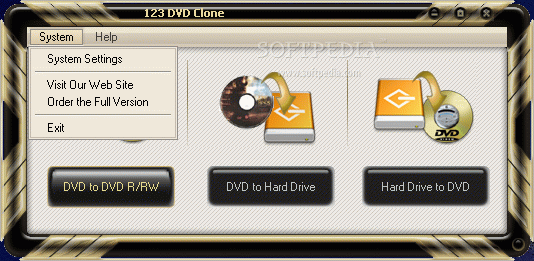
The interface reminded me of CDRWIn. Only three options are available in the first screen: DVD to DVD R/RW, DVD to Hard Drive and Hard Drive to DVD. They have not left anything out of the necessary options for creating the backups.
The second option (DVD to Hard Drive) is absolutely necessary when you find a degraded disc and want to save it immediately, but you do not have a blank DVD to put it on. Hard Drive to DVD comes to the rescue later on and copies the saved files on a new disc.
Copying one disc to a blank requires two DVD supporting device and one of them being able to write it is a must. The backing up is done by copying the files on the computer in a temporary folder and then they are written on the blank disc. So we can conclude that this process is similar to copying the files on your computer and then burning them to a disc.
The only difference between this option and the next one is that this one is fully automated, while the second one allows for a period of timeto pass before the backup is complete. The process requires a significant amount of time if you take into consideration that only the saving in the temporary folder takes about forty minutes.
DVD to Hard Drive takes a little less, but not by much, about thirty minutes. Hard Drive to DVD is practically the burning on the disc and this option takes the least time.
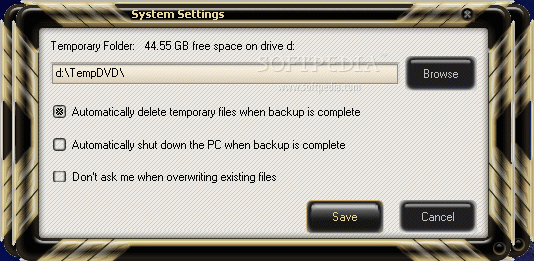
The user has the option of choosing a temporary folder the software to work with by going into Settings under System menu. Here you can also configure the software to automatically delete the temporaries after the backup is complete, or to shut down the computer.
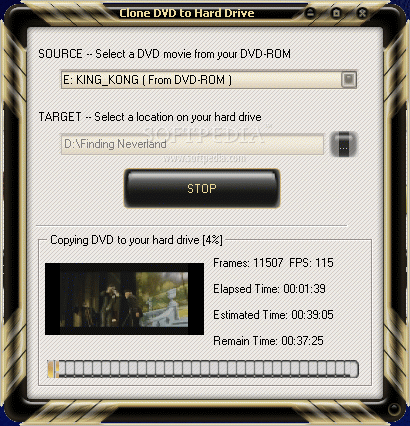
After making your backup choice you are free to select the source and the target. In copy mode (in the lower part of the window) the user can choose to copy the whole disc or only the main movie. Lower in the screen, you get to select the type of the disc (DVD 5 or DVD 9).
In the "operation" window, you will be shown the number of frames that have been copied already, the FPS (frames per second), as well the elapsed, estimated and remaining time. This will give you and idea about how much you will have to wait till the backup is complete.
The Good
The software is extremely useful and its functionality is very high. Using it will not give headaches, except if your DVDs are not readable.
The Bad
The limitation is too "limited" and if by any chance some of the users have several broken DVDs, they would not be able to test the application properly.
The errors appeared only when I inserted the scratched DVD. As soon as I changed it with a less used one, everything was OK and I had absolutely no problems.
The time for creating the backup using DVD to DVD R/RW extends to almost an hour if you think that the copying in the temporary folder takes about forty minutes.
I also noticed that my computer slowed down during the backup and, when checking the Task Manager, I saw that the application was using about 88MB of my RAM and the CPU was over 90. When writing the disc, the facts changed and the CPU usage was normal, the memory instead climbed up to 117MB.
The Truth
I really liked the software as it does the job and it is very easy to use, but the costs are too big. Anyway, if you decide to test it, pay attention to the limitations, so that you do not get any surprises.
Here are some snapshots of the application in action: