Search Perform an advanced search query SOFTPEDIA
 
SOFTPEDIA
Updated one minute ago
HomeSubmit a program for being reviewedAdvertise on our websiteGet help on surfing our websitesSend us your feedbackGet information about our XML/RSS backend and how to use itBrowse the news archiveVisit our discussion forumVizitati forumul in limba romana


Review Finder NormalFreeware onlyShareware only

New Web Experience
Category: SOFTPEDIA REVIEWS :: Windows

The American way to browse the Web
By: Ionut Ilascu, Editor, Software Reviews

AOL Explorer by AOL Add Your Rating   See Editor's Ratings
Version reviewed: 1.5 Build 1.5001.7.1

AOL Explorer's built-in pop-up controls help you protect against annoying pop-ups and Spyware Quick Scan makes your surfing much safer.

Some features:

Tabbed Browsing
Desktop Search
Enhanced security
Time-saving features

DOWNLOAD PROGRAM    REQUEST A REVIEW

AOL hugeness is well known in the American Web territory. Among the services they provide to the American public they have also released a couple of web tools for their users. I am talking about AIM, AOL Explorer, the spyware protection or the PC optimizing tool.

To be frank, I am not too much of an AOL fan, but I like to keep an open mind, so I began prospecting the products designed primarily for the American consumer. AIM has been developed and its users benefit now from a series of very easy to handle features and a very nicely drawn interfaces. Not quite to my taste, but a good software, though.

Now it is time for the web browser produced by AOL and released under the name of AOL Explorer. This browsing tool is absolutely free and succeeds in making almost no discrimination in what concerns its users, so there will be no registration forms and no abundant data to provide in order to use it.

However, if you are trying to login in the AOL network a screen name and password are required and in order to obtain a registration you will have to fill in all those forms. A downside is that you are going to need an AOL account if you want to view the help for the software. Lucky for us, we are smart enough and do not need all that trouble. Also full functionality cannot be achieved unless you have an AOL account.

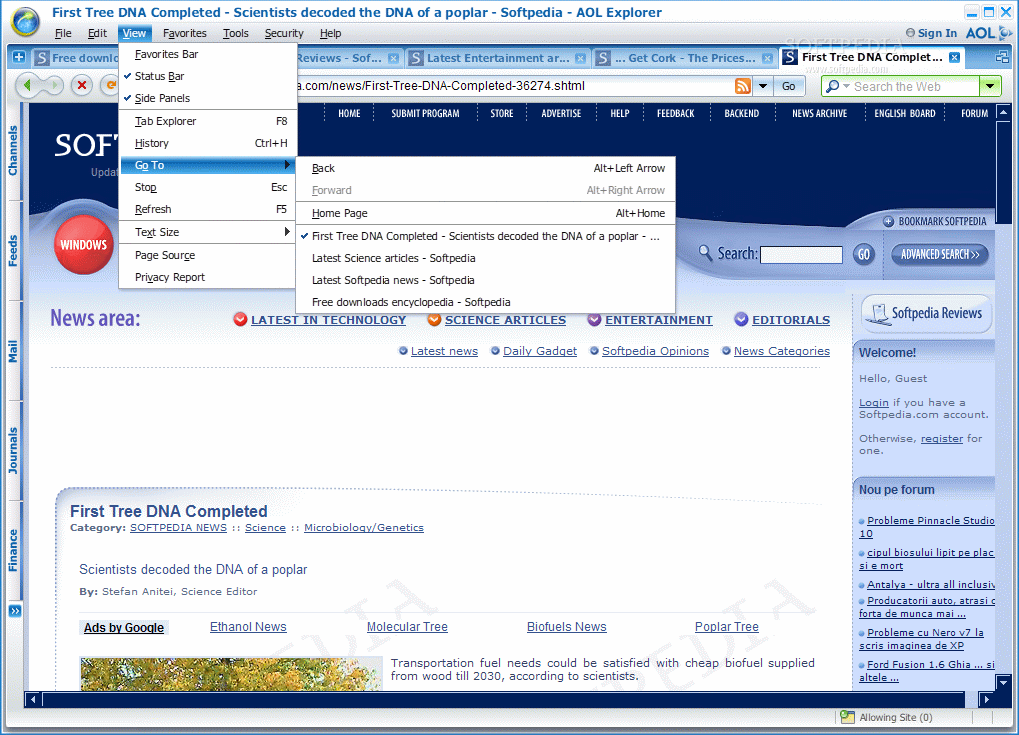
The interface is again one of the big pluses of the application, as in all their products, and the customizable themes available will allow the user to set the desired colors for the application window. Tabbed browsing is a must for today's users so the feature is covered in the application. A difference from the regular browsers out there consists in the fact that you can preview a web page by hovering your mouse over an inactive tab.

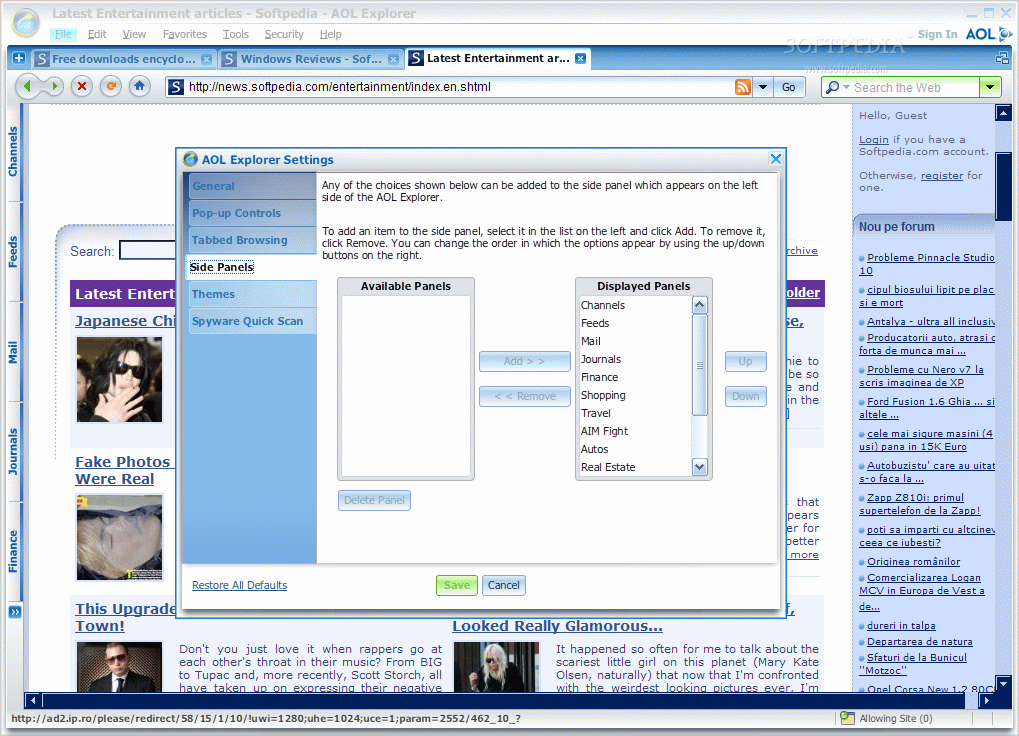
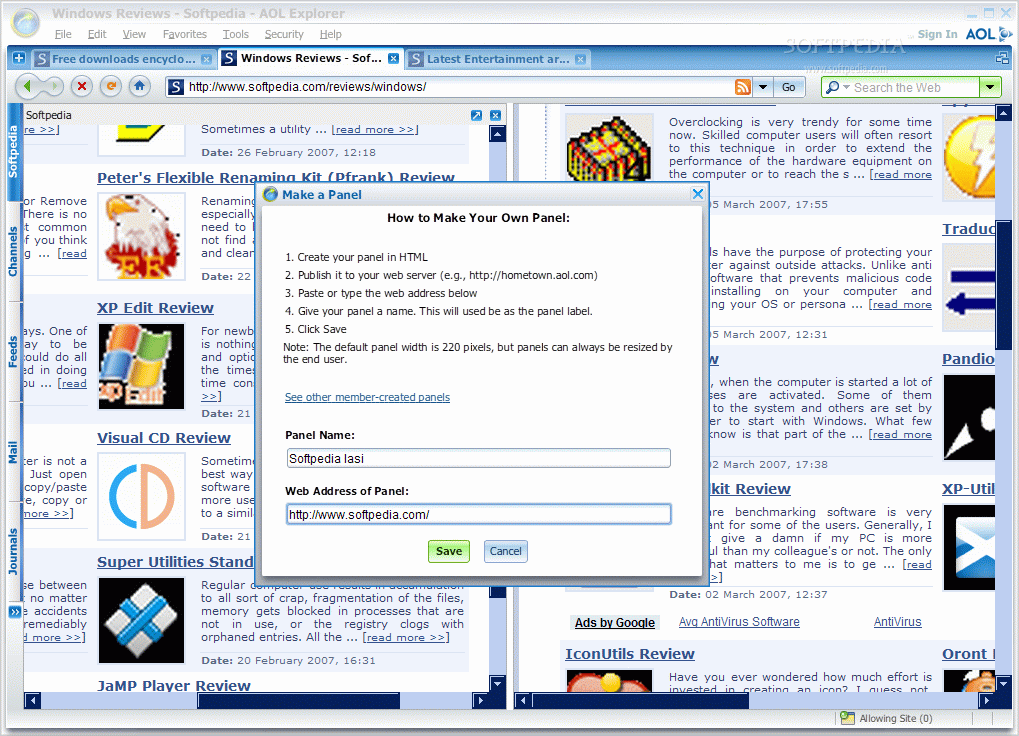
The side panel offers a series of options designed to help the end user in finding the desired information fast and easy. The categories implemented in here cover feed reading, AOL mail check, financial information from DJIA, NASDAQ and S&P 500 markets, AOL shopping, Travel information, Jobs, favorites (URL bookmarks are imported from IE) and History. The user has the possibility of adding new categories in the panel and all there is needed is a name for the category and an URL address.

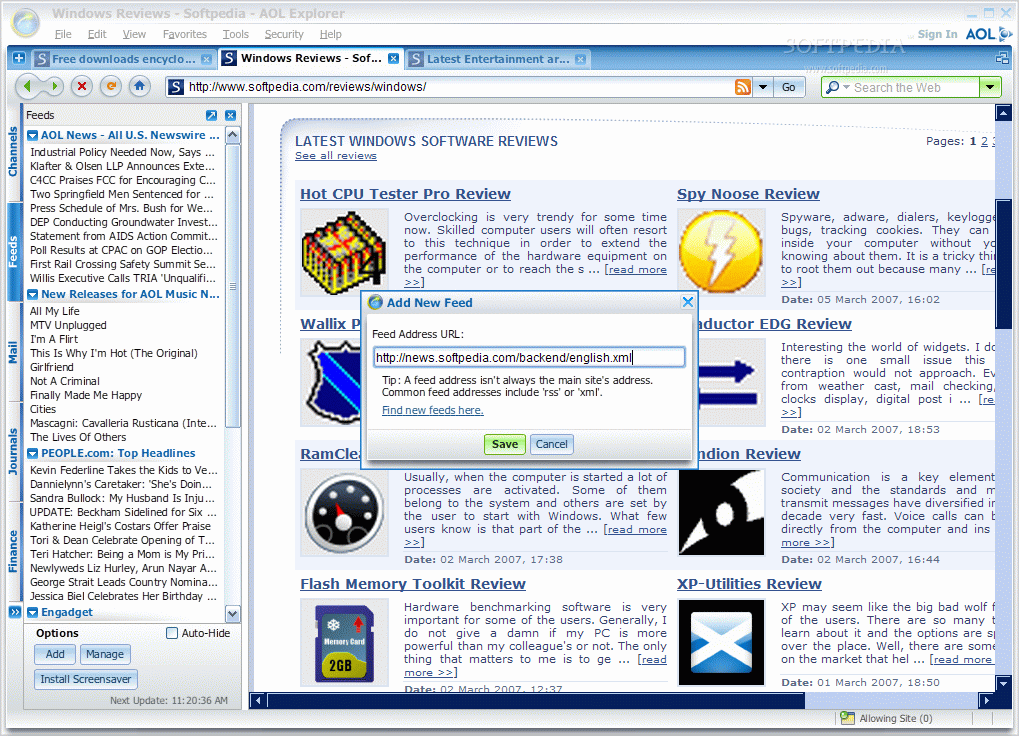
In what concerns the feed reading feature, you can add as many feeds as you want. The feeds provided by default by the Software include the most important domains like news or music releases, all from AOL. The feeds can be removed by using the context menu. The maximum number of headlines per feed is set to 10 by default but it can be increased or decreased.

A very important feature with regards to the side panel is that you can create a desktop widget from it. Press the arrow in the top right corner of the panel and you'll have the active panel on your desktop. The panel will copy itself from the browser and all the available options are taken with it. So you will have all the control available.

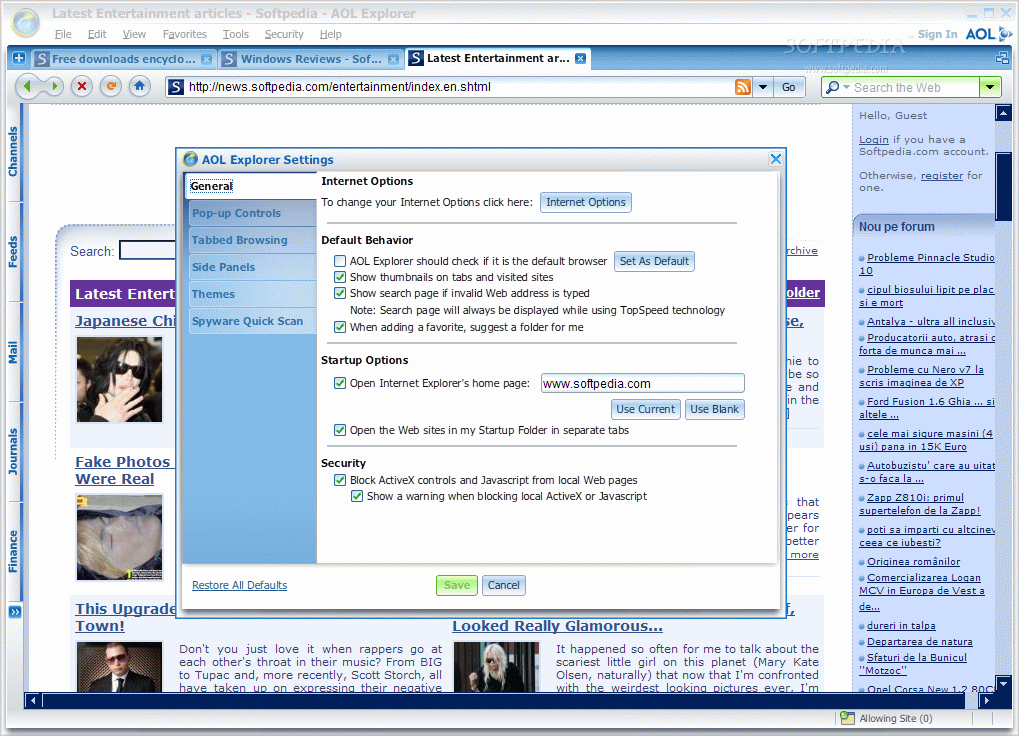
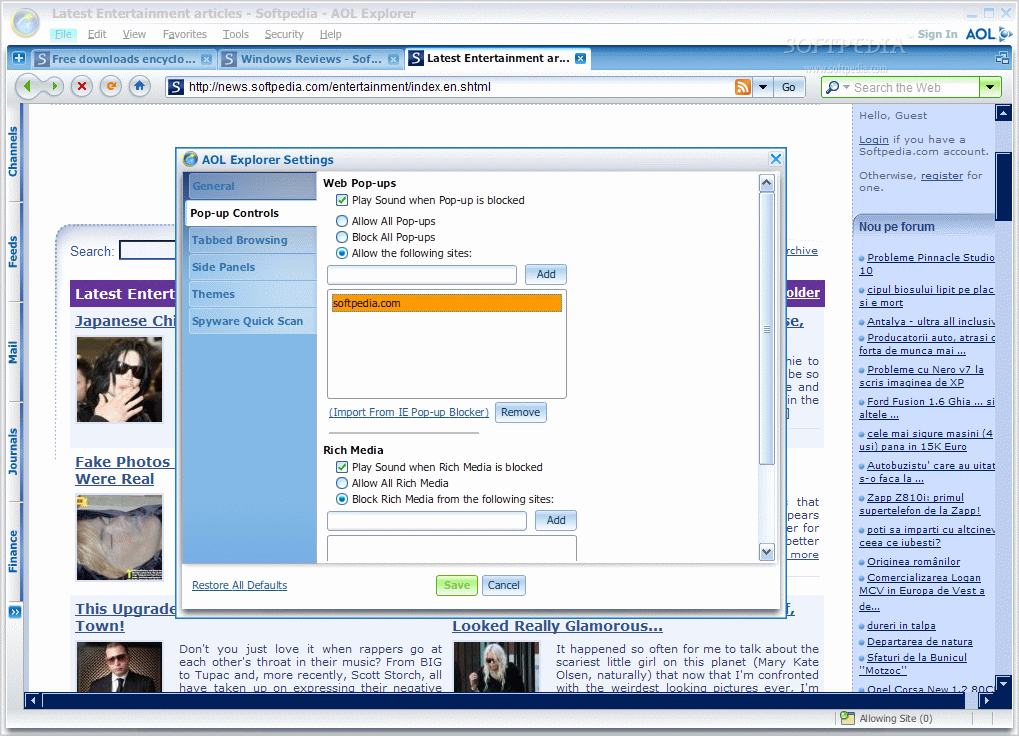
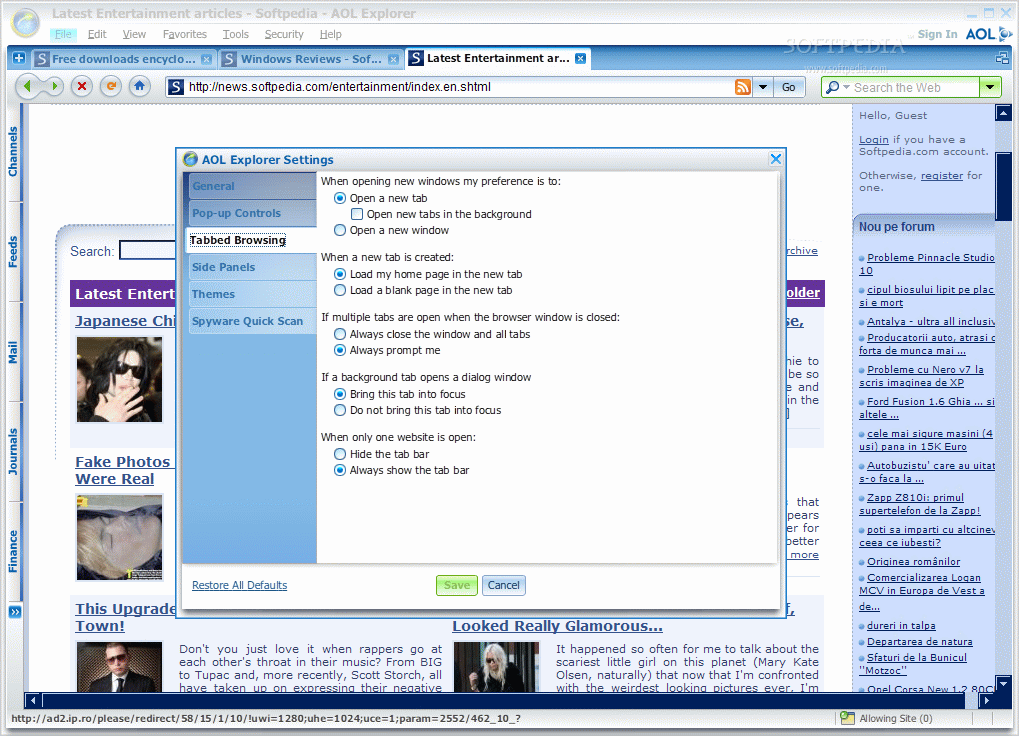
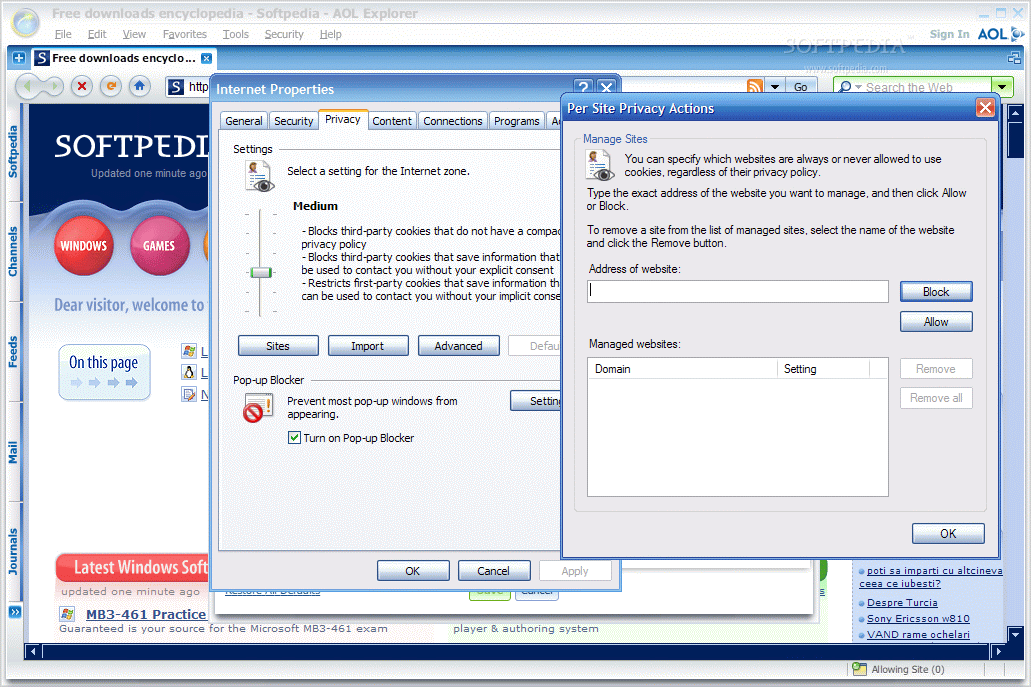
The panel list can be modified to display only the categories you are interested in. This can be achieved from the Side Panels in Settings option under Tools menu. Settings is also the place to configure the entire application and the Internet Options, Pop-up Controls (block or allow pop-ups from certain websites), configure the opening of the tabs.

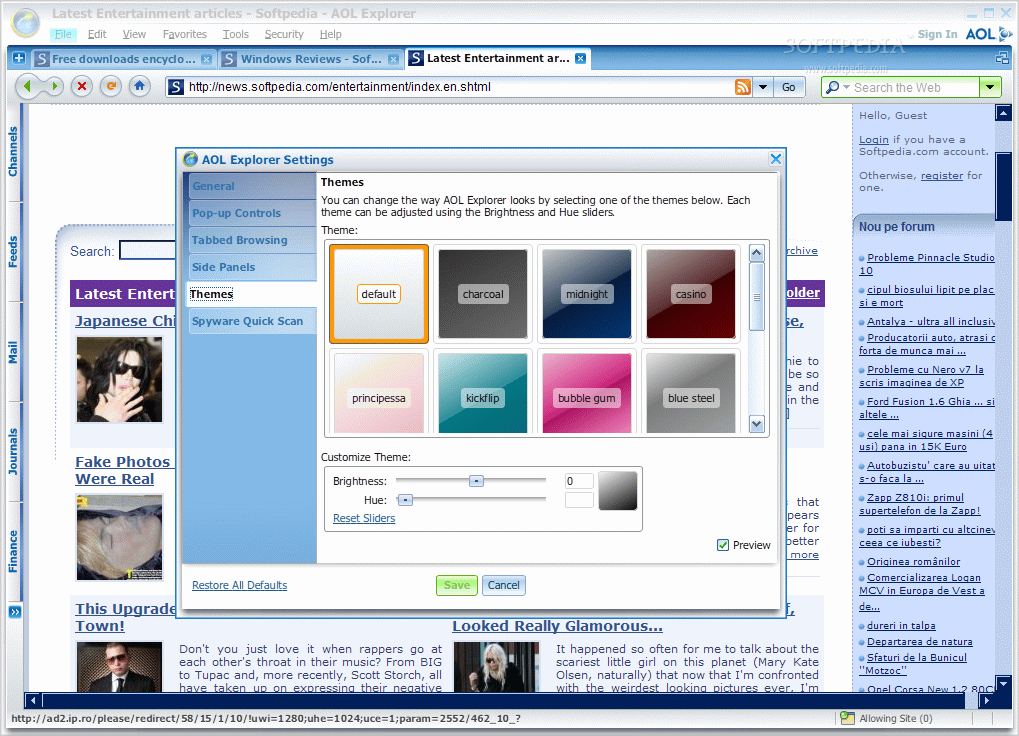
Themes are the way to change the AOL Explorer's looks. There are 16 predefined choices for you covering themes from solid color to different gradient effects. More than this, each theme can be
adjusted using the Brightness and Hue sliders. The instant preview will help you decide faster. My favorite theme is Bubble Gum. It is exactly what Reese Witherspoon needed in "Legally Blonde".

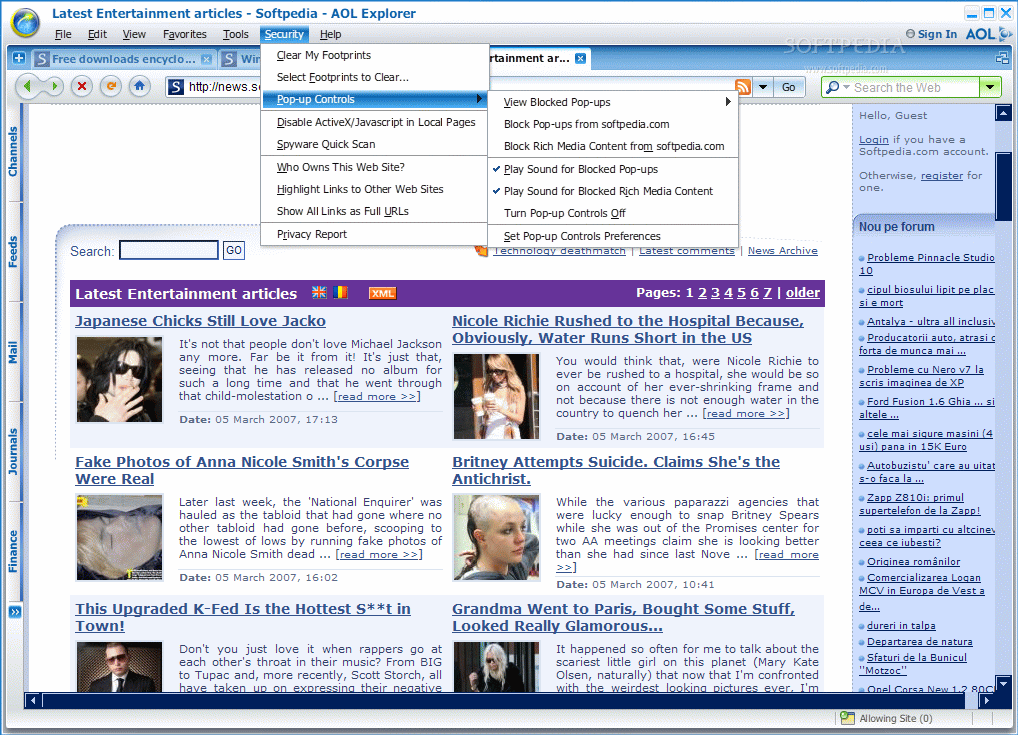
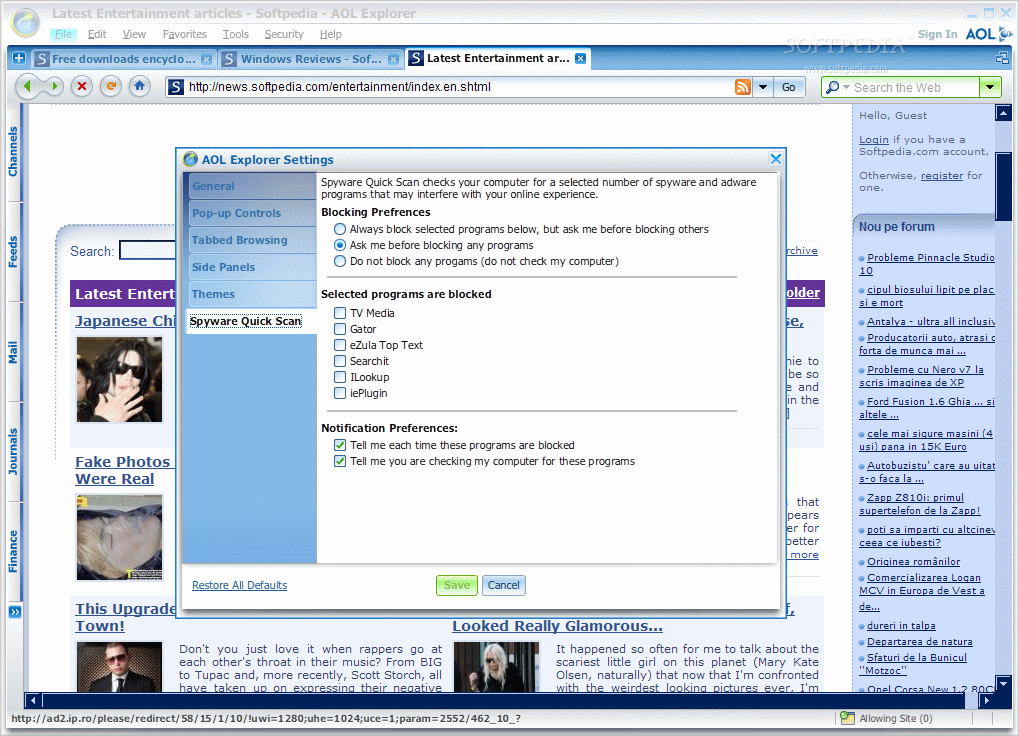
The Spyware Quick Scan option is probably aimed to increase the security of your browsing, despite the fact that the check is made for a limited number of spyware and adware. The user also has the chance to block a number of 6 programs (TV Media, Gator, eZula Top Text, Searchit, ILookup and iePlugin) and receive notifications every time one of these programs have been blocked.

Security related options also include cleaning the browsing history, blocked pop-up list, thumbnails and recent searches. The list can be enlarges and if you go to Select Footprints to Clear option under Security you will get your chance to get rid of the browser cache (recommended when closing the browsing session) and the cookies (unfortunately there is no selector available to save some of the cookies you may later need in your browsing).

WhoIs feature is incorporated in AOL Explorer both in the Security menu and in PowerBrowsing option under Tools. This feature will give you details about the owner of the website in the active tab and contact information as well as number of servers and the location.

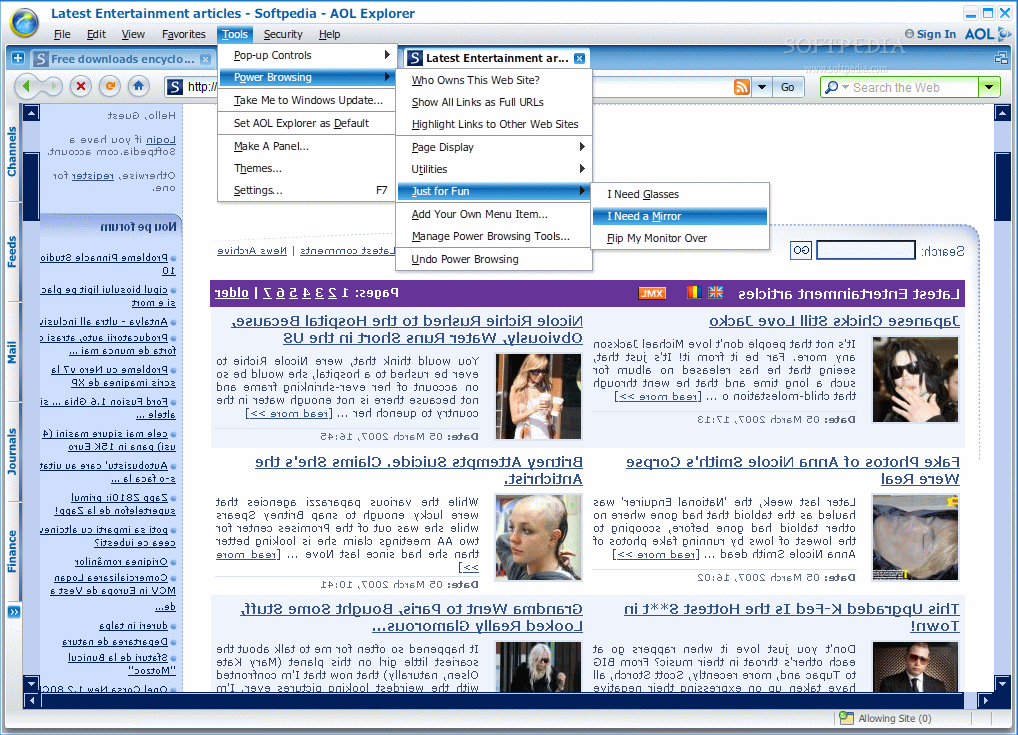
Power Browsing provides new options designed to make web browsing easier and find exactly what you are looking for. The user can add his/her own menu item in here, provided that the required java script is embedded. Also, there is an option that should list the links in the opened page, but I never got to take a look at it because it disappeared as fast as it loaded.

I could not quite get the role of The Just For Fun option in Power Browsing. It is totally useless as applying one of the three effects available is reversed if you click on a link in the page. Also, if you want to play a prank on someone you have to be sure that person is using AOL Explorer. And if s/he does, then be sure that such option would not pass unnoticed too easily.

The Good

The application looks incredibly good and moves pretty fast too. Also, the set of panels available help you go faster to the desired AOL locations.

The feed reader is definitely my favorite panel and turning the categories into a desktop widget proves the flexibility of the application.

The Bad

First of all, I take it as a limitation against all non American residents the fact that AOL screen name and password are needed in order to access a trivial file like Help. Not too bright of an idea.

A reviewing of the spelling in some areas of the options would have been proven a sense of responsibility. Mind me saying, but such slips are not worthy of AOL.

Two tabs open and the AOL processes are already gulping almost 60MB of my RAM. Not to mention the virtual memory that is somewhere over 170 and if I add the other process it reaches almost 240MB. I think AOL Explorer is greedier then Mozilla Firefox. Additionally, after closing AOL Explorer there still is an AOL process eating 6MB of RAM.

The Truth

I have read some very laudatory reviews on AOL Explorer. To be frank, I do not know why everybody is praising it so much. If you strip it off the additional elements, the browser itself is still running on IE engine and is not much. The looks are extraordinary indeed, but users tend to sacrifice this aspect over functionality and low resource costs.

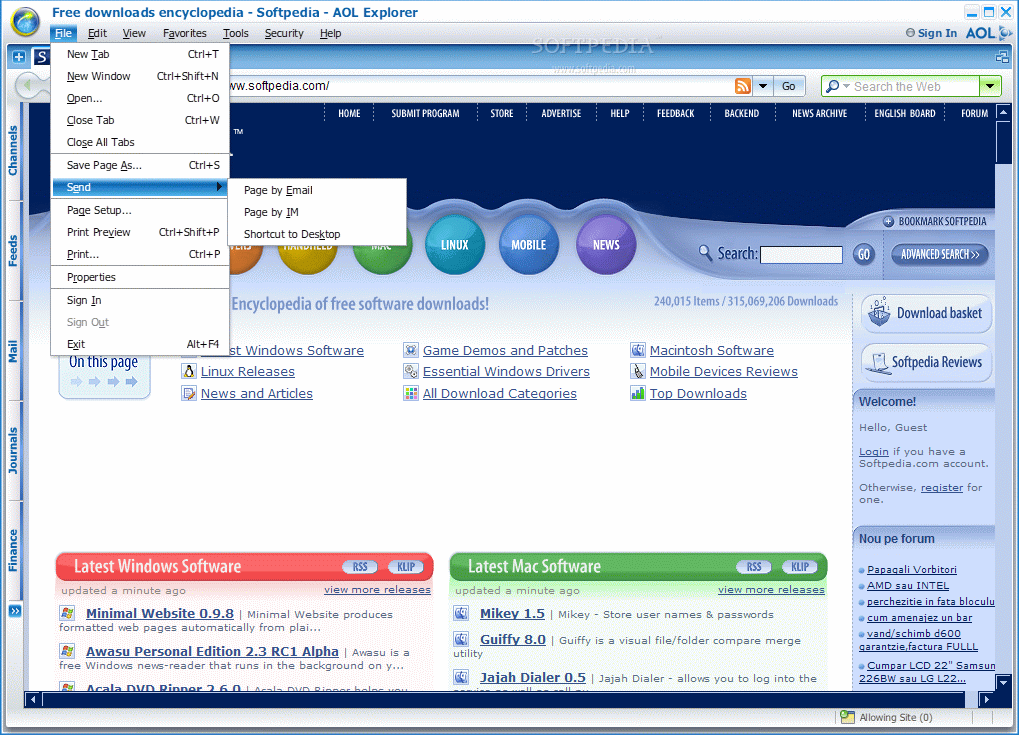
Here are some snapshots of the application in action:
Review image
Review image
Review image
Review image
Review image
Review image
Review image
Review image
Review image
Review image
Review image
Review image
Review image
Review image
Review image

MORE RELATED ARTICLES: Explore the Depths of the Internet! Internet Browser Reloaded! Be a Smart Web Surfer Browsing Around


Editor's ratings:
User Interface:   Features:   Ease of Use:   Price/Value:   OVERALL:


6th March 2007, 13:18 GMT | Copyright (c) 2007 Softpedia | Contact:

Read by 5,125 user(s) | Add comment | Link to this news
Subscribe to news | Print article | Send to friend
TODAY'S HEADLINES: Camfrog Video Chat Review  Almanah Diary Review  Portable Quicksys RegDefrag Review  Sunbelt Personal Firewall Review  XML Copy Editor Review  GNOME Mplayer Review  GeoAze Review  Checkout Review  Simply Calenders Review  KJClipper Review  JCODER Review  Optimism Review  
Today's News | Yesterday's News | View News Archive
Search:

AOL Explorer 1.5 Build 1.5001.7.1 - OPINIONS AND REVIEWS Pages: 1 2

AOL Explorer 1.5 Build 1.5001.7.1
Reviewer: Casey

Date: 2008-03-24, 00:03 GMT
Version: AOL Explorer 1.5 Build 1.5001.7.1
Overall rating: (Poor)

GUI:    Features:    Ease of use:    Value:    
Slow! I can fix a sandwich in the time it takes to get a single video up, much less running! No freedom! causes trouble using anything not aol, which is a lot of the world out there! I hate it and am glad I am using it on a friend's machine instead of having to deal with it on mine. I will never get this. Never. No aol, no, no, no.
AOL Explorer 1.5 Beta
Reviewer: Tokar

Email me | PM me
Read all my reviews (508)

Date: 2006-03-07, 01:16 GMT
Version: AOL Explorer 1.5 Beta
Overall rating: (Excellent)

GUI:    Features:    Ease of use:    Value:    
There is no change in the interface. It looks exactly the same as 1.2 (beta/final).
The same issues with Windows Large/Extra Large fonts still exist.

The only major changes are the ones noted in the OP.
The skins are basically like the Win95/98/ME/2000 skins. They dont change the interface at all. It just changes colors.
Yeah, it seems faster than 1.2. Memory usage seems to mimic Opera, as in dont be fooled by the large numbers as they seem to lead to better browser performance.
The page preview over link is pretty neat. You literally have to hold your mouse over the link for 5 seconds. It pops up a window like 200px by 200px in size which looks like a mini-IE window. You can't do anything in it as it closes once you move your mouse. Its meant to just show you a preview of the link. However I think its faster to just visit the link (IMG:style_emoticons/default/tongue.gif). It works on all pages which is nice...not just google like all those IE addons do (IE Preview or Browster for example).
AOL Explorer 1.2.3.7
Reviewer: Tokar

Email me | PM me
Read all my reviews (508)

Date: 2005-10-28, 01:45 GMT
Version: AOL Explorer 1.2.3.7
Overall rating: (Excellent)

GUI:    Features:    Ease of use:    Value:    
You MUST try out the MOSAIC feature in 1.2.3.7. Its AMAZING.

This browser is going places!!!!
AOL Explorer 1.2.2.10
Reviewer: Nozavi

Email me | PM me
Read all my reviews (117)

Date: 2005-10-14, 02:41 GMT
Version: AOL Explorer 1.2.2.10
Overall rating: (Good)

GUI:    Features:    Ease of use:    Value:    
Well... I did install it before updating it and the new interface didn't seem to have a lot of important changes... Maybe I'll find the time in the next days for some new screenshots :P
AOL Explorer 1.2.2.10
Reviewer: Tokar

Email me | PM me
Read all my reviews (508)

Date: 2005-10-14, 02:21 GMT
Version: AOL Explorer 1.2.2.10
Overall rating: (Excellent)

GUI:    Features:    Ease of use:    Value:    
Excellent, excellent improvements in 1.2...highly suggest you guys try it out.


TOO BAD SOFTPEDIA DOESNT UPDATE THEIR SCREENSHOTS TO ACCURATELY REPRESENT SOFTWARE AS IT IS!
:) :) :)...
You guys need some new screenshots...the ones you have are from version 1.0.4234.122, which is version 1.0. There have been two monumental versions since then...1.1 and now 1.2...with 1.2 providing a much improved interface.
AOL Explorer 1.1.4234.1039
Reviewer: Tokar

Email me | PM me
Read all my reviews (508)

Date: 2005-07-26, 07:00 GMT
Version: AOL Explorer 1.1.4234.1039
Overall rating: (Excellent)

GUI:    Features:    Ease of use:    Value:    
There is also build 1040, which includes AOL Desktop Search.

AOL Desktop Search integrates into the AOL Search side panel very nicely.
AOL Explorer 1.1.4234.1035
Reviewer: Tokar

Email me | PM me
Read all my reviews (508)

Date: 2005-07-17, 12:42 GMT
Version: AOL Explorer 1.1.4234.1035
Overall rating: (Excellent)

GUI:    Features:    Ease of use:    Value:    
Journals side panel is now fully accessible.

I'll probably never use it...but its good that they added it.
AOL Explorer 1.1.4234.1030
Reviewer: Tokar

Email me | PM me
Read all my reviews (508)

Date: 2005-07-12, 14:14 GMT
Version: AOL Explorer 1.1.4234.1030
Overall rating: (Excellent)

GUI:    Features:    Ease of use:    Value:    
I like that they are constantly updating AOL Explorer.

But only bugfixes this time???? :) :) :)
AOL Explorer 1.0.4234.122
Reviewer: Tokar

Email me | PM me
Read all my reviews (508)

Date: 2005-05-27, 19:40 GMT
Version: AOL Explorer 1.0.4234.122
Overall rating: (Excellent)

GUI:    Features:    Ease of use:    Value:    
Its getting better and better.

The great thing is that along with the major releases on the AOL Explorer Beta site, you can get newer releases included with each new version of AIM.

I was using Build 94 for a while. I go and get the new AIM and it included Build 110. I get Build 122, and the new AIM after that includes Build 123. Now its up to 126. No sense in using 123.

They have included support for Windows screen fonts (in the window title bar), they have a new icon which looks a lot like firefox's icon, they have new panels, new this new that.
They are really pushing this browser to be the next best thing.
The great thing is that it uses an IE core and its very fast. Probably the reason its fast is because its always sitting in memory (which a lot of people complain about). But seeing as how it just sits there never using CPU and never stealing memory until a new window is opened, i dont think its a problem.
All AOL software is becoming this way...if not there already.
AOL 9.0
AOL Explorer
AOL Media Player
AOL Toolbar
AOL Instant Messenger (Triton Builds...not 5.x)
Basically you have two exe's running all the time...AOLHostManager.exe and AOL ServiceHost.exe. They are sitting at 3,168 KB, and 7,292 KB, respectively. Both are completely idle while AOL products are not open. So all these people who COMPLAIN about those stealing resources are a little childish.

Its a great browser, fueled by a lot of money (AOL money :)), and it has a bright future. It also has a lot of feature FireFox will never have.
AOL Browser 1.0.4234.94
Reviewer: skeezxh

Email me | PM me
Read all my reviews (1)

Date: 2005-04-29, 20:57 GMT
Version: AOL Browser 1.0.4234.94
Overall rating: (Excellent)

GUI:    Features:    Ease of use:    Value:    
This is the first review I've ever felt the need to submit here,but I've got to tell you..this browser rocks! Seriously if I could have built a browser this would have been it.It's fast,smooth and has alot of 'extras' such as the mouse over page preview.I like the neutral white skin, the large viewing area,the slim side bar and the close tab buttons ON the tabs.The only thing I didn't like was it trying to add itself to my startup menu on install,but my microsoft Antispyware(another great program) took care of that.I'm not an AOL fan by any means but this time they finally got something right.
AOL Browser 1.0.4234.94
Reviewer: Tokar

Email me | PM me
Read all my reviews (508)

Date: 2005-04-08, 15:12 GMT
Version: AOL Browser 1.0.4234.94
Overall rating: (Excellent)

GUI:    Features:    Ease of use:    Value:    
well im not trying to make you use it, but people reading this mini-discussion we are having might make or break their own decisions to use it.

I didnt comment on this "update" thing, because Im not sure what you are talking about...which I why i was talking about AOL TopSpeed, because thats the only thing I have that keeps popping up (only when requested, though). I cant seem to find any kind of AOL Updater in AOL Browser.
Again, the only thing that I know in AOL Browser that only works with an AOL login is AOL TopSpeed, which is nothing more than AOL's proprietary service to help dial-up users get a better web experience by compressing images.

As far as the spyware thing. Just one of the users was complaining of adware coming with AOL Browser. There is no adware/spyware with this. Which im sure AA and SB will tell you as well.

Yeah AI Roboform...i know...it doesnt work. But i dont use it, so im not complaining. Again, why dont you bring this up on the Beta message boards? I highly suggest you do. one of the beta team members will reply in less than 1 day's time. They highly appreciate any comments on their product...whether positive or negative. They said their objective is to build the best possible browser...so anything that can help them improve is welcome.
Im not sure if you are willing to help them out, but im just saying you have the ability to get your voice heard.

Just go here:
http://beta.aol.com/aolbrowser/
and click on message boards on the left.
You need an AIM login to access the boards, so if you have one you are riding fine.
AOL Browser 1.0.4234.94
Reviewer: knightrider2727

Email me | PM me
Read all my reviews (6)

Date: 2005-04-07, 12:07 GMT
Version: AOL Browser 1.0.4234.94
Overall rating: (Poor)

GUI:    Features:    Ease of use:    Value:    
don't matter what they do to it tokar i wont use it cause my accelerator wont work right on it i have dial-up i realy need that im sure you got dsl or cable it so you would be all set. and there it still the update thing that keeps poping up you didn't say anything about that i can't get the update i don't have aol i use to but it cost more then its worth. far as the antispyware program that you said in one of your posts i got 2 good programs spybot - search & destroy and ad-aware se personal that works vey well. i use my roboform alot to i know that aol will never have anything on that browser that will come close to working that good thats it they even do put one on it i put in alot of passwords in every day to lazy to keep having to look them up and type them in all the time lol. they will never beat maxthon.
AOL Browser 1.0.4234.94
Reviewer: Tokar

Email me | PM me
Read all my reviews (508)

Date: 2005-04-07, 02:14 GMT
Version: AOL Browser 1.0.4234.94
Overall rating: (Excellent)

GUI:    Features:    Ease of use:    Value:    
knightrider...

are you referring to the AOL TopSpeed? and it not working with your AIM account? This is a known issue. You should check out the beta message boards, and voice your opinion. The beta team replies on there daily...so you can get some help with the issues.

Im sure you also disliked the Desktop Search as well. There is a hidden uninstaller located at C:\Program Files\AOL\Desktop Search\uninst.exe...an exe with such a name...but it uninstalls it perfectly.


Unfortunately AOL Browser doesnt work with any IE 3rd party programs at the moment...though i have voiced my opinions on the mesage boards about Google Toolbar and Ad-Muncher...so we shall see. Im not surprise RoboForm doesnt work. My guess is that instead of making such programs work, AOL will provide their own software built into the browser to do the functions of 3rd party programs...but that is just a guess...

This is only the 3rd public release of AOL Browser (Beta 86,89 and 94). So give it time and it will improve. The beta team is open to all suggestions and such...so i recommend you head on over there. The message boards are accessible with your AIM account via the screen name service, and are easily access with the Beta slideout panel in AOL Browser.

If you dont have AOL Browser installed anymore, the Beta homepage is available on the Softpedia download information page for AOL Browser.
AOL Browser 1.0.4234.94
Reviewer: knightrider2727

Email me | PM me
Read all my reviews (6)

Date: 2005-04-06, 09:55 GMT
Version: AOL Browser 1.0.4234.94
Overall rating: (Poor)

GUI:    Features:    Ease of use:    Value:    
i think anything to do with aol sucks this browser does one thing i realy hate that stupid thing that keeps coming up about a update but you can't get it unless you have aol stupid morons should give you a chouce if you want to be reminded or not be able to turn it off. another thing i don't like is that my roboform wont work on it that works on alot of browsers. my accelerator wont work right on it eather i'll stick to the real browsers like maxthon that my roboform and accelerator work on and that has alot of good things on it.
AOL Browser 1.0.4234.94
Reviewer: Tokar

Email me | PM me
Read all my reviews (508)

Date: 2005-04-04, 14:17 GMT
Version: AOL Browser 1.0.4234.94
Overall rating: (Excellent)

GUI:    Features:    Ease of use:    Value:    
AOL Browser just keeps getting better than faster.

Beta 94 seems much faster than Beta 89.

It now includes an antispyware program...and not that junky one that comes with AOL 9.0. Its called SpyZapper...well...its nothing special. It only has support for blocking and removing three spywares...Gator, TVMedia and eZula...all of which are removed by every other AntiSpy program on the planet, even the scam ones...heh.

The options menu seems faster.
The menus seem faster...

And I sure as hell know this, as my computer is very sluggish with everything...so i can definitely see the difference.

5/5...cant wait for the final version.

go to top Pages: 1 2


SHARE YOUR OPINION ABOUT AOL Explorer 1.5 Build 1.5001.7.1

Since you are not logged on, your comments will have to be approved before being displayed.
Click here to login, or register.
Your Name:
Your Email: (will not be published anywhere)
Type in the result:
GUI (Graphical User Interface): Poor   Fair   Good   Very Good   Excellent  
Features: Poor   Fair   Good   Very Good   Excellent  
Ease of use: Poor   Fair   Good   Very Good   Excellent  
Price/Value: Poor   Fair   Good   Very Good   Excellent  
Overall rating: Poor   Fair   Good   Very Good   Excellent  
Your review/opinion:


DO YOU WANT TO CONTACT US?  

If you have some comments or you want to send us some information you can send us an email directly to .
You can use the form below for the same purpose.
Your full name: (at least 3 characters)
Your email address: (at least 5 characters)
Message subject: (at least 5 characters)
Message text:
(at least 10 characters)
Type in the result:


Welcome!
Hello, Guest

Login if you have a Softpedia.com account.

Otherwise, register for one.

Main categories:
  • Antivirus
  • Compression tools
  • CD/DVD Tools
  • Office tools
  • Programming
  • Authoring tools
  • File managers
  • Desktop Enhancements
  • Internet
  • Network Tools
  • IPOD TOOLS
  • Mobile Phone Tools
  • Multimedia
  • Tweak
  • System
  • Security
  • Others
  • Science / CAD
  • UNIX
  • Windows Widgets
  • PORTABLE SOFTWARE

  • Week's best:
  • Adobe Media Player 1...
  • Registry Mechanic 8....
  • BitSpirit 3.3.2.263
  • AnyDVD 6.4.5.6
  • Firefox 3.0.1 / 2.0....
  • AutoCAD 2009
  • Norton AntiVirus 200...
  • Norton Internet Secu...
  • The Bat! Professiona...
  • WinRAR 3.80 Beta 3 /...
  • GMail Drive shell ex...
  • DAEMON Tools Lite 4....
  • UBCD4WIN 3.2.0
  • Adobe Reader 9.0.0 /...
  • Total Commander Ulti...
  • System Mechanic 8.0....
  • Adobe Acrobat Profes...
  • iPhone PC Suite 1.0....
  • Portable Firefox 3.0...
  • MPlayer for Windows ...
  • Vista Codec Package ...
  • Windows Live Messeng...
  • WinBubble 1.73
  • Kaspersky Anti-Virus...
  • Malware Removal Tool...
  • Royale Noir Theme fo...
  • IBM Lotus Symphony 1...
  • Adobe Dreamweaver 10...
  • Adobe Fireworks 10.0...
  • BitDefender Total Se...
  • © 2001 - 2008 Softpedia. All rights reserved.
    Softpedia™ and Softpedia™ logo are registered trademarks of SoftNews NET SRL.
    Copyright Information | Privacy Policy | Terms of Use | Contact Softpedia | Update your software | Archive