Search Perform an advanced search query SOFTPEDIA
 
SOFTPEDIA
Updated one minute ago
HomeSubmit a program for being reviewedAdvertise on our websiteGet help on surfing our websitesSend us your feedbackGet information about our XML/RSS backend and how to use itBrowse the news archiveVisit our discussion forumVizitati forumul in limba romana


Review Finder NormalFreeware onlyShareware only

Easy Watermarker - Protect Your Digital Image Files
Category: SOFTPEDIA REVIEWS :: Windows

Digitally sign your photos and images
By: Daniela Olariu, Windows Editor

Easy Watermarker by Zards Software Add Your Rating   See Editor's Ratings
Version reviewed: 1.5

Easy Watermarker helps you add visible transparent text and image watermarks to any picture to protect them from unauthorized distribution. The watermark can be any text such as copy right or company website or it can be any image you can create such as company logos.
Easy Watermarker provides you with the possibility to place the warermark wherever you point the mouse cursor on the input image as well as to rotate the watermark image from 0 to 360 degrees. Easy Watermarker also has a built in screen shot function for grabbing active window, custom sized window or the entire screen.

Some features:

Change the transparency of your watermark to blend with your image.
Stamp your images with text or image watermarks.
Customize your text watermark.
Screen shot function for importing pictures.
Choose your font, color, style etc...
Support for a wide variety of images including jpeg, gif, bmp, tif, png.
Edit watermarks in a convenient graphical interface.
Emboss watermark text.
Rotate watermark image.
Small file size.

DOWNLOAD PROGRAM    REQUEST A REVIEW

The long-awaited summer is here and I'm sure everyone has an idea about the places where they want to spend their vacation. But regardless of your destination, don't forget to take your digital camera with you so you can take tens or even hundreds of photos to remind you of those beautiful days. Whether or not you take photos of you and your friends/family, or simply landscapes, if you decide to publish them on specialized websites such as Flickr, you should take into account that others might just "borrow" them and take all the credit. In order to avoid this unpleasant situation, one of the simplest and most effective solutions is to watermark them. Place a small, custom signature on the digital image so everyone knows it's yours.

There are loads of such applications on the market nowadays and today's topic is Easy Watermarker, provided to you by Zards Software. Easy Watermarker comes with an extremely lightweight installation kit and after unpacking the archive, by simply following the instructions, you won't find any trouble installing it. The application will launch immediately after installation, but if you have the unregistered version you will have to wait for a couple of seconds before properly using it.

Easy Watermarker presents its users with a clean and highly intuitive interface, making it extremely easy to use even for those who have little to almost no experience in working with computers.

Applying watermarks to your photos is as easy as 1-2-3 with this application. The first thing you need to do is, obviously, input the source file. Unfortunately, a major downside of Easy Watermarker can be encountered at this very first step of the process, namely that it doesn't allow you to watermark your photos in batches. The image files need to be opened one by one, which can be an impediment for someone who needs to stamp a large number of photos using the same pattern. On the other hand, the application supports the most commonly used graphics file formats, JPG, PNG, GIF, BMP and TIFF, so it's likely to serve common user's all needs, as long as of course, no extremely exotic or proprietary file format is being used.

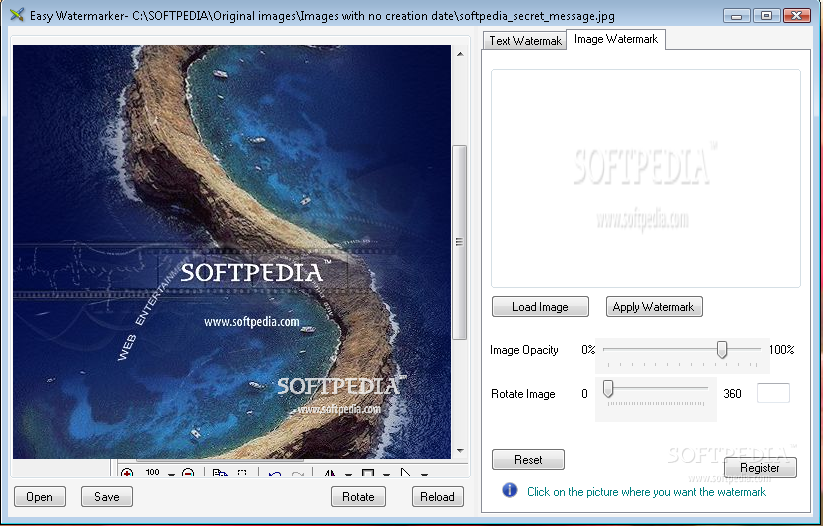
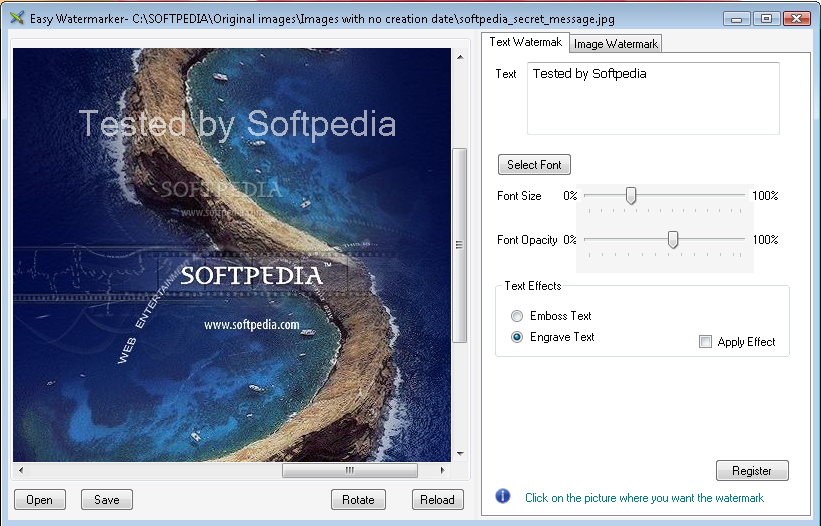
After loading the image file, the next thing that needs to be done is to select the type of watermark you wish to apply. The good thing is that Easy Watermarker supports two ways of stamping your photo collection: applying either a text or a logo watermark, whichever you find more difficult to remove. If you choose to put a custom text on your image files, you can also select the font, color, text size and opacity you find most appropriate as well as two text effects: emboss and engrave. As for the logo watermark, some adjustments can be made here too, namely you can set the opacity of the image or rotate it. If you are not satisfied with the results, you can also reset to the default settings. After you decide upon the type of watermark you wish to apply, what's left for you to do is select its location. This is where Easy Watermarker presented us with a pleasant surprise. You actually have the possibility to place the watermark wherever you want, by simply clicking its location on the picture. When everything is done, don't forget to save the output file. At this point the stamping process is done and you can either load a new image file or go on with your work.

The Good

Easy Watermarker comes with a comprehensive interface and does its job quickly and effectively when it comes to watermarking graphic files. Users have the possibility to adjust the logo instead of sticking to a default one, thus making sure the result will look really professional.

The Bad

If we take into consideration similar graphic orientated utilities that come equipped with a host of advanced features, the $39.95 you have to pay for the registered version is quite a lot. Many other utilities out there host additional useful features such as image cropping, key shortcuts for the basic actions, removing EXIF information, batch processing and so on and cost a fraction of the price you have to pay for Easy Watermarker. Finally, although the interface is highly intuitive, a Help file could come in handy for some users who might get stuck on their way to stamping the images.

The Truth

All in all, Easy Watermarker is worth trying and it definitely has potential. If you don't do photo stamping for a living the 30-day trial version is more than enough to complete the task. Nevertheless, if you are looking for both an advanced watermarking utility and a cheaper solution you might want to search elsewhere for Easy Watermarked will most likely disappoint you.

Here are some snapshots of the application in action:
Review image
Review image

MORE RELATED ARTICLES: Watermark Creator - The Easiest Way to Protect Your Photo Collection Photo Batch Watermark - Sign Your Digital Image Collection


Editor's ratings:
User Interface:   Features:   Ease of Use:   Price/Value:   OVERALL:


27th June 2008, 14:34 GMT | Copyright (c) 2008 Softpedia | Contact:

Read by 1,470 user(s) | Add comment | Link to this news
Subscribe to news | Print article | Send to friend
TODAY'S HEADLINES: GameJackal Pro Review  Records Master Review  StoryMill Review  Crypt4Free Review  EnvyNG Review  Speed Launch Review  Defraggler Review  Nikon Capture NX Review  StorURL Review  Click 2 Crop Review  Math Educator Review  SuperDocker Review  
Today's News | Yesterday's News | View News Archive
Search:

Easy Watermarker 1.5 - OPINIONS AND REVIEWS


We are sorry, there are no opinions/reviews available for this program.


SHARE YOUR OPINION ABOUT Easy Watermarker 1.5

Since you are not logged on, your comments will have to be approved before being displayed.
Click here to login, or register.
Your Name:
Your Email: (will not be published anywhere)
Type in the result:
GUI (Graphical User Interface): Poor   Fair   Good   Very Good   Excellent  
Features: Poor   Fair   Good   Very Good   Excellent  
Ease of use: Poor   Fair   Good   Very Good   Excellent  
Price/Value: Poor   Fair   Good   Very Good   Excellent  
Overall rating: Poor   Fair   Good   Very Good   Excellent  
Your review/opinion:


DO YOU WANT TO CONTACT US?  

If you have some comments or you want to send us some information you can send us an email directly to .
You can use the form below for the same purpose.
Your full name: (at least 3 characters)
Your email address: (at least 5 characters)
Message subject: (at least 5 characters)
Message text:
(at least 10 characters)
Type in the result:


Welcome!
Hello, Guest

Login if you have a Softpedia.com account.

Otherwise, register for one.

Main categories:
  • Antivirus
  • Compression tools
  • CD/DVD Tools
  • Office tools
  • Programming
  • Authoring tools
  • File managers
  • Desktop Enhancements
  • Internet
  • Network Tools
  • IPOD TOOLS
  • Mobile Phone Tools
  • Multimedia
  • Tweak
  • System
  • Security
  • Others
  • Science / CAD
  • UNIX
  • Windows Widgets
  • PORTABLE SOFTWARE

  • Week's best:
  • Vista Sidebar 2.5 Bu...
  • FlashGet 2.11.0.1188...
  • Opera 9.52 Build 101...
  • DVDFab Platinum 5.0....
  • Vuze (formely Azureu...
  • The Bat! Professiona...
  • AVG Anti-Virus plus ...
  • Acronis True Image H...
  • Rising Antivirus Fre...
  • DirectX Redistributa...
  • Adobe Flash Player 1...
  • Nero 8 8.3.6.0
  • FileZilla 3.1.1.1
  • AVG Internet Securit...
  • Microsoft Malicious ...
  • Maxthon 2.1.3.2430 F...
  • BitComet 1.04 Beta
  • Deluge 0.9.06 (1.0....
  • Pidgin (formerly Gai...
  • ATi Multimedia Cente...
  • K-Lite Codec Pack Fu...
  • Mozilla Thunderbird ...
  • Corel DVD MovieFacto...
  • Portable Winamp 5.35
  • VirtualDub 1.8.5 Bui...
  • Winamp 5 Full 5.541 ...
  • FFDShow MPEG-4 Video...
  • Hide IP Platinum 1.2...
  • GX::Transcoder 5.0.2...
  • TopSpyAdware Remover
  • © 2001 - 2008 Softpedia. All rights reserved.
    Softpedia™ and Softpedia™ logo are registered trademarks of SoftNews NET SRL.
    Copyright Information | Privacy Policy | Terms of Use | Contact Softpedia | Update your software | Archive