Search Perform an advanced search query SOFTPEDIA
 
SOFTPEDIA
Updated one minute ago
HomeSubmit a program for being reviewedAdvertise on our websiteGet help on surfing our websitesSend us your feedbackGet information about our XML/RSS backend and how to use itBrowse the news archiveVisit our discussion forumVizitati forumul in limba romana


Review Finder NormalFreeware onlyShareware only

Win the download speed race!
Category: SOFTPEDIA REVIEWS :: Windows

Good thing there's no download speed police control...
By: Cosmin Nitu, Editor, Software Reviews

Internet Download Manager by Download Manager Tonec Inc Add Your Rating   See Editor's Ratings
Version reviewed: 5.02.14

Internet Download Manager (IDM) is a tool to increase download speeds by up to 500 percent, resume and schedule downloads.
Comprehensive error recovery and resume capability will restart broken or interrupted downloads due to lost connections, network problems, computer shutdowns, or unexpected power outages. Simple graphic user interface makes IDM user friendly and easy to use.
Internet Download Manager has a smart download logic accelerator that features intelligent dynamic file segmentation and safe multipart downloading technology to accelerate your downloads.

Some features:

· Simple installation wizard. Quick and easy installation program will make necessary settings for you, and check your connection at the end to ensure trouble free installation of Internet Download Manager.
· Automatic Antivirus checking. Antivirus checking makes your downloads free from viruses and trojans.
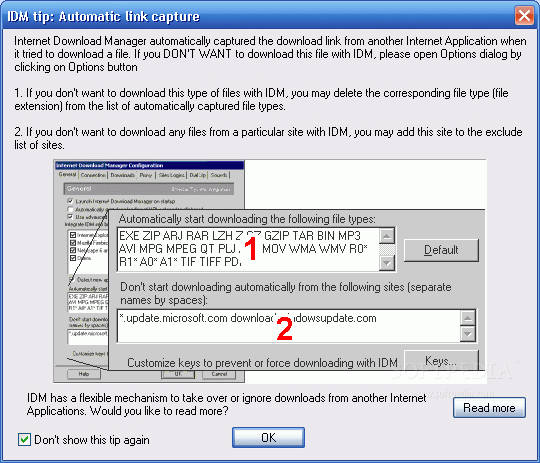
· Advanced Browser Integration. When enabled, the feature can be used to catch any download from any application. None of download managers have this feature.
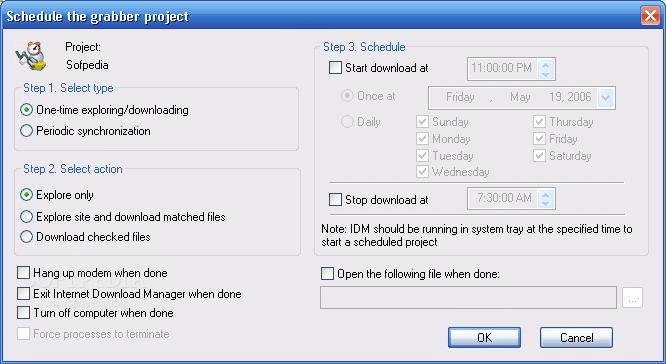
· Built-in Scheduler. Internet Download Manager can connect to the Internet at a set time, download the files you want, disconnect, or shut down your computer when it's done.

DOWNLOAD PROGRAM    REQUEST A REVIEW

Ever since the beginning of life on earth, there has been a trend to speed things up, make them as easy and comfortable as possible: first there was fire, that helped our ancestors cook their meat, thus speeding up the evolution process, then there was the wheel that along with the steam engine set the basis for transportation later on, then there was the phone that helped us communicate with other people at greater and greater distances, then there was the trip to Mars that helped us travel out to space, then there was USA’s Department of Defense that developed ARPANET, which transformed into what we now call the INTERNET, and then there was Internet Download Manager.


Introduction

Just as the name suggests, this is a download manager that uses new technologies in order to use your Internet connection as efficient as possible, having as a result a shorter download time.

Dynamic file segmentation means that the program will segment the files not only before, but also when running downloads, unlike most of the other programs that will do this operation only before starting the download. This will insure that the segmentation is done in an optimal way, and reflects in a greater download speed.

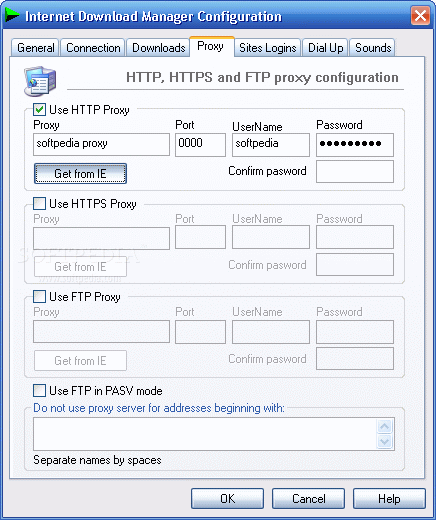
It supports proxy servers, ftp and http protocols, directories that require authorization, redirects, cookies, and download queuing. The pause/resume function isn’t a feature anymore, but a program requirement if works in this branch.


Working with the program


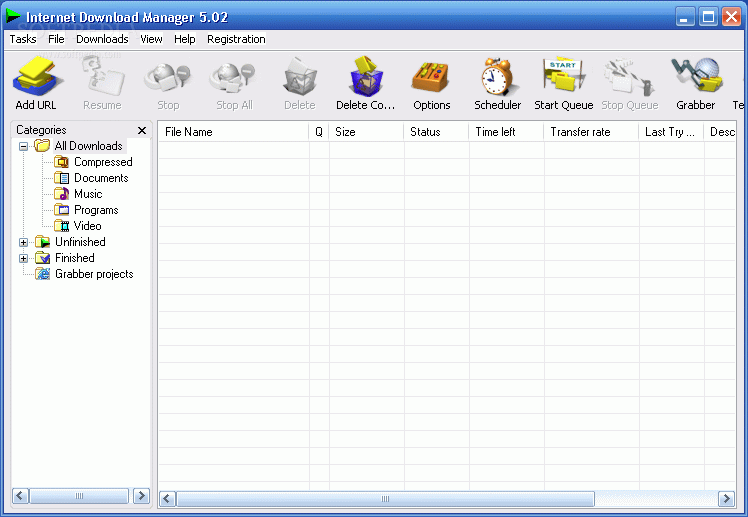
When running Internet Download Manager (IDM) you’ll get a friendly main window that has a button toolbox right under the program menu which offers all the main features gathered in one place. The buttons are nicely designed and placed in a logical order, so that you get an idea about what you need to do when downloading a file.

You can customize the toolbar, by placing separators so that you can organize your actions in different sections, move, remove or add buttons as you wish.

Since IDM integrates into your browser’s context menu, you won’t need to work too much from the program’s console. You simply have to select the file you want to download, and before you know it, it’s done!

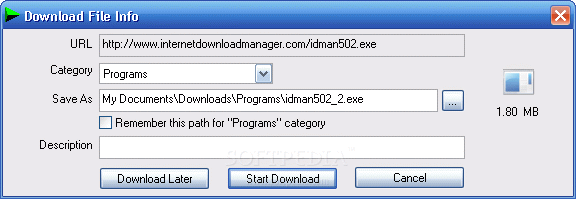
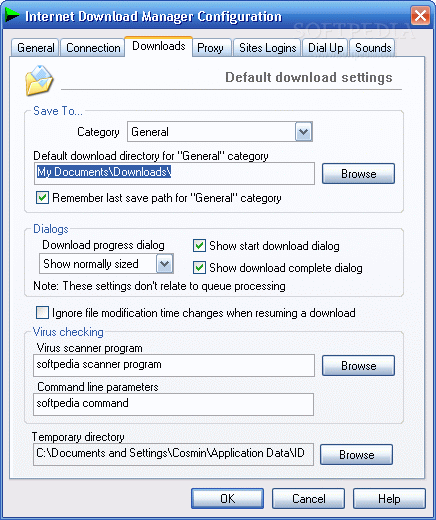
The program auto detects the type of file you’re copying onto your hard drive, and moves it in one of the correspondent folders: compressed, documents, music, programs and video. It you’re handling a different file format, it will be placed in the main directory, that contains all of the above. This allows you, not only to manage your downloads, but to manage your files too.

IDM also features a small Drop target window that stays on
top of all other ones, allowing you to drag and drop items for quicker downloads.

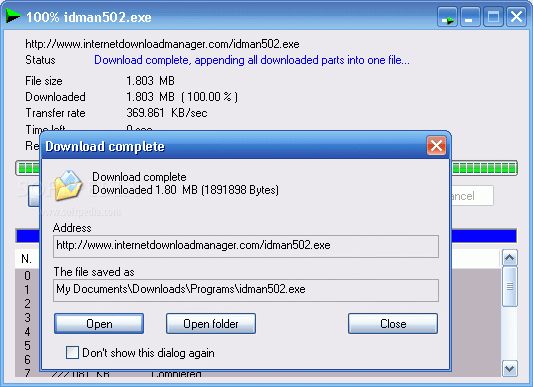
The download progress window can be minimized to the system tray, so that it won’t be in your way when you’re working on something else.

If you need your bandwidth for other purposes and don’t want the downloads to slow down your connection, you can simply add them to a queue, and the job will be taken care of at a later time (that you specify). Also, there are two buttons, conveniently placed in the toolbar, that allow you to start or stop the queue at any time.

There’s also a queue manager (in the program it’s referred to as a Scheduler) that will help you arrange the order and other details about your delayed downloads.

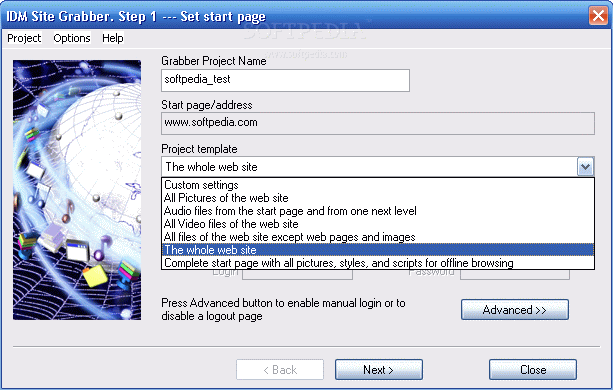
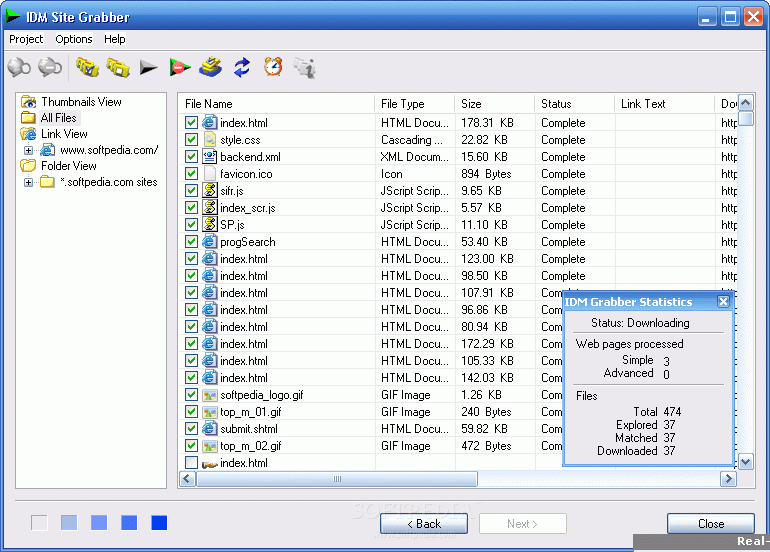
If you like the files you download so much, you have the option of downloading more associated files from the source website or even the entire site, using the Site Grabber feature that’s included. You can choose from all pictures on the website, all audio on the start page and the next level, all video files on the website, all files except for web pages and images, complete start page with all pictures, styles, and scripts for offline browsing or the entire website. If you should choose the latter, the program does not relink the pages so that you can navigate offline through the site. But it does, however, download all the files and web pages, so that you can access them all from the download directory.

The program features virus detection, and it prevents you from downloading infected files. Nevertheless, it’s not an advanced antivirus application, and you should check every file after downloading it, to make sure that you’re in the safe zone.


The good

I really like the way this program handles downloads, but the most important is the great speed. Sometimes it’s even more than five times faster like the producer claims it to be. The interface is nice and clean, and gives you good control over the program’s features.

The bad

I don’t know if there’s anything bad about the program. I would really like it if the site grabber would be able to relink the downloaded pages, so that offline browsing could be easier. Also, when minimized, the progress window only shows the download progress when you click it: a mouse over effect would be appreciated. But we’re getting too much into details here, and these are only minor issues.

The truth

This is a great download manager that, not only increases the speed of your downloads, but also, organizes them for you, and makes every operation seem like taking candy from a baby (but in a good way). The price is average for what the market has to offer, but you get a very good value. Download the 30 days trial and give it a run!


Here are some screenshots of the program in action:
Review image
Review image
Review image
Review image
Review image
Review image
Review image
Review image
Review image
Review image


Editor's ratings:
User Interface:   Features:   Ease of Use:   Price/Value:   OVERALL:


19th May 2006, 09:00 GMT | Copyright (c) 2006 Softpedia | Contact:

Read by 10,519 user(s) | Add comment | Link to this news
Subscribe to news | Print article | Send to friend
TODAY'S HEADLINES: Camfrog Video Chat Review  Almanah Diary Review  Portable Quicksys RegDefrag Review  Sunbelt Personal Firewall Review  XML Copy Editor Review  GNOME Mplayer Review  GeoAze Review  Checkout Review  Simply Calenders Review  KJClipper Review  JCODER Review  Optimism Review  
Today's News | Yesterday's News | View News Archive
Search:

Internet Download Manager 5.14 - OPINIONS AND REVIEWS Pages: 1 2

Internet Download Manager 5.12 Build 11
Reviewer: lily helmy

Date: 2008-07-02, 11:59 GMT
Version: Internet Download Manager 5.12 Build 11
Overall rating: (Fair)

GUI:    Features:    Ease of use:    Value:    
it does not increase download very much and it stops downloading by itself
it doesn not worth its price
Internet Download Manager 5.12 Build 11
Reviewer: Ajaz

Date: 2008-06-02, 00:33 GMT
Version: Internet Download Manager 5.12 Build 11
Overall rating: (Excellent)

GUI:    Features:    Ease of use:    Value:    
Great software
always use when downloading anything
Internet Download Manager 5.12 Build 8
Reviewer: faheem

Date: 2008-04-29, 03:01 GMT
Version: Internet Download Manager 5.12 Build 8
Overall rating: (Excellent)

GUI:    Features:    Ease of use:    Value:    
best of the best download manager
Internet Download Manager 5.07 Beta Build 6
Reviewer: dingo169

Email me | PM me
Read all my reviews (1)

Date: 2007-01-07, 22:25 GMT
Version: Internet Download Manager 5.07 Beta Build 6
Overall rating: (Excellent)

GUI:    Features:    Ease of use:    Value:    
very good downloadtool ,i can't say any bad thing.
Internet Download Manager 5.07 Beta 2
Reviewer: gargouri2001

Email me | PM me
Read all my reviews (4)

Date: 2006-12-14, 21:01 GMT
Version: Internet Download Manager 5.07 Beta 2
Overall rating: (Good)

GUI:    Features:    Ease of use:    Value:    
i dont realy like it s user interface . i prefer to go with flashget
Internet Download Manager 5.05 Build 3
Reviewer: Soheyl

Email me | PM me
Read all my reviews (24)

Date: 2006-10-05, 19:38 GMT
Version: Internet Download Manager 5.05 Build 3
Overall rating: (Excellent)

GUI:    Features:    Ease of use:    Value:    
It's reaaly best download maanager because:

+ Full integrate with you browser (Firefox, IE, Opera & all another...)
+ Can download from Anti-Leech websites
+ Easy to use
+ Can integrate with any application want downlaod any file (Messangers, Antivirus updates...)

;)
Internet Download Manager 5.02.14
Reviewer: toulinwoek

Email me | PM me
Read all my reviews (10)

Date: 2006-05-19, 16:07 GMT
Version: Internet Download Manager 5.02.14
Overall rating: (Excellent)

GUI:    Features:    Ease of use:    Value:    
This is the king of download managers (believe me, I have tried about 15 or more of them). Many others -especially the free ones, so watch out- are simply lies and do nothing but keep a list of programs you've downloaded, but there is no acceleration at all, or at least far less than they claim. Not so with IDM, it truly speeds up downloads by up to 500% (five times faster than without it). For those who might not know, it does this by breaking the file into segments, and downloading all the segments simutaneously, then putting the segments back together again. Other programs that happen to work basically do the same thing, but IDM does it more efficiently. The program also lets you set folders for organizing downloads by type (programs, archives, music, video, etc.) and you can create your own custom folders and types. When a download starts, you can do such useful things as change the default folder in which to save that download, change even the name of the file if you like, plus enter a full description for what you're downloading (very useful if you download as many programs as I do). There are a couple of other programs that allow this also, but here's where IDM distinguishes itself: while you're doing all this, IDM is already downloading the file! By the time you get done and click the "Start Download" button, there's a good chance that the download is already complete. This is a great timesaver, compared to other programs don't do anything until you actually click the button to start the download. This makes downloading with IDM "feel" even faster.
I have never encountered a problem with browser integration (it will take over downloads from ANY browser) and with extremely few exceptions, it is smart enough NOT to try to take over certain downloads (for instance, with Webshots photos, which MUST be downloaded with Webshots' own technology). Other than that, IDM is powerful, robust and stable as a rock. My only problem with it is that, although you can export your list of downloaded programs, the export doesn't include your descriptions, so if you import a long list of programs, and you have included such things as version numbers and the like in your description, that information will not be imported. This is a serious enough oversight for me to give it a "Very Good" rather than "Excellent" rating for features.
Otherwise, I consider it perfect, one of the few programs I can say I have no reservations about recommending strongly.
Internet Download Manager 5.02.14
Reviewer: Sriubol

Email me | PM me
Read all my reviews (5)

Date: 2006-04-27, 06:08 GMT
Version: Internet Download Manager 5.02.14
Overall rating: (Excellent)

GUI:    Features:    Ease of use:    Value:    
This is the best downloader for me I have been reviewed about setting the options of IDM as this [url=http://www.nsitez.net/nvillage/index.php?showtopic=4453]link[/url] but it shown in THAI Language
Internet Download Manager 5.02.09
Reviewer: Mohib

Email me | PM me
Read all my reviews (4)

Date: 2006-04-06, 01:29 GMT
Version: Internet Download Manager 5.02.09
Overall rating: (Very Good)

GUI:    Features:    Ease of use:    Value:    
One of the best download managers i have ever used. it is so easy to use. its very effective. it really divides the files into patrs to speed up downloading. But i tried to keep the download basket on the desk top but i failed so i have to bush it every time i use idm. the programme needs more toolbars and more colours. the Options should be more detailed. i admit it's very useful.
Internet Download Manager 5.01.2
Reviewer: ARRON

Email me | PM me
Read all my reviews (37)

Date: 2005-12-26, 08:08 GMT
Version: Internet Download Manager 5.01.2
Overall rating: (Excellent)

GUI:    Features:    Ease of use:    Value:    
I have tried so many download managers to find one with a good browser integration and this one is the best!
Internet Download Manager 4.07.3
Reviewer: dumbada

Email me | PM me
Read all my reviews (1)

Date: 2005-11-11, 16:32 GMT
Version: Internet Download Manager 4.07.3
Overall rating: (Excellent)

GUI:    Features:    Ease of use:    Value:    
I've been using download managers since the first release of getright. It was the only one back then and now is very outdated despite the updates.

This program has very good aspects than has made it one of the best download managers out there. In my opinion it is the best! It does fragments your downloads into several parts which increases your download speed considerably. But the aspect that makes this atribute special is that it does it while you are downloading (dynamic fragmentaton). So if one part finishes before the olthers, the programs splits one of the slow fragments in order to keep the maximum speed. I haven't seen any problems what so ever during the completion of the files downloaded.

Aspects regarding catching browser links and clipboarded links work flawlessly as well.

On the other hand the program has matured throughout the years and has a very loyal user base. Certainly worth the download in my opinion and contains no spyware or major security flaw.

Happy Downloading ...
Internet Download Manager 4.07.2
Reviewer: the darkside

Email me | PM me
Read all my reviews (2)

Date: 2005-09-25, 03:16 GMT
Version: Internet Download Manager 4.07.2
Overall rating: (Poor)

GUI:    Features:    Ease of use:    Value:    
Can't say it worked, at all.
Internet Download Manager 4.07.2
Reviewer: wwwluckyro

Email me | PM me
Read all my reviews (5)

Date: 2005-09-22, 15:21 GMT
Version: Internet Download Manager 4.07.2
Overall rating: (Excellent)

GUI:    Features:    Ease of use:    Value:    
I think it is the best download manager. You fu_king lamers have no idea on how to use it.
Anyway... in the last 2 versions, 4.07 and 407.2 .. . it doesn`t let me update. I was using 4.06 and it didn`t let me update :P.
I had to redownload the installer. . whatever.. great program! It beats GetRight and Download Accelerator Plus.
Internet Download Manager 4.07.2
Reviewer: clocky

Email me | PM me
Read all my reviews (40)

Date: 2005-09-22, 12:07 GMT
Version: Internet Download Manager 4.07.2
Overall rating: (Excellent)

GUI:    Features:    Ease of use:    Value:    
To the first two reviewers : Dudes , there is life out there. Go get it!

Internet Download Manager is by far the best download tool out there. It catches almost everything having an inteligent(advanced) browser integration and clipboard monitoring. Also is very easy to set up. There is no such thing as spyware in this program.
Internet Download Manager 4.0.6
Reviewer: Sorin

Email me | PM me
Read all my reviews (10)

Date: 2005-08-30, 09:59 GMT
Version: Internet Download Manager 4.0.6
Overall rating: (Good)

GUI:    Features:    Ease of use:    Value:    
To carlsson75, can you prove what you just said? That IDM tried to access your emails (?!?)

Actually, do you have any idea what you are talking about?

go to top Pages: 1 2


SHARE YOUR OPINION ABOUT Internet Download Manager 5.14

Since you are not logged on, your comments will have to be approved before being displayed.
Click here to login, or register.
Your Name:
Your Email: (will not be published anywhere)
Type in the result:
GUI (Graphical User Interface): Poor   Fair   Good   Very Good   Excellent  
Features: Poor   Fair   Good   Very Good   Excellent  
Ease of use: Poor   Fair   Good   Very Good   Excellent  
Price/Value: Poor   Fair   Good   Very Good   Excellent  
Overall rating: Poor   Fair   Good   Very Good   Excellent  
Your review/opinion:


DO YOU WANT TO CONTACT US?  

If you have some comments or you want to send us some information you can send us an email directly to .
You can use the form below for the same purpose.
Your full name: (at least 3 characters)
Your email address: (at least 5 characters)
Message subject: (at least 5 characters)
Message text:
(at least 10 characters)
Type in the result:


Welcome!
Hello, Guest

Login if you have a Softpedia.com account.

Otherwise, register for one.

Main categories:
  • Antivirus
  • Compression tools
  • CD/DVD Tools
  • Office tools
  • Programming
  • Authoring tools
  • File managers
  • Desktop Enhancements
  • Internet
  • Network Tools
  • IPOD TOOLS
  • Mobile Phone Tools
  • Multimedia
  • Tweak
  • System
  • Security
  • Others
  • Science / CAD
  • UNIX
  • Windows Widgets
  • PORTABLE SOFTWARE

  • Week's best:
  • Adobe Media Player 1...
  • Registry Mechanic 8....
  • BitSpirit 3.3.2.263
  • AnyDVD 6.4.5.6
  • Firefox 3.0.1 / 2.0....
  • AutoCAD 2009
  • Norton AntiVirus 200...
  • Norton Internet Secu...
  • The Bat! Professiona...
  • WinRAR 3.80 Beta 3 /...
  • GMail Drive shell ex...
  • DAEMON Tools Lite 4....
  • UBCD4WIN 3.2.0
  • Adobe Reader 9.0.0 /...
  • Total Commander Ulti...
  • System Mechanic 8.0....
  • Adobe Acrobat Profes...
  • iPhone PC Suite 1.0....
  • Portable Firefox 3.0...
  • MPlayer for Windows ...
  • Vista Codec Package ...
  • Windows Live Messeng...
  • WinBubble 1.73
  • Kaspersky Anti-Virus...
  • Malware Removal Tool...
  • Royale Noir Theme fo...
  • IBM Lotus Symphony 1...
  • Adobe Dreamweaver 10...
  • Adobe Fireworks 10.0...
  • BitDefender Total Se...
  • © 2001 - 2008 Softpedia. All rights reserved.
    Softpedia™ and Softpedia™ logo are registered trademarks of SoftNews NET SRL.
    Copyright Information | Privacy Policy | Terms of Use | Contact Softpedia | Update your software | Archive