Softpedia
 

NEWS CATEGORIES:


NEWS ARCHIVE >>
SOFTPEDIA REVIEWS >>
MEET THE EDITORS >>
TRENDING TODAY
Home > News > Reviews > Windows software reviews

May 21st, 2008, 12:06 GMT · By Daniela Olariu

PhotoStage - Present Your Photo Collection in an Original Manner

SHARE:

Adjust text size:


PhotoStage by NCH Software See editor's ratings     Request a review
Version reviewed: PhotoStage 1.10

Create a slideshow from your digital photos and videos on Windows and apply effects such as fade, crossfade, zoom and much more. Burn your slideshow to DVD for playback on TV, or as a standalone video file for enjoying on web and portable devices. Add a soundtrack, narrative or text captions to further enhance your memories. PhotoStage allows you to easily enhance or touch up your photos.


Download PhotoStage
Features:

Panning and zooming effects let you bring your photos to life.
Fade transition effect gives your slideshow that professional touch.
Preview the effects in real time.
Customize the duration of the effect.
Fine tune brightness, saturation and color for photos and video.
Add your favorite photos with a click of a button.
Crop, rotate and flip photos easily and preview the changes in real time.
Add text captions to individual slides.
Add video clips for a complete slideshow presentation.

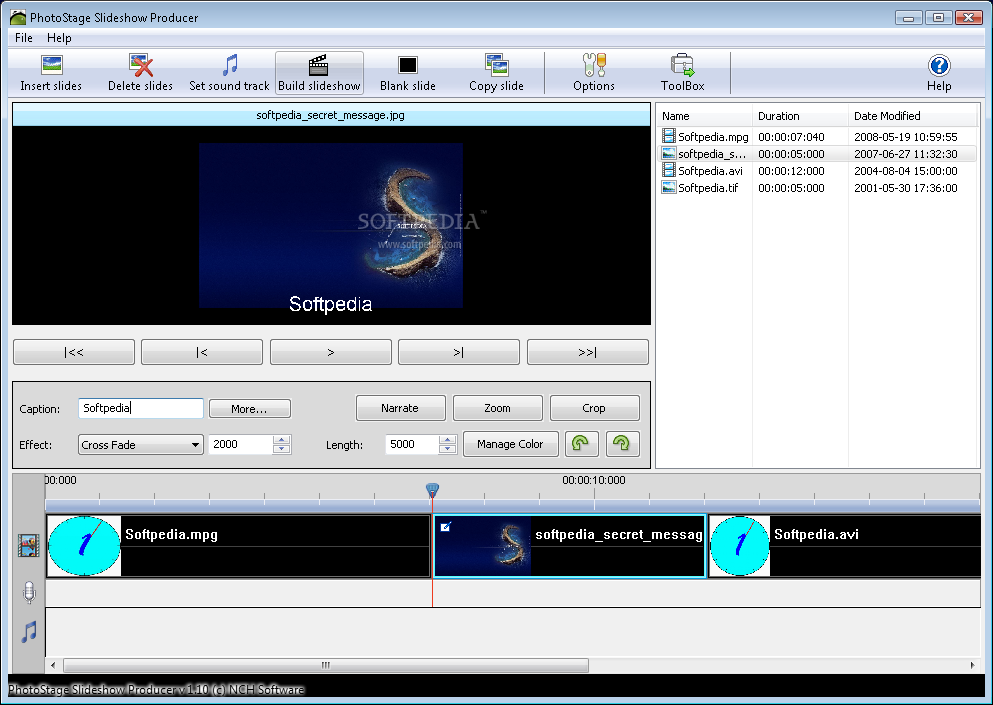
The main window of PhotoStage
Enlarge picture
Summer is almost here and I'm sure most of you are already thinking about the places where you would like to spend your vacation. Needless to say that, regardless of the destination you choose, you'll take loads of photos to remind you of the places you have visited and, of course, to share them with your friends and family. When you present your photo collection, you can either choose a common photo viewing application like the one included in Windows - or any other modern operating system for that matter - or you can play the "extravagance" card and create a slideshow using your own image files.

This second approach, besides being more elegant, also has the advantage of taking off your shoulders the task of periodically switching back and forth between various images and thus letting you concentrate on the actual pictures. Plus it makes a good impression on the audience.

There are numerous software utilities on the market nowadays designed for this specific purpose and today's topic is a lightweight application named PhotoStage Slideshow Producer designed by NCH Software.

PhotoStage Slideshow Producer presents its users with a clean and highly intuitive interface making it extremely easy to use even for those who have little to no experience in working with computers. In order to create a slideshow, all you have to do is insert the media files into the desired location. One thing that pleasantly surprised me just as I started testing this software was the fact that it supports both graphic and video files. Most popular file formats can be used with PhotoStage Slideshow Producer since it instantly downloads the necessary encoders for the video files. The application also allows you to preview the created slides as thumbnails for a better management of the sequence.

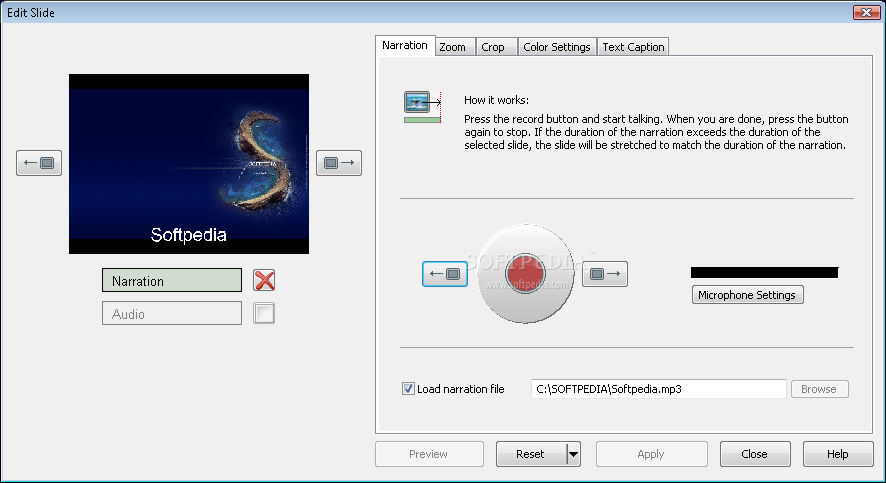
They say beauty is in the eye of the beholder so, while adding the slides, you might want to customize them a little bit, in order to make them more conclusive or more appealing to the eye. PhotoStage Slideshow Producer provides you with various options to edit your slides. Probably the most interesting one of all is the ability to add narration - simply click on the Record button and start talking. In case your recording exceeds the duration of the selected slide, the slide will be stretched to match the duration of your recording. If you don't feel like talking when creating your presentation or you simply cannot think of something appealing to say, you can let any audio file do the job for you. This turns out to be a very useful feature to have when you are putting together a slideshow that is intended as a backend for a presentation or conference.

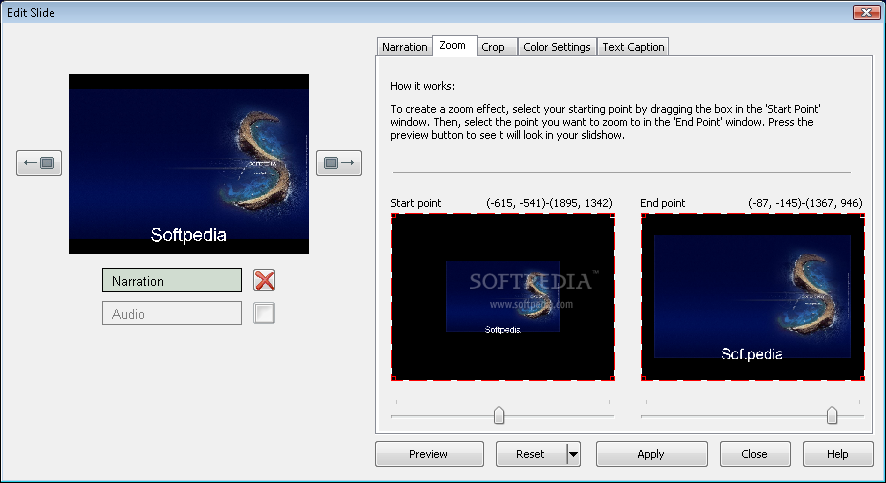
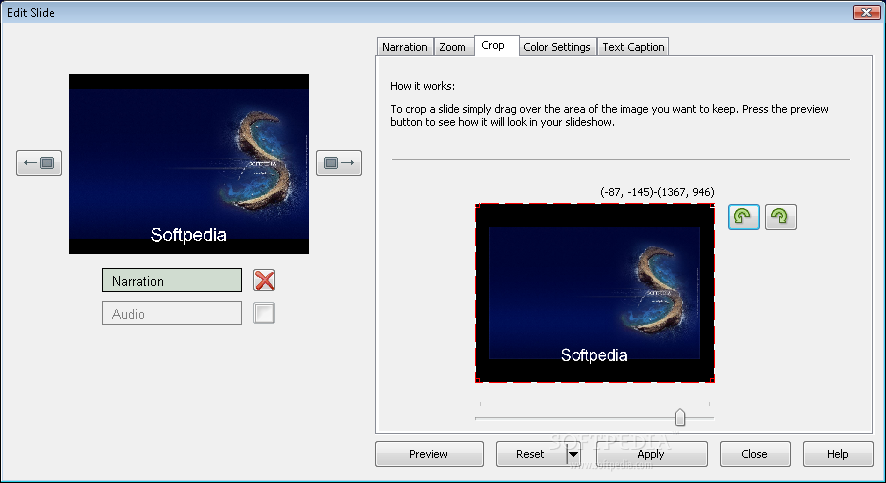
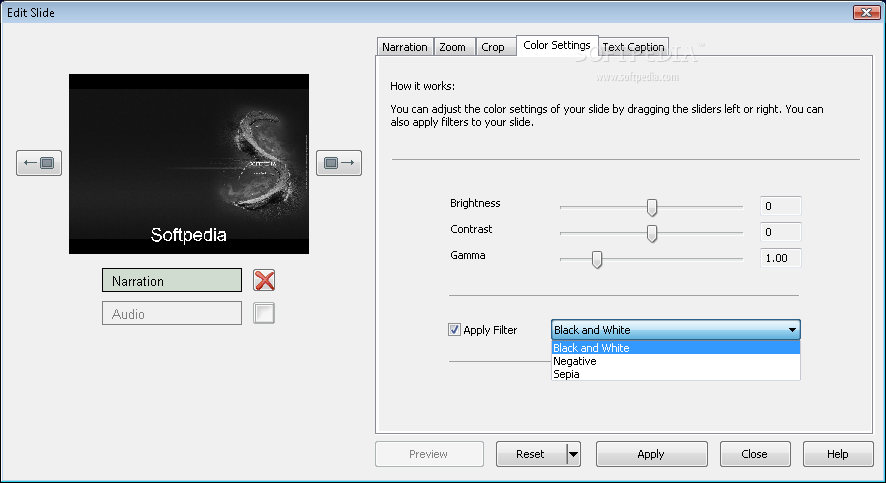
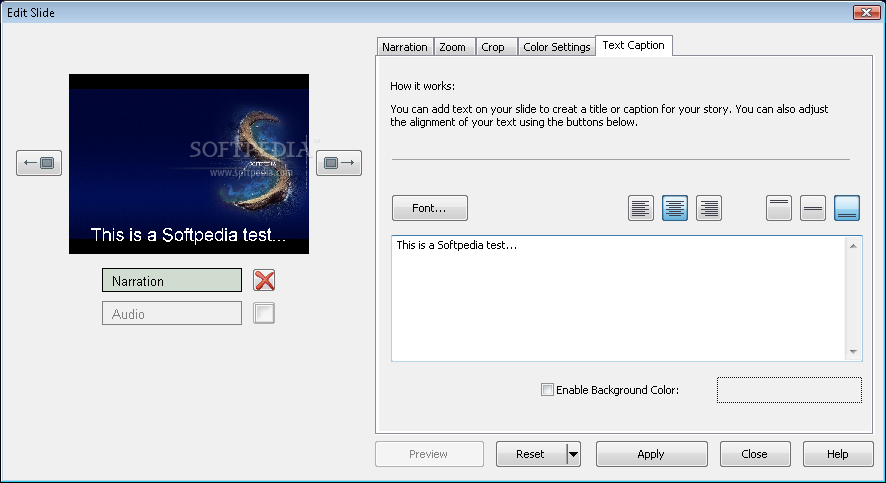
Besides adding narration to your slideshow, PhotoStage also supports other useful editing features. The next one on the list is "zoom effect" that can be applied on a section of the slideshow by selecting the start and end points. At any given time, you can preview this action to see how it will appear on your slide. Moving on, we find that PhotoStage Slideshow Producer also allows you to crop the selected slide, modify the default colors - by adjusting the brightness, contrast and gamma parameters - as well as to apply filters. Last, but definitely not least, is the text caption feature, which is helpful if you want to add a description to your slide. This too can be customized by selecting the desired font, alignment and text position. In case you are not satisfied with the results, you can always reset the changes and stick to the default settings or try editing the slides once again.

Assuming that you have finished adding the slides and customizing them, if you want to make the presentation friendlier, you can add sound files in different formats so you can listen to them while watching the slideshow.

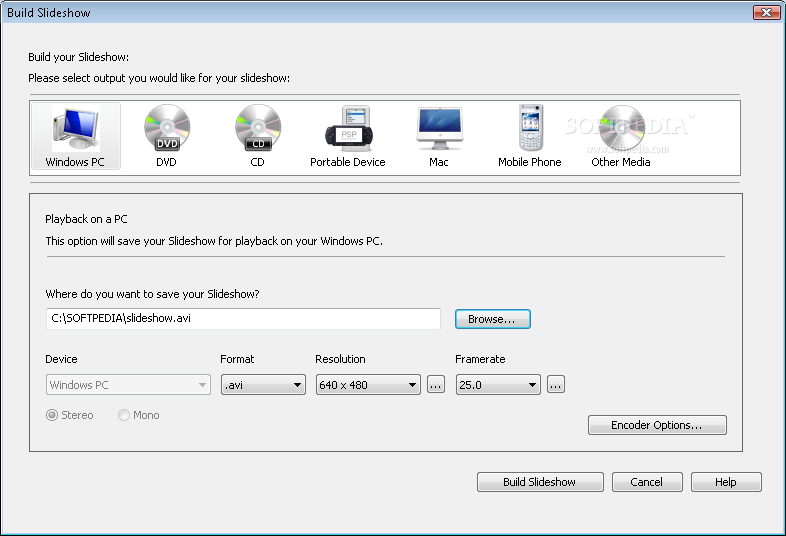
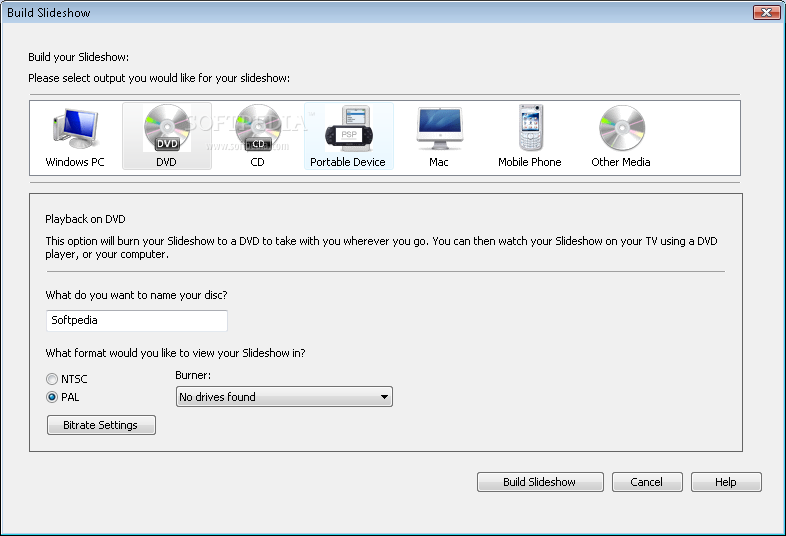
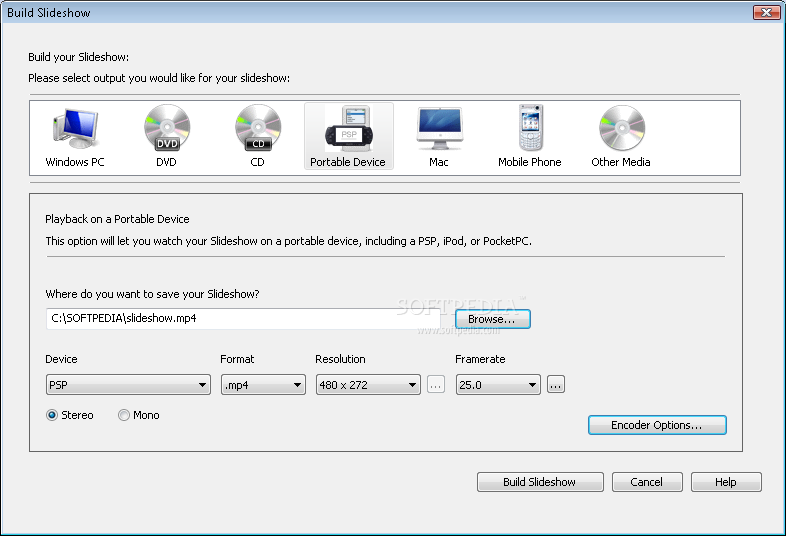
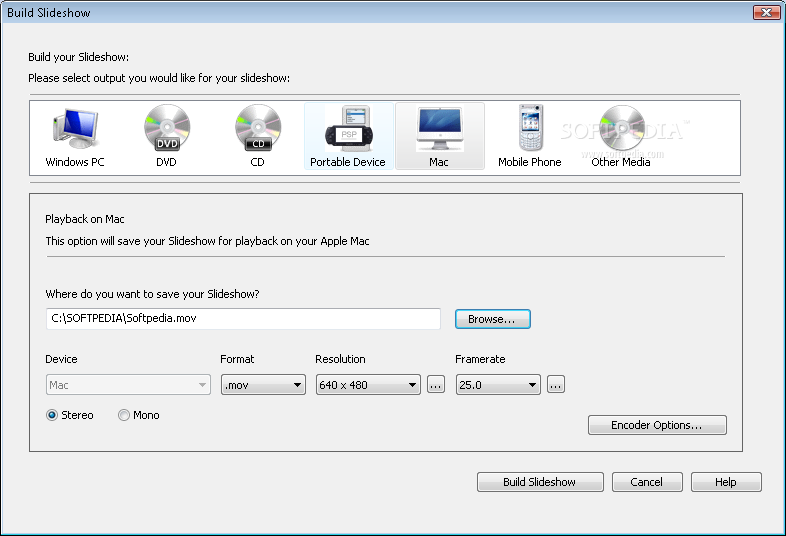
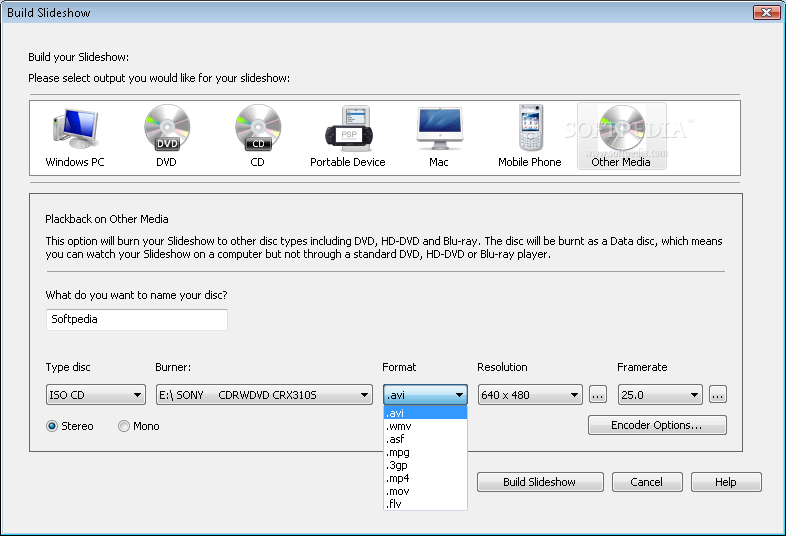
When everything is finished, all that's left for you to do is build the slideshow, which is as simple as selecting the output medium that will host the generated slides and clicking a few times. PhotoStage Slideshow Producer allows you to choose the output medium where you want to store the slideshow from the following options: the hard-drive, CD, DVD, portable devices like cell phones and PDAs, as well as Mac computers. For users who find these selections somehow restrictive, the "Other Media" tag allows them to directly select and edit a number of lower level options, like the file system's type that will be used to store the data, the file format that will encapsulate the newly created slideshow and the playback resolution in pixels. When it comes to the file system type, PhotoStage Slideshow Producer is able to write your slideshows on a CD/DVD using the venerable ISO format and going up to the newly introduced, high performance Blu-Ray.

For users who need to pack their slideshows in a specific file format, this software utility comes equipped with the ability to create and write video files with the following extensions: AVI, WMV, ASF, MPG, 3GP, MP4, MOV, FLV. When it comes to resolution of the video, this depends on the desired output medium and it varies from the low and old 640x480 to a maximum of 2000x1500 supported by professional presentation devices. The framerate can also be modified, a higher value being translated into greater accuracy of the slideshow.

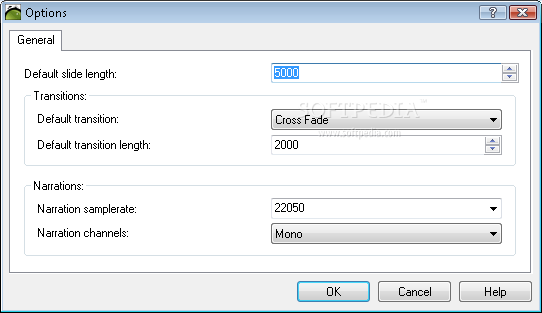
As miscellaneous options, you have the possibility to adjust the default slide length, transition effect and length, as well as narration sample rate and channels, all these being found in the Options window.

The Good

PhotoStage Slideshow Producer is extremely easy to use in creating presentations using media files stored on your hard drive. The slides can be customized using a myriad of options that guarantee professional results. The fact that the slideshow can be stored in a variety of formats can only come as a plus. The Help file is also well developed and ready to assist you.

The Bad

As far as my testing went, I only need to complain about two things: that there are only 3 transition effects, a wider variety being more than welcomed, and that that you have to wait for a couple of minutes in order to create a compilation that contains more than 15 media files.

The Truth

Given the fact that PhotoStage Slideshow Producer is completely free of charge and it comes enhanced with many useful features, it makes for a perfect alternative to the standard Movie Maker found in Windows operating system. If you want to bring your photos to life, my suggestion is to make full use of PhotoStage Slideshow Producer.

Here are some snapshots of the application in action:


Review image

Review image

Review image

Review image

Review image

Review image

Review image

Review image

Review image

Review image

Review image

Review image


EDITOR'S RATINGS:

User Interface: (4/5)
Features: (5/5)
Ease of use: (5/5)
Pricing/Value: (5/5)
Overall: (5/5)
  Final verdict: Excellent


19,308 hits · 14 comments
Link to this article · Print article · Send to friend

MUST-READ RELATED ARTICLES:


Professional Slideshows

Audio SlideShow

DVD Slideshow Entertainment

Photo Collage Creator

SlideShows For the Web

READER COMMENTS:


Comment #1 by: DJGray on 28 May 2009, 15:13 UTC reply to this comment

The review above is spot on in most respects. I just produced a slideshow of my family legacy dating back to 1916. This constitutes just over 2,200 photos. Yes, there were some wait times as the show was compiled, but that is to be expected for a project of this size. I applaud NCH for handling the task when MS Movie Maker would not!!

Wish list? It would be nice if the tool allowed concatenation of audio tracks. At present, tracks must be combined in another application and added as a single audio file. There also seems to be an issue with synchronization, but this is just during the test run. The synchronization issue may resolve itself in the final product. I've also noted a significant loss in fidelity of the soundtrack.

All in all, however, for a freebie product, this is a very respectable release!

Comment #1.1 by: Linda Humphries on 24 Jun 2010, 16:27 GMT

I enjoyed your review and agree with the ease of using PhotoStage. I have a HUGE problem though on the show I've put together for my son's wedding rehearsal dinner.

When I put it in View mode, faces and all objects look like they are water streaked. Plus they look much fuzzier than when I am viewing it in the design mode.

I am using the free download version. Would purchasing a version make any difference in the final slide quality?

Do you have any suggestions? I would so appreciate any help you can give me. This is for a VERY important occasion. Thank you.

Comment #1.2 by: GuyS on 21 May 2011, 23:18 GMT

I got the same issue...the crisp pictures that I took look blurry when I put a slideshow together...as far as I'm concerned, the software is a waste of money.

Comment #1.3 by: KK on 12 Apr 2013, 21:00 GMT

If anyone is looking to purchase this software, don't!!!!! I don't normally place comments on any type of forums but believe me, this is a complete rip off! I purchased the software, which kept crashing, i.e, suddenly the software does not accept your effects or transitions and it completely locks!! so i took the software off my computer (after spending £25), and paid another £25 for a fresh download only to find the same again, again and again. Shame on you whoever is taking all this money from members of the public who just want to put together a memory etc etc, etc. Be warned anyone looking to purchase, DON'T!!! ....
I am a professional photographer who is extremely unhappy about all the time I have wasted hoping that the next time I re-visit the program file it's working again, which at times it does but then FREEZE'S AGAIN!!!!


Comment #2 by: miskairal on 30 Aug 2009, 21:11 UTC reply to this comment

This is a really nice and easy piece of software to use. I'd recommend it to anyone BUT none of the disks I make will play for more than about 4 seconds on my standalone DVD player or in my pc :(

I tried the forum but got no joy there so have had to ditch what is one of the best freeware programmes out there. It does seem this is a rare occurrence though so it might be great for you.

When installed you will find a whole heap more shortcuts in your start menu to other NCH software. I was annoyed at this until I decided to download WAVPad to join MP3s and use the fade in and fade out to create music for my slideshows. It too is a really nice piece of freeware.


Comment #3 by: Gigi on 22 Sep 2009, 06:54 UTC reply to this comment

Am I the only one dissatisfied with PhotoStage Slideshow Publisher?!?!
Sure it was easy to put the slideshow together, but after several hours of assembling more than 200 photos for a birthday video keepsake, I was very annoyed when the 10 DVD's that I burned only played for 47 seconds each! I, too, went to the forums for assistance, to no avail! There are no helpful answers there. No one seemed willing to help with the faulty burning of the DVD's. My hopes of presenting this gift have been ruined! Although the software is FREE, it is NOT worth the heartache or headache in the end..............


Comment #4 by: GuyS on 21 May 2011, 23:34 UTC reply to this comment

I thnik that people rating this product highly are into low end photography only. Pics with a decent resolution end up washed out in a very disappointing slideshow. Complete waste of money.


Comment #5 by: Lilly on 11 Jul 2011, 03:07 UTC reply to this comment

I made some slideshow DVDs.

My issues with this software were that I could not use the transitions or affects. If I used an affect, the slide would be messed up and blurry. As long as I didn't use a transition or affect I was basically fine.

Sometimes when I added a pic to the slideshow it would appear very pixelated. But a lot of times what you see wasn't what you got.

It wasn't very stable software and any picture editing had to be done in other software and re-jpegged.

Comment #5.1 by: ajoomma on 02 Nov 2011, 10:10 GMT

I downloaded the free software and created a slideshow to test it out. I admit that it was very easy to use with no tutorial needed, I was able to put two audio tracks in, combine photo slideshow with a video with audio on top of the background music -- all great features! However, and this is a BIG BUT, the picture quality was very poor - most of the pictures were so pixelated and blurry that this CON outweighed all the PROS mentioned above. I have not tried taking out the transition effect to see if it would help, like the other poster mentioned, and I wonder if the Pro version you pay for is better than the freeware. Can anyone comment on this?

The bottom line is, I am going to keep looking for a good slideshow software that delivers crisp, clear pictures. This is too imporant to comprise on.

Comment #5.2 by: Bob on 05 Nov 2012, 01:33 GMT

I downloaded the free program, assembledmy slideshow, but the pictures were fuzzy and the video of poor quality. I didn't want to lose my time so thaought if I were to purchase the software, it would improve. I purchased PhotoStage Pro. I read someplace that the picture quality improves when the slideshow is saved. I saved it to a DVD disk and when I played it back the pictures all flickered and the sound was sick. I wish I had not purchased it. I give it poor ratings.


Comment #6 by: Marame on 21 Jul 2011, 02:13 UTC reply to this comment

I have this free version of the PhotoStage slide show - and it's truly a terrific program!

This program has never ever 'froze' nor had a glitch (unlike so many others that I've used and/or tried) ... and is intuitive to use, too!

Thank you to the makers of this great software for sharing it with so many free of charge!


Comment #7 by: Tom Neil on 13 Feb 2012, 16:53 UTC reply to this comment

The program highly degrades the resolution of pictures. If that could be fixed it would be a great program. But as it is with the resolution degradation, it is useless.

Thomas Neil
aaalawyer@aol.com


Comment #8 by: Beth on 07 Mar 2012, 02:47 UTC reply to this comment

PhotoStage may be easy to use and has features not available with Windows Media Player. However, burning to a CD or DVD is next to impossible. The program freezes when only 52-56% complete. Or, if you're lucky enough to burn a DVD, then as much as 50% of your photos are lost--do not convert to DVD video. I've tried this routine 8-10 times and spent countless hours to no avail. Contacting NCH Software Technical Support is worthless. I'm extremely disappointed with PhotoStage and would never recommend it to anyone.


Comment #9 by: Ed on 06 May 2012, 12:43 UTC reply to this comment

Just downloaded and as a test I tried creating a slideshow of about 200 photos (which I had previously created in Adobe Premier). I used the simple fade transition, added title and trailer frames plus music track. All good so far. The problem came when I created avi file. Using windows media player the video freezes after a half dozen few frames but the music plays on! VLC runs poorly and displays half the previous frame on top of each photo! It's a shame as I really liked it, it's also really quick creating the files but unfortunately is no good for me. Oh Dear, back to Adobe Premier it is, it's not so quick to use but at least I can rely on it.

Copyright © 2001-2013 Softpedia. Contact/Tip us at

WindowsGamesDriversMacLinuxScriptsMobileHandheldNews

SUBMIT PROGRAM   |   ADVERTISE   |   GET HELP   |   SEND US FEEDBACK   |   RSS FEEDS   |   UPDATE YOUR SOFTWARE   |   ROMANIAN FORUM