14 DAY TRIAL //
 What's the one feature Windows never integrated into any of its operating systems? I bet few of you have ever thought of it. Just to spice things up I'll say that Mac supports this feature natively as well as some Linux distros. OK, no more suspense...it is all about rearranging taskbar buttons the way you see fit. It is not too much of a feature, indeed, but if you work with multiple windows it is very convenient to group related ones or the most frequently used together.
For instance, I always liked to have my Total Commander window at the beginning of the task bar, followed by one or two web browsers, a text editor and the application I'm testing. This arrangement suits me quite well as I always know where to find the task I'm looking for.
Getting the order I needed in the taskbar always meant paying attention to the order in which I opened the applications. And when I had to close one of the tasks the balance... well, there would be no balance anymore. The bottom line is that I had to change my habits because of Windows' the lack of flexibility in this sense (not very user oriented I would say).
But (this is a magical "but"), there is a way to inject a bit more functionality into Windows taskbar, be it on XP or Vista. Taskbar Shuffle is a nifty little program able to remove the rigidity of the taskbar buttons allowing you to easily and painlessly sort them out the way you like it.
It installs in a jiffy and configuration won't take long either. The moment the app is activated on your computer, you can try its abilities by simply dragging taskbar buttons left or right and dropping them to the desired position. The action is similar to the tab arranging in your web browser and the same functionality is induced.
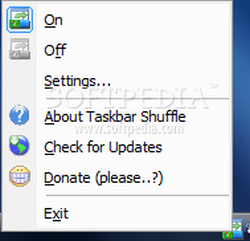
There is no interface and you can even skip the configuration panel because all you have to do is drag the taskbar buttons to the left or right to reach the optimal alignment. But by doing this you'll miss some pretty useful options relating both to setting up the application and the way it handles taskbar windows.
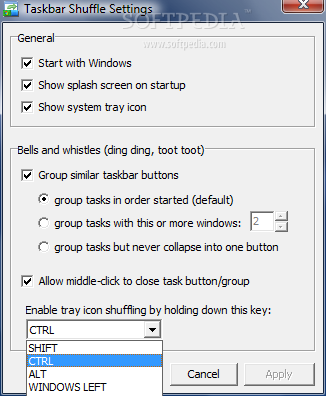
Settings dialog is split into two distinct sections, one for making the general configuration of the application and one for making Windows Taskbar more functional in the way it handles all the buttons.
Taskbar Shuffle can be set to start with the operating system so that you don't have to activate it each time Windows loads. Also, for reducing all the hassle you can choose for its system tray icon to be visible or not. This option is particularly interesting as it will turn the application almost invisible (process still available for killing in Task Manager).
Bells and Whistles area gives you better control over Windows Taskbar handling of the buttons. The two options available let you pick out how similar taskbar buttons should be grouped and enabling closing them with mouse middle-clicks. Thus, tasks belonging to the same app can be lumped together and not ordered by the way they are opened, you can set the number of group tasks that should cause a collapse into the same button for more space.
Besides the simple drag and drop of the buttons in the taskbar for achieving the desired order, Taskbar Shuffle is also offering the chance of doing the same thing with system tray icons. The only difference is that you have to use an additional key for this. Unfortunately, you don't get to select a key of your own and the presets include Ctrl, Shift, Alt and Windows (left and right side of the keyboard).
Using Taskbar Shuffle will not affect computer resources too much. During our testing Task Manager recorded about 6MB use of RAM. Even if you are low on memory this isn't too expensive compared to the benefits.
Taskbar Shuffle can be 100% non-intrusive thanks to the system tray icon hiding option. This way your tray will no longer be cluttered and you are free to arrange all the items according to their importance. Simply run it and you will benefit from its advantages at once.
The Good
The ease of use is amazing. Once installed, it seems just like a native function of both XP and Vista. Taskbar Shuffle can be totally non-intrusive and runs on low computer resources.
You can configure how similar tasks are grouped and even enable middle-clicking for closing the application.
The Bad
The user cannot set his/her own hotkey for arranging system tray elements.
The Truth
Taskbar Shuffle brings in Windows a feature much needed by many users. It is not intrusive and does the job perfectly. The system assimilates it just fine and there are absolutely no problems with running it (does not affect the native Windows functionality in any way). And on top of all the functionality and ease of use, the program is also free.
It would be nice to have more options like being able to arrange the buttons in a group as well or hiding certain taskbar buttons or system tray elements.
Here are some snapshots of the application in action: