
A lightweight application that can easily extract video and audio streams, as well as timecodes from multiple FLV video files at once. #Extract video #FLV extractor #Extract timecode #Extract #Extractor #Converter

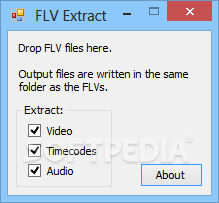
FLV Extract is one of the simplest programs you will ever find for extracting audio and video from a FLV file.
The program does not have an installation package. Since it is a portable product, your Windows registry entries remain unchanged. You can place FLV Extract on an external device, such as a USB flash drive, and run the executable file from there.
The user interface of FLV Extract consists of a single, small window that stays always on top of other applications. First you have to select what you want to extract (video, time codes, audio) and then drag and drop the FLV file inside the interface.
The task is automatically performed, without you having to confirm anything. Output files are placed in the same directory as the source file.
The video file (that has no sound) is AVI, the audio file is MP3, and the time codes are listed in a TXT document. All of them have the same name as the source file.
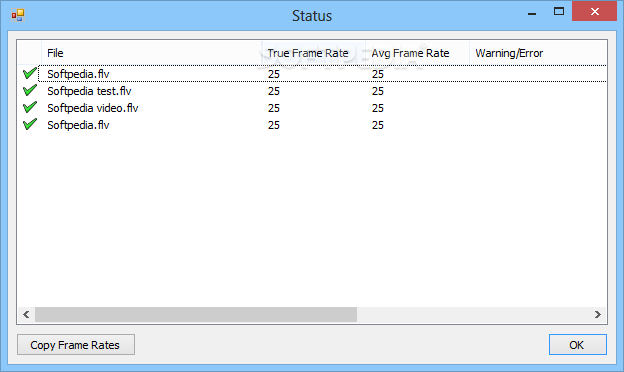
Once the task is completed, you are able to view some kind of report in the status window (file, true frame rate, average frame rate, warning or error), and you can copy this data to the clipboard. If the files already exist in the source directory, FLV Extract asks for your permission to overwrite them.
The program does not come with a help file (although there isn’t much to be explained), but what it doesn't tell you is the fact that you can add several files at once (i.e. batch extraction), and that FLV Extract also works on a FLV file that you are currently playing.
In conclusion, FLV Extract may not be a sophisticated tool, but it is ultrafast, portable, demands minimum memory usage, and it does not freeze or crash. We definitely recommend it to users who appreciate a straight forward software that focuses on functionality, not on looks.
What's new in FLV Extract 1.6.5:
- Supports files containing HE-AAC audio.
FLV Extract 1.6.5
add to watchlist add to download basket send us an update REPORT- runs on:
-
Windows 10 32/64 bit
Windows 8 32/64 bit
Windows 7 32/64 bit
Windows Vista
Windows XP - file size:
- 80 KB
- filename:
- FLV_Extract.zip
- main category:
- Multimedia
- developer:
- visit homepage
calibre

7-Zip

IrfanView

Windows Sandbox Launcher

4k Video Downloader

Zoom Client

Context Menu Manager

Microsoft Teams

Bitdefender Antivirus Free

ShareX

- Microsoft Teams
- Bitdefender Antivirus Free
- ShareX
- calibre
- 7-Zip
- IrfanView
- Windows Sandbox Launcher
- 4k Video Downloader
- Zoom Client
- Context Menu Manager