
Work faster and more efficiently by using your keyboard instead of your mouse.. #Shortcut control #Countdown timer #Shortcut utility #Hotkey #Shortcut #Launcher
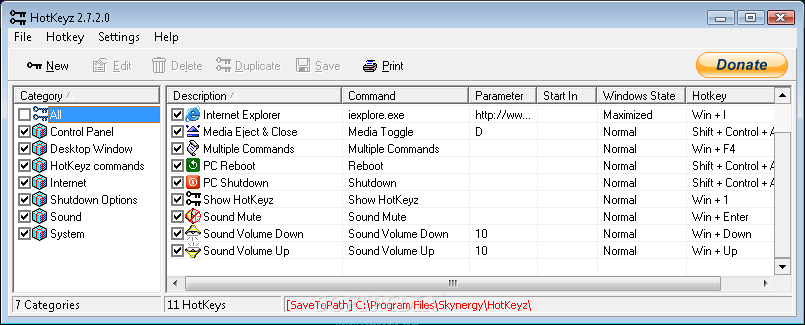
If you ever wondered how professionals move that fast on the computer, the answer is 'keyboard shortcuts'. Although the mouse brought to the PC's interface more accessibility and interaction, the keyboard is still the quicker way to access programs, functions or commands.
While the mouse requires you to move quite a bit through the menus and between different areas of the desktop, properly configured keyboard shortcuts can skip most of the intermediary steps and get you where you want right away.
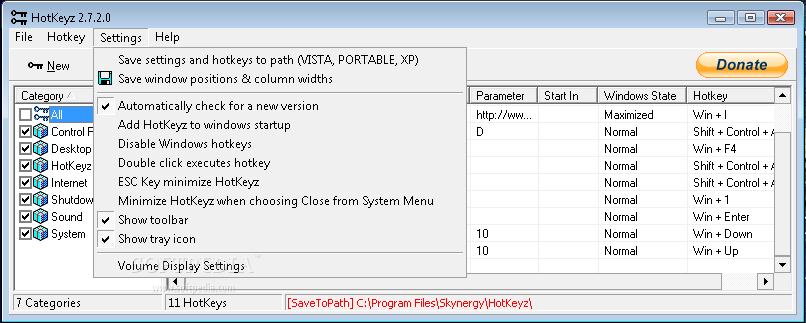
HotKeyz is such a software that allows you to assign a multitude of key shortcuts also referred as hotkeys to trigger various actions. The application comes with a set of predefined hotkeys to give you a preview of what it can do for you, the simple interface allowing you to quickly add new shortcuts, edit or delete them, create duplicate hotkeys for easier editing, or save your work.
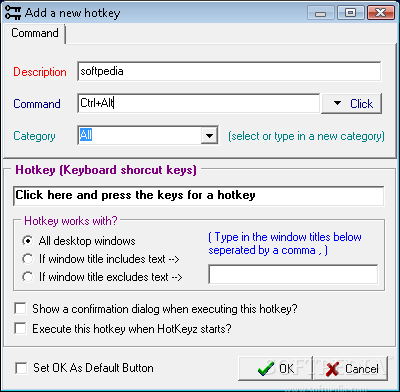
When adding a new hotkey you are asked to select one of many commands available, offer a brief description, choose a category and assign the desired keyboard shortcuts. You can choose the desktop windows they work with and customize a delay for executing the actions.
You can assign hotkeys for files, folders, programs or commands. Some useful HotKeyz commands let you to remap your keyboard, access macros playback and recording, change case or auto correct. The customizable Windows commands enable you to show or hide the desktop and taskbar, hide, minimize or restore windows, compose new mail, kill processes or tasks, control media devices or swap mouse buttons, to name just a few.
The most interesting function is the parameter control, that allows users to configure applications to execute specific actions. For example you can choose to open a custom web page in the desired browser. If you work a lot with a fixed number of web pages, you can now open them maximized, minimized, or hidden by simply assigning a different hotkey to each of them.
Concluding, we would say that HotKeyz rises up to the expectations and does no more and no less than it promises: it offers the possibility to customize hotkeys for various actions.
Download Hubs
HotKeyz is part of these download collections: Window Maximizer, Minimize Windows
What's new in HotKeyz 2.8.3.0:
- Fixed the category that disappeared when renaming a new category.
- Fixed the commands that didn't execute because of their case. HotKeyz will ignore the case.
- Fixed the Access Violations that appeared when HotKeyz don't have write access to the HotKeyz folder.
HotKeyz 2.8.3.0
 Softpedia Editor's Pick
add to watchlist
add to download basket
send us an update
REPORT
Softpedia Editor's Pick
add to watchlist
add to download basket
send us an update
REPORT
- runs on:
- Windows All
- file size:
- 1.3 MB
- filename:
- htkz.exe
- main category:
- Tweak
- developer:
- visit homepage
7-Zip

IrfanView

ShareX

Microsoft Teams

Windows Sandbox Launcher

Bitdefender Antivirus Free

calibre

4k Video Downloader

Context Menu Manager

Zoom Client

- 4k Video Downloader
- Context Menu Manager
- Zoom Client
- 7-Zip
- IrfanView
- ShareX
- Microsoft Teams
- Windows Sandbox Launcher
- Bitdefender Antivirus Free
- calibre