14 DAY TRIAL //
 Take a look at this picture. What is wrong with it? For those familiar with Vista, this is just a display of Flip 3D. But a keen eye will notice that the system is, in fact, XP and that is not really Flip 3D, but you have to admit it looks mighty good, though. This is just one of the examples that Vista, despite user's lack of appetite for it, has pushed Windows limits further into coating functional features with nice looking effects.
Although switching between the different windows opened on the desktop is not a new feature, having as much information at hand as possible and a review of the opened window would actually be of great help to any user. And, if all this functionality is presented to the user with a beautiful three dimensional effect, it has great chances of turning into a success. There's no secret that XP is perfectly capable of supporting Flip 3D, as the operating system has absolutely nothing to do with the frilly standards Vista dawned into the market.
If you want to adorn your dear old XP with one of the aesthetic looking features that not long ago were reserved only to high speced computers supporting Vista, than WinFlip will do the job just fine. The more I think of the effects of WinFlip on a system, the more I believe that this is one of the best ways to promote the use of window switching feature. The truth is that most of the users would rather use the mouse for activating a window in the taskbar than use Alt+Tab.
Considering it works on both Vista and Windows XP, WinFlip is designed not as a substitute of Flip 3D, but rather as an alternative to this feature. In support to this statement, there is the argument that WinFlip is a somewhat improved version of Vista's Flip 3D, as there is much more flexibility injected into the software.
The result is obvious in the image above, but there are some details with regards to the configuration of the application. First of all, you should know that WinFlip is also portable and needs no installation, so you can carry it all over on a portable device and run it on any system you want. Once the executable is launched, a short desktop restart will occur and then you will be able to benefit from window flipping, with the use of two keys.
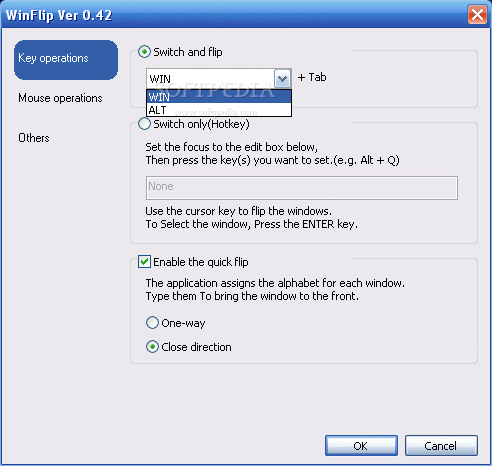
However, configuring the application to suit your needs is one of the best parts. The three main areas building the Options menu are all the setting up WinFlip supports. Despite the few configuration options, the software has a few aces up the sleeve and allows the user several modes of switching between windows.
The regular 3D flip is available by using either Win+Tab or Alt+Tab, depending on your setting. There is no other way to make this effect pop on your screen, but considering that a different key combination may intrude on you, this will do just fine.
A simple switch of the windows (merely accessing the 3D view), however, can be activated by any key combination the user desires. With this enabled, you will not be able to flip through the windows unless keyboard arrows are used. It is kind of a lazy use of the feature, but I have to admit it looks great.
You will notice that the default configuration of the software labels each of the windows with a letter. Invoking a letter while in flip or switch mode will put all the focus on the window it corresponds to, making it easier for you to reach it. In fact, there is an explanation of this right in the Options menu.
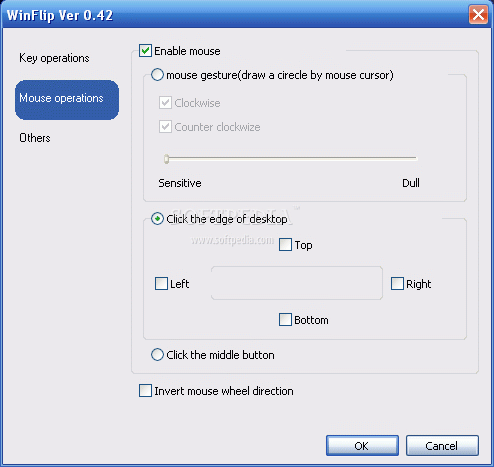
To give the user even more freedom in choosing how windows flipping should be activated, WinFlip introduces mouse gestures into its configuration, permitting a simple move of your mouse to activate the 3D screen. The possibilities in this respect include drawing a circle on the desktop (clockwise, counterclockwise or both, it's your call), clicking on one of the four desktop edges, or you can spark it off with a click of the mouse wheel.
Regardless of your choice, they all work like a charm, although you may want to adjust the sensitivity of circle drawing to a higher level. Otherwise, it may take a good while to activate the 3D view. To tell you the truth, I took the slider all the way too sensitive for the trick to work.
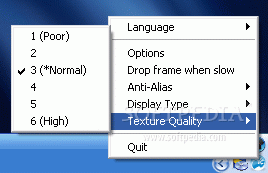
The third option in the menu is the least complicated of all: you simply have to decide if the desktop should be thrown in the flip or not. Vista has it and, from my experience, it is very helpful sometimes. If you are looking for additional configuration, try sys tray icon's context menu for a change. You have anti-alias options (unfortunately not all levels are available) and texture quality settings.
Despite the little configuration options WinFlip manages to bring a pinch of Vista into XP and make it work right. The application works like a charm on Vista as well (we tested it on Basic, Vista Business with and without SP1 RC), but, on those editions already endowed with Aero, there will be some problems with displaying windows minimized to taskbar. The issue consists in the fact that, in flip mode, only the title bar is displayed on the screen. But disabling Aero will set things right.
The Good
Windows flipping result is absolutely extraordinary. All the windows are beautifully displayed and configuring the application is a cinch.
WinFlip supports mouse gestures for launching the 3D screen, which include drawing on the desktop, accessing it by clicking on the edge of the screen or make it pop up at a mouse middle click.
The Bad
The application cannot be started with Windows and you cannot hide its icon in the system tray in order to make it totally invisible.
Switch and Flip can be launched only with the use of one of the two hotkeys available. It would be nice to be able to set any key combination.
Not all the windows can be previewed in flip mode and text processors are among the applications affected by this glitch.
The Truth
The effect is even more amazing, considering it is applied to the old reliable XP and the list of options, though short, is very original. The lack of additional options and all the mischiefs in the application (like making it start with Windows and the invisible mode) are due to the early version.
Hopefully future versions will make the software completely integrate in Windows and offer a wider palette of options and settings.
Here are some snapshots of the application in action: